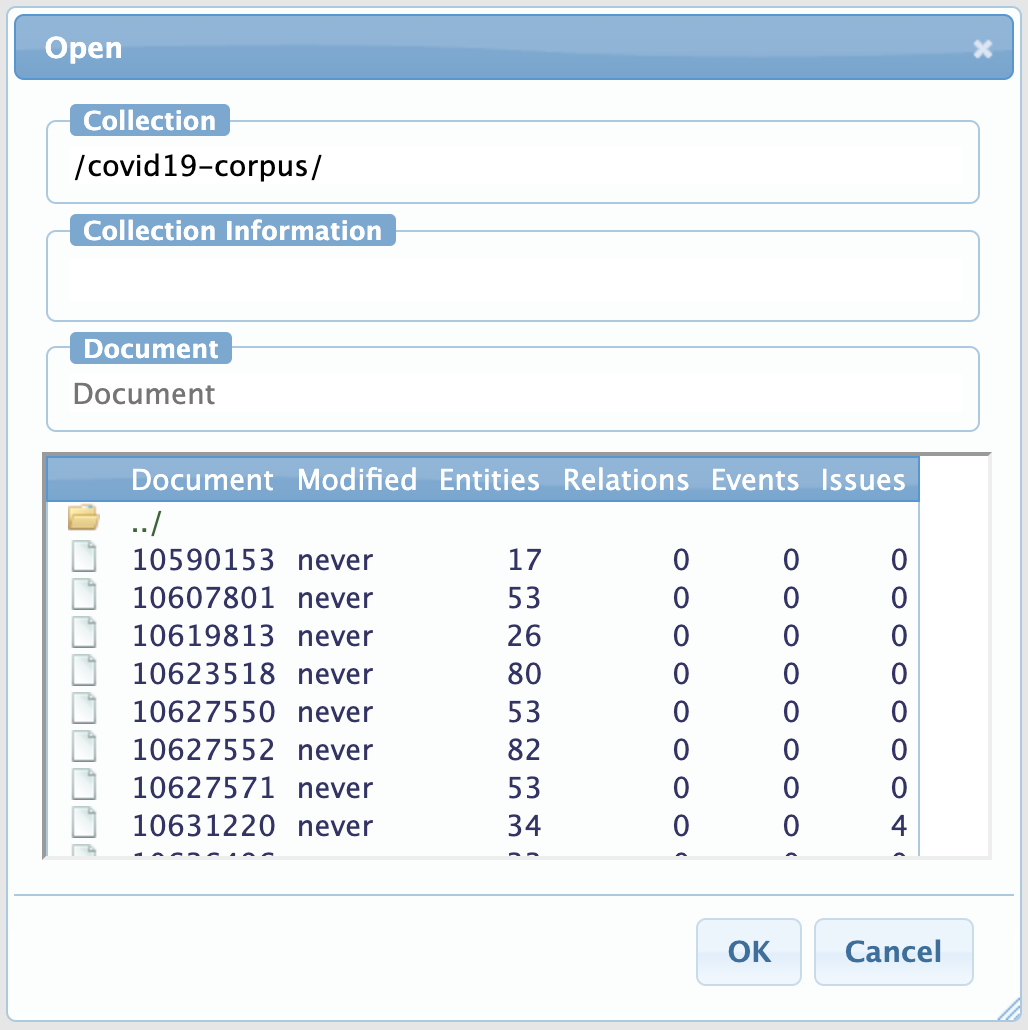
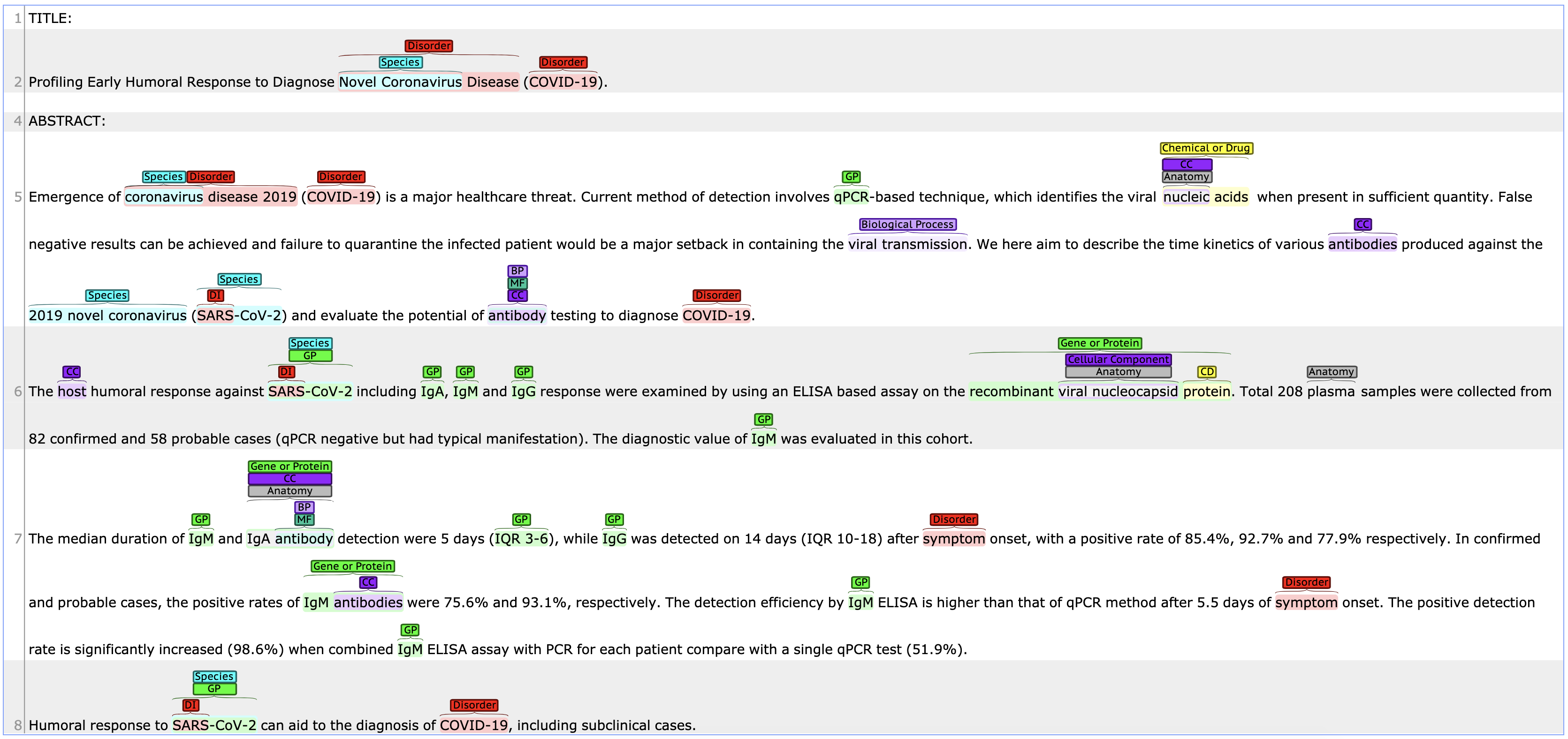
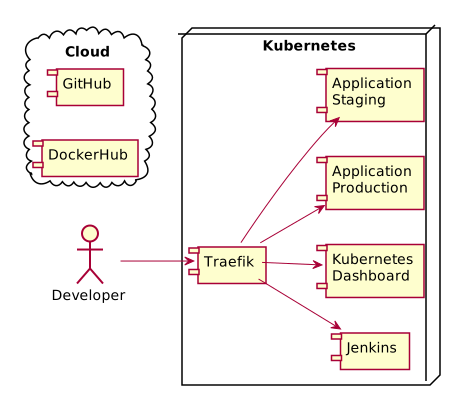
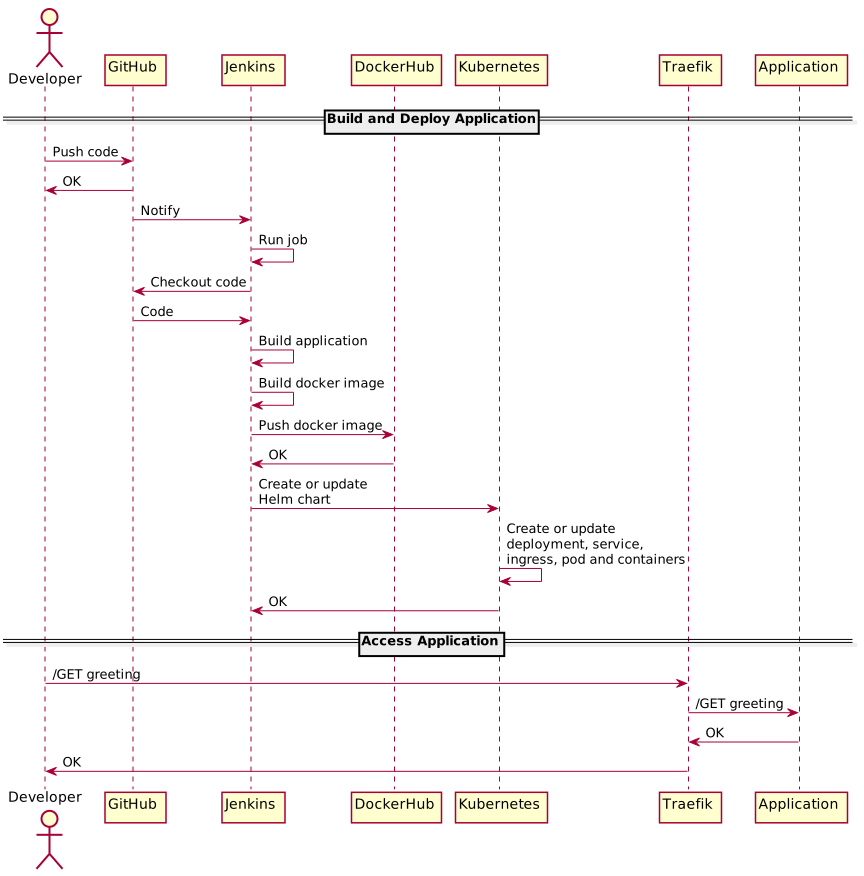
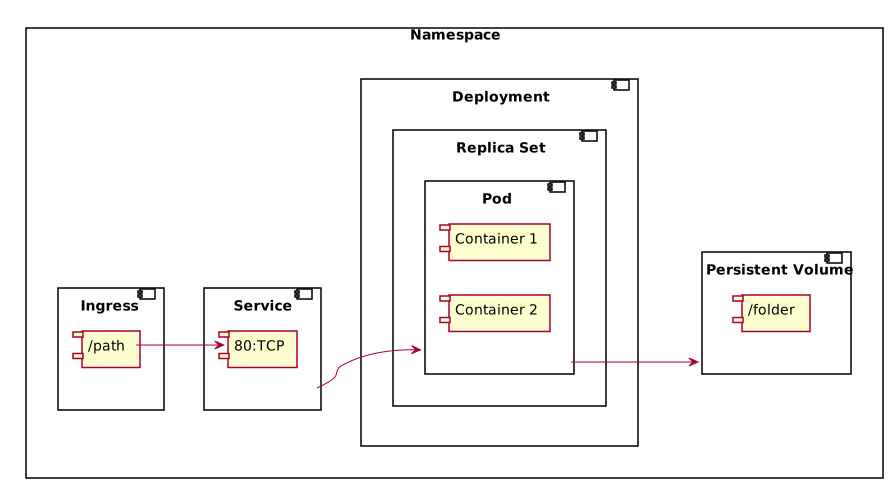
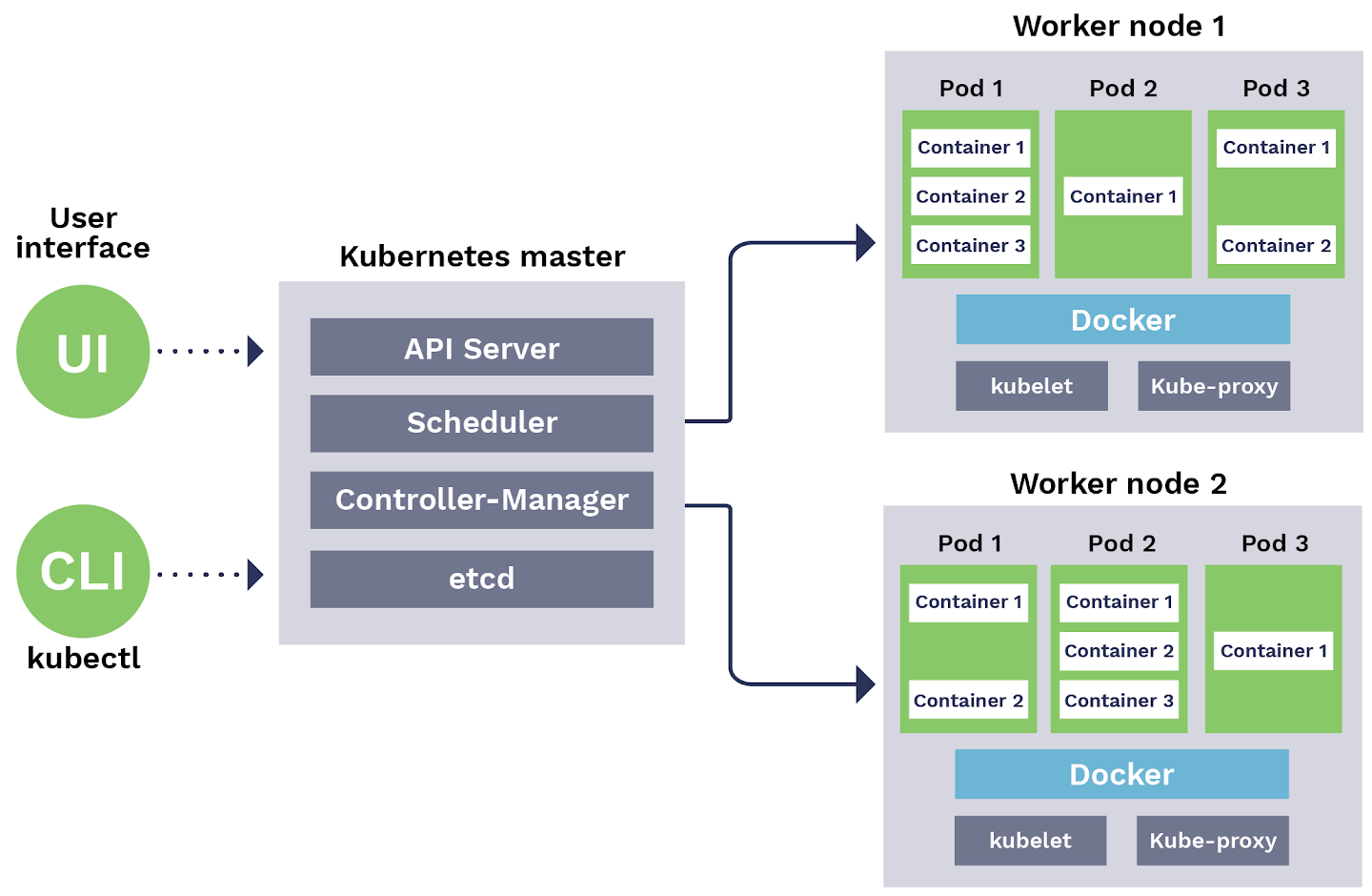
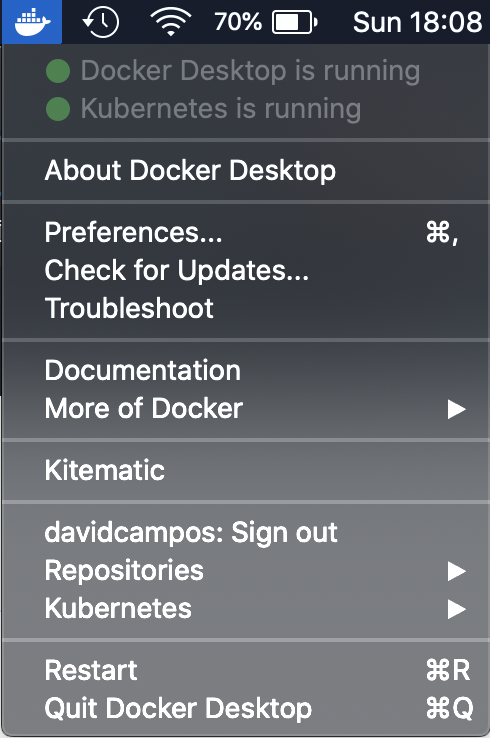
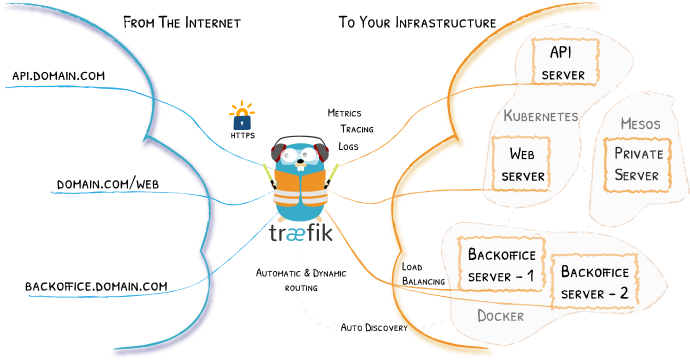
<?xml version="1.0" encoding="utf-8"?><feed xmlns="http://www.w3.org/2005/Atom"><generator uri="https://jekyllrb.com/" version="3.10.0">Jekyll</generator><link href="https://davidcampos.org/feed.xml" rel="self" type="application/atom+xml"/><link href="https://davidcampos.org/" rel="alternate" type="text/html"/><updated>2025-11-21T07:31:58+00:00</updated><id>https://davidcampos.org/feed.xml</id><title type="html">David Campos - Blog</title><subtitle>about technology, engineering and leadership.</subtitle><author><name>David Campos</name></author><entry><title type="html">From Bottleneck to Multiplier</title><link href="https://davidcampos.org/blog/2025/11/17/engineering-leadership.html" rel="alternate" type="text/html" title="From Bottleneck to Multiplier"/><published>2025-11-17T09:00:00+00:00</published><updated>2025-11-17T09:00:00+00:00</updated><id>https://davidcampos.org/blog/2025/11/17/engineering-leadership</id><content type="html" xml:base="https://davidcampos.org/blog/2025/11/17/engineering-leadership.html"><![CDATA[<h1 id="tldr">TL;DR</h1> <p><strong>Engineering leaders can multiply team intelligence instead of bottlenecking it.</strong> This series introduces a framework with five interconnected pillars: psychological safety, clear success criteria, intentional delegation, alignment through documentation, and evidence-driven decisions. <strong>When these work together, teams ship faster, retain top talent, and solve problems before they escalate, creating a resilient culture that scales from a single team to an entire organization.</strong></p> <hr/> <h1 id="the-problem">The Problem</h1> <p>Engineering organizations plateau despite having talented teams. You have smart people, decent infrastructure, and established processes. Yet problems emerge: shipping slows (sprint velocity predictions miss by +20%), innovation stalls (only three people propose solutions), and retention drops (mid-level engineers leaving +15% more than last year). <strong>The bottleneck isn’t talent or technology: IT’S LEADERSHIP</strong>.</p> <p><strong>But not leadership as authority or decision-making. Leadership as <em>multiplication</em>.</strong> <a href="https://thewisemangroup.com/books/multipliers/">Liz Wiseman’s research</a> reveals a powerful distinction: multipliers create conditions where team intelligence amplifies. The whole becomes greater than the sum of its parts. Each person thinks more deeply, surfaces problems early, and takes ownership. Diminishers, even well-intentioned ones, do the opposite. Many leaders become accidental diminishers by acting as the primary problem-solver, creating a dependency that hinders team growth. Teams slow down waiting for direction, ideas die in silence, and problems hide until they explode because the culture punishes the messenger.</p> <blockquote class="blockstory"> <p><strong>I learned this the hard way</strong>. Early in my career, I led a team responsible for an alarming service for connected heating devices—a critical system where mistakes had real-world consequences. I had transitioned from a developer-like role and believed my job was to ensure nothing went wrong. I involved myself in every design, reviewed every line of code, and mentored every engineer. On the surface, it worked. We shipped reliable software. But beneath the surface, a dependency culture was growing. The team would wait for my input before moving forward, turning me into a bottleneck. I was working late nights just to keep up, not realizing I was the one slowing them down. The turning point came when I started defining clear acceptance criteria for tasks and then deliberately stepped back, empowering two senior engineers to make decisions on new features. There was an initial discomfort, but soon, they were not only making sound technical choices but also mentoring others. They replaced me. By removing myself as the central node, I had multiplied their intelligence instead of just adding my own.</p> </blockquote> <p><strong>The difference shows up everywhere.</strong> Multiplier-led teams ship faster with fewer surprises because decisions don’t bottleneck at the top. They retain top talent because people stay where they can think and own outcomes. They catch issues in design review, not in production, because psychological safety makes problems visible early. <strong>Diminisher-led teams drift into service organizations that execute features handed down from product rather than proposing solutions as strategic partners.</strong></p> <p><strong>This matters now more than ever.</strong> AI and tooling are rapidly commoditizing code generation, allowing junior engineers to produce what seniors wrote five years ago. While this shifts the landscape, it doesn’t eliminate the need for deep technical skill. Instead, it elevates the importance of what can’t be automated: robust architecture, systems thinking, product intuition, and operational excellence. The competitive edge is no longer just individual coding ability, but the collective intelligence of the team that applies these skills. <strong>The teams that win will combine deep technical expertise with the clearest thinking, the fastest decision cycles, and deepest psychological safety.</strong> This framework is built to cultivate that combination.</p> <h1 id="the-framework">The Framework</h1> <p><strong>Multiplier leadership is the work of a gardener.</strong> A gardener does not force growth. They prepare the soil, water with care, and put up the trellis so the plant can find its shape. In teams, that means creating the conditions where thinking happens and ownership grows. Good intent is not enough. You need clear structures the whole team can trust: decision frameworks, explicit success criteria, a steady communication rhythm, and shared measures of progress. The framework we’ll explore brings these together into one system with five pillars:</p> <ul> <li> <p><strong><span style="background: #24734C; padding: 0 10px; color: white;">THE FOUNDATION</span> Psychological Safety &amp; Bidirectional Communication</strong>: Teams that can raise concerns without fear identify problems early, innovate more effectively, and adapt faster. This is where a strong leadership culture begins, fostered by continuous feedback that balances caring personally with challenging directly.</p> </li> <li> <p><strong><span style="background: #6EA3BF; padding: 0 10px; color: white;">THE STRUCTURE</span> Clear Acceptance Criteria &amp; Measurable Success</strong>: When everyone knows what “done” looks like before work begins, autonomy becomes possible. Teams make smarter decisions because the constraints are explicit.</p> </li> <li> <p><strong><span style="background: #E4AD41; padding: 0 10px; color: white;">THE GROWTH ENGINE</span> Delegation as Development</strong>: Rather than decision-making bottlenecking at the leader, capability multiplies through mentoring, coached delegation, and empowerment. You grow people while delivering.</p> </li> <li> <p><strong><span style="background: #59508E; padding: 0 10px; color: white;">THE CLARITY LAYER</span> Technical Alignment through Documentation</strong>: RFCs, Design Documents, and Architecture Decision Records create asynchronous alignment across time zones and teams. Documentation distributes leadership, not being an overhead but an enablement.</p> </li> <li> <p><strong><span style="background: #C26B25; padding: 0 10px; color: white;">THE RHYTHM</span> Evidence-Driven Culture</strong>: SMART OKRs, SLIs/SLOs, DORA metrics, and tech maturity frameworks replace intuition with shared reality. When teams see data, they collaborate on improvement rather than debate priorities.</p> </li> </ul> <p><img src="/assets/leadership/framework.png" alt="Framework" class="image-center img-thumbnail" width="75%"/> <em><strong>Figure:</strong> The Engineering Leadership Multiplier Framework.</em></p> <p>The framework’s power comes from viewing it not as a list of best practices, but as a coherent system. It can be seen from four interconnected perspectives:</p> <ul> <li> <p><strong>As a Diagnostic Tool:</strong> The five pillars directly address the most common failure modes in engineering teams. Psychological safety prevents hidden problems from going unaddressed. Clear success criteria and documentation prevent distributed decision-making from descending into chaos. Intentional delegation resolves leadership bottlenecks, and metrics with context stop teams from optimizing for the wrong outcomes. It provides a map to identify why a team is struggling.</p> </li> <li> <p><strong>As a Reinforcing System:</strong> The pillars are designed to be interconnected, where each one strengthens the others. For example, psychological safety is what allows for honest and critical feedback in RFCs. Clear acceptance criteria are what make effective delegation possible. Documentation enables distributed decision-making, and metrics provide the feedback loop to validate that the entire system is working. This creates a virtuous cycle of continuous improvement.</p> </li> <li> <p><strong>As a Holistic Philosophy (Systems Thinking):</strong> Unlike fragmented leadership advice (‘run good 1:1s’, ‘use OKRs’), this framework emphasizes systems thinking. Individual practices, when applied in isolation, can backfire. For instance, metrics without psychological safety feel like surveillance, and delegation without clear criteria feels like abandonment. The framework’s value lies in its coherence—seeing the practices as an integrated whole where each element supports the others.</p> </li> <li> <p><strong>As a Scalable Blueprint:</strong> The framework is grounded in universal human principles—trust, clarity, growth, and evidence—not rigid tools or processes. This allows it to scale from a single team to a large organization. A five-person team might foster safety through daily stand-ups, while a 100-person organization may need formal skip-levels and RFC processes. The implementation adapts to the context (team size, tools, development methodology), but the underlying principles remain constant.</p> </li> </ul> <h1 id="the-expected-outcome">The Expected Outcome</h1> <p>Teams that operate within this framework show predictable patterns:</p> <ul> <li> <p><strong>They ship faster with better predictability</strong>. Decisions are distributed, so they don’t bottleneck at the leader. Documentation reduces rework and context-switching costs. Clear acceptance criteria mean fewer approval cycles. In practical terms, sprint velocity becomes more consistent (80%+ of sprints hit their forecast), deployment frequency increases, and change-lead time drops because decisions aren’t waiting for leadership consensus.</p> </li> <li> <p><strong>They retain high-potential talent</strong>. People stay where they feel they can think, grow, and own outcomes. Organizations applying these principles see mid-level engineer attrition drop significantly within a year, and more importantly, their exit interviews shift. Instead of “I wanted more growth”, you hear “I had genuine ownership” from people who stay.</p> </li> <li> <p><strong>They catch problems early, not in production</strong>. Psychological safety means design flaws surface in review, not in production incidents. Clear criteria catch scope creep in planning, not in integration hell. Regular metrics conversations identify degradation trends before they become fires. As a result, incident count decreases, and incident severity when they do happen is lower because problems were partway solved already.</p> </li> <li> <p><strong>They propose more solutions themselves</strong>. Instead of waiting for direction, teams think about what’s possible. They’re not executing a backlog handed down from product, they’re partners in strategy. Concrete markers are: 1) observing more RFCs initiated by individual contributors, 2) higher idea quality in planning sessions, and 3) smaller gaps between problem identification and solution proposals.</p> </li> </ul> <h1 id="context-matters">Context Matters</h1> <p>This framework reflects my experience leading engineering organizations and conversations with other leaders, but it’s also heavily grounded in research. <a href="https://amycedmondson.com/psychological-safety/">Amy Edmondson’s work on psychological safety</a>, <a href="https://thewisemangroup.com/books/multipliers/">Liz Wiseman’s multiplier leadership</a>, <a href="https://www.radicalcandor.com/the-book/">Kim Scott’s Radical Candor</a>, <a href="https://rework.withgoogle.com/intl/en/guides/understanding-team-effectiveness">Google’s Project Aristotle on team dynamics</a>, and <a href="https://dora.dev/research/">DORA research on engineering performance</a> all point to the same conclusion: <strong>high-performing teams trust each other, communicate clearly, grow continuously, and measure what matters</strong>.</p> <p>It’s an approach that has worked, not the only way or the right way. <strong>Your context is different, namely your team size, market, technology, and constraints.</strong> Take what resonates. Adapt what doesn’t. Skip what contradicts your values. The framework’s strength is its coherence, but coherence doesn’t mean rigidity. <strong>The goal isn’t to follow the framework perfectly, it’s to think systematically about how the pieces of your leadership system work together.</strong></p> <h1 id="whats-next">What’s Next?</h1> <p><strong>Over the next six posts, we’ll unpack the framework one piece at a time</strong>. Each of the five pillars will get its own dedicated post, and we’ll conclude with a pragmatic implementation guide—where to start, how to scale, and the pitfalls to avoid.</p> <p><strong>Each post stands alone but builds on the others</strong>. If you’re leading a single team of five, start with safety and clarity. If you’re managing managers, rhythm and metrics will feel urgent. The system clicks when you see how the parts reinforce one another.</p> <hr/> <h1 id="try-this-week">Try This Week</h1> <p><strong>Pick the pillar that’s costing you the most right now.</strong> Ask yourself: Where did you last lose time? Was it because someone didn’t feel safe raising a concern early? Because “done” wasn’t defined clearly enough? Because you’re still the decision bottleneck? Because tribal knowledge lives in someone’s head instead of documentation? Because you’re arguing about priorities without data? <strong>That’s your starting point. Pick one concrete action for this week:</strong></p> <ul> <li><strong>Psychological safety weak?</strong> In your next 1:1, ask “What’s one thing we could do better that you haven’t told me?” and <em>genuinely listen</em>.</li> <li><strong>Unclear criteria?</strong> Before your next project starts, write down what “done” looks like and have the team challenge it.</li> <li><strong>Delegation bottleneck?</strong> Identify one decision you made this week that someone else could have made. Next time, coach them through making it.</li> <li><strong>Documentation gaps?</strong> Take the last significant decision your team made and write an ADR. Share it.</li> <li><strong>Missing metrics?</strong> Ask your team: “What’s the one metric that would tell us we’re improving?” Start tracking it manually if you have to.</li> </ul> <p><strong>That’s how systems change, through small and deliberate interventions.</strong></p> <p>In the next post, we’ll explore the foundation of everything else: psychological safety and bidirectional communication.</p>]]></content><author><name>David Campos</name><email>me@davidcampos.org</email></author><category term="engineering-leadership"/><category term="systems-thinking"/><category term="psychological-safety"/><category term="delegation"/><category term="documentation"/><category term="decision-making"/><category term="okrs"/><category term="dora-metrics"/><category term="slis"/><category term="slos"/><category term="team-performance"/><category term="scaling-teams"/><summary type="html"><![CDATA[TL;DR Engineering leaders can multiply team intelligence instead of bottlenecking it. This series introduces a framework with five interconnected pillars: psychological safety, clear success criteria, intentional delegation, alignment through documentation, and evidence-driven decisions. When these work together, teams ship faster, retain top talent, and solve problems before they escalate, creating a resilient culture that scales from a single team to an entire organization.]]></summary></entry><entry><title type="html">COVID-19 corpus of research articles annotated with biomedical entities</title><link href="https://davidcampos.org/blog/2020/03/28/covid19-corpus.html" rel="alternate" type="text/html" title="COVID-19 corpus of research articles annotated with biomedical entities"/><published>2020-03-28T09:00:00+00:00</published><updated>2020-03-28T09:00:00+00:00</updated><id>https://davidcampos.org/blog/2020/03/28/covid19-corpus</id><content type="html" xml:base="https://davidcampos.org/blog/2020/03/28/covid19-corpus.html"><![CDATA[<h1 id="tldr">TL;DR</h1> <p>Created a <strong>corpus</strong> of <strong>research articles</strong> related with <strong>COVID-19</strong>, automatically <strong>annotated</strong> with 10 <strong>biomedical entities</strong> of interest, namely <strong>Disorder</strong>, <strong>Species</strong>, <strong>Chemical or Drug</strong>, <strong>Gene or Protein</strong>, Enzyme, Anatomy, Biological Process, Molecular Function, Cellular Component, Pathway and microRNA.</p> <p><img src="/assets/covid19-corpus/annotations-example.png" alt="Annotations" class="image-center img-thumbnail" width="75%"/></p> <p>The corpus is <strong>freely available</strong> and can be used to further research topics related with COVID-19, contributing to <strong>find insights</strong> towards a <strong>better understanding of the disease</strong>, in order to <strong>find effective drugs</strong> and reduce the pandemic impact.</p> <p>Please follow the progress on <a href="https://github.com/davidcampos/covid19-corpus"><strong>Github</strong></a>, which already provides the <strong><a href="https://www.kaggle.com/allen-institute-for-ai/CORD-19-research-challenge">CORD-19</a> corpus of full-text articles with more then 31 million biomedical annotations.</strong></p> <h1 id="download">Download</h1> <p><a href="https://github.com/davidcampos/covid19-corpus/blob/master/corpus">Download the latest version of the COVID-19 annotated corpus</a>.</p> <h1 id="statistics">Statistics</h1> <p>Overall corpus statistics:</p> <ul> <li>Number of <strong>abstracts</strong>: <strong>17740</strong></li> <li>Number of entity <strong>occurrences</strong>: <strong>683349</strong></li> <li>Number of <strong>unique</strong> entities: <strong>29423</strong></li> </ul> <p>Number of annotations per entity type:</p> <table class="table-striped table-bordered"> <thead> <tr> <th>Entity</th> <th># Occurrences</th> <th># Unique</th> </tr> </thead> <tbody> <tr> <td>Disorder</td> <td>183528</td> <td>4477</td> </tr> <tr> <td>Species</td> <td>128356</td> <td>2170</td> </tr> <tr> <td>Chemical or Drug</td> <td>70619</td> <td>2768</td> </tr> <tr> <td>Gene and Protein</td> <td>51114</td> <td>15025</td> </tr> <tr> <td>Enzyme</td> <td>7892</td> <td>282</td> </tr> <tr> <td>Anatomy</td> <td>106401</td> <td>2369</td> </tr> <tr> <td>Biological Process</td> <td>74286</td> <td>1561</td> </tr> <tr> <td>Molecular Function</td> <td>15089</td> <td>383</td> </tr> <tr> <td>Cellular Component</td> <td>39451</td> <td>263</td> </tr> <tr> <td>Pathway</td> <td>6587</td> <td>97</td> </tr> <tr> <td>microRNA</td> <td>26</td> <td>28</td> </tr> </tbody> </table> <h1 id="structure">Structure</h1> <p>Corpus file <code class="language-plaintext highlighter-rouge">corpus/pubmed_YYYYMMDD.zip</code> contains the following folders:</p> <ul> <li><strong>json</strong>: article in JSON format from Pubmed;</li> <li><strong>raw</strong>: article with text only;</li> <li><strong>annotations</strong>: annotations in <a href="https://brat.nlplab.org/standoff.html">A1 format</a>.</li> </ul> <p>On each folder you can find one file per article, with the Pubmed ID on its name.</p> <h1 id="articles">Articles</h1> <p>To collect articles related with COVID-19 from Pubmed, the following <a href="https://pubmed.ncbi.nlm.nih.gov/?term=%28%222000%22%5BDate+-+Publication%5D+%3A+%223000%22%5BDate+-+Publication%5D%29+AND+%28%28COVID-19%29+OR+%28Coronavirus%29+OR+%28Corona+virus%29+OR+%282019-nCoV%29+OR+%28SARS-CoV%29+OR+%28MERS-CoV%29+OR+%28Severe+Acute+Respiratory+Syndrome%29+OR+%28Middle+East+Respiratory+Syndrome%29+OR+%282019+novel+coronavirus+disease%5BMeSH+Terms%5D%29+OR+%282019+novel+coronavirus+infection%5BMeSH+Terms%5D%29+OR+%282019-nCoV+disease%5BMeSH+Terms%5D%29+OR+%282019-nCoV+infection%5BMeSH+Terms%5D%29+OR+%28coronavirus+disease+2019%5BMeSH+Terms%5D%29+OR+%28coronavirus+disease-19%5BMeSH+Terms%5D%29%29">query</a> was applied:</p> <div class="language-plaintext highlighter-rouge"><div class="highlight"><pre class="highlight"><code><table class="rouge-table"><tbody><tr><td class="rouge-gutter gl"><pre class="lineno">1
</pre></td><td class="rouge-code"><pre>("2000"[Date - Publication] : "3000"[Date - Publication]) AND ((COVID-19) OR (Coronavirus) OR (Corona virus) OR (2019-nCoV) OR (SARS-CoV) OR (MERS-CoV) OR (Severe Acute Respiratory Syndrome) OR (Middle East Respiratory Syndrome) OR (2019 novel coronavirus disease[MeSH Terms]) OR (2019 novel coronavirus infection[MeSH Terms]) OR (2019-nCoV disease[MeSH Terms]) OR (2019-nCoV infection[MeSH Terms]) OR (coronavirus disease 2019[MeSH Terms]) OR (coronavirus disease-19[MeSH Terms]))
</pre></td></tr></tbody></table></code></pre></div></div> <p>To collect the articles in JSON and then extract the text in raw format:</p> <div class="language-bash highlighter-rouge"><div class="highlight"><pre class="highlight"><code><table class="rouge-table"><tbody><tr><td class="rouge-gutter gl"><pre class="lineno">1
2
</pre></td><td class="rouge-code"><pre>python scripts/pubmed/pubmed.py
python scripts/pubmed/json2raw.py
</pre></td></tr></tbody></table></code></pre></div></div> <p>Please not that sentences in other languages than english are currently being discarded.</p> <h1 id="resources">Resources</h1> <p>The following resources were applied to annotated each entity type:</p> <ul> <li>Disorder (DISO): <a href="https://www.nlm.nih.gov/research/umls/index.html">UMLS</a></li> <li>Species (SPEC): <a href="https://www.ncbi.nlm.nih.gov/taxonomy">NCBI Taxonomy</a></li> <li>Chemical or Drug (CHED): <a href="https://www.ebi.ac.uk/chebi/">ChEBI</a></li> <li>Gene or Protein (PRGE): NER with CRFs and normalization with <a href="https://www.uniprot.org">UniProt</a></li> <li>Enzyme (ENZY): <a href="https://enzyme.expasy.org">ExPASy</a></li> <li>Anatomy (ANAT): <a href="https://www.nlm.nih.gov/research/umls/index.html">Unified Medical Language System (UMLS)</a></li> <li>Biological Process (PROC): <a href="http://geneontology.org">Gene Ontology (GO)</a> and <a href="https://www.nlm.nih.gov/research/umls/index.html">UMLS</a></li> <li>Molecular Function (FUNC): <a href="http://geneontology.org">Gene Ontology (GO)</a></li> <li>Cellular Component (COMP): <a href="http://geneontology.org">Gene Ontology (GO)</a></li> <li>Pathway (PATH): <a href="https://www.ncbi.nlm.nih.gov/biosystems">NCBI BioSystems</a></li> <li>microRNA (MRNA): <a href="http://www.mirbase.org">miRBase</a></li> </ul> <p>For more details please check the <a href="https://doi.org/10.1186/1471-2105-14-281">article</a>. Unfortunately dictionaries could not be shared for download, due to UMLS usage license. Nevertheless, keep in mind that <strong>Disorder and Species entities were extended to include COVID-19 entities of interest</strong>.</p> <h1 id="annotation">Annotation</h1> <p><a href="https://github.com/BMDSoftware/neji">Neji</a> is the tool used for NER (Named Entity Recognition) and normalization, which is optimized for biomedical scientific articles and provides an easy to use CLI. For more details please check the <a href="https://doi.org/10.1186/1471-2105-14-281">article</a>.</p> <p>The annotation script is available at <code class="language-plaintext highlighter-rouge">scripts/pubmed/annotate.sh</code>.</p> <h1 id="visualization">Visualization</h1> <p><a href="https://brat.nlplab.org/">brat</a> is used to visualize the annotations in the articles. Find below the instructions to run the tool, create corpus for brat and visualize annotations.</p> <h5 id="install-and-run-brat">Install and run brat</h5> <div class="language-bash highlighter-rouge"><div class="highlight"><pre class="highlight"><code><table class="rouge-table"><tbody><tr><td class="rouge-gutter gl"><pre class="lineno">1
2
3
4
5
</pre></td><td class="rouge-code"><pre><span class="nb">cd </span>tools
unzip brat-1.3.zip
<span class="nb">cd </span>brat-1.3
./install.sh <span class="nt">-u</span>
python standalone.py
</pre></td></tr></tbody></table></code></pre></div></div> <h5 id="create-corpus-for-visualization">Create corpus for visualization</h5> <div class="language-bash highlighter-rouge"><div class="highlight"><pre class="highlight"><code><table class="rouge-table"><tbody><tr><td class="rouge-gutter gl"><pre class="lineno">1
2
</pre></td><td class="rouge-code"><pre>./scripts/pubmed/brat.sh
<span class="nb">ln</span> <span class="nt">-s</span> corpus/pubmed/brat tools/brat-1.3/data/covid19-corpus
</pre></td></tr></tbody></table></code></pre></div></div> <h5 id="visualize-corpus">Visualize corpus</h5> <p>Go to <a href="http://localhost:8001/index.xhtml#/covid19-corpus/">http://localhost:8001/index.xhtml#/covid19-corpus/</a> and wait for the articles to load:</p> <p><img src="/assets/covid19-corpus/corpus.png" alt="Annotations" class="image-center img-thumbnail" width="40%"/> <em><strong>Figure:</strong> List of articles.</em></p> <p>Double click in a document to visualize it:</p> <p><img src="/assets/covid19-corpus/article.png" alt="Annotations" class="image-center img-thumbnail" width="90%"/> <em><strong>Figure:</strong> Article with annotations visualization.</em></p> <h1 id="example">Example</h1> <p>Find below an example article in the provided document formats: JSON, Raw and A1.</p> <h5 id="json">JSON</h5> <div class="language-json highlighter-rouge"><div class="highlight"><pre class="highlight"><code><table class="rouge-table"><tbody><tr><td class="rouge-gutter gl"><pre class="lineno">1

2
3
4
5
6
7
8
9
10
11
12
13
14
15
16
17
18
19
20
21
22
23
24
25
26
27
28
29
30
31
32
33
34
35
36
37
38
39
40
41
42
43
44
45
46
47
48
49
50
51
</pre></td><td class="rouge-code"><pre><span class="p">{</span><span class="w">
    </span><span class="nl">"pubmed_id"</span><span class="p">:</span><span class="w"> </span><span class="s2">"32198088"</span><span class="p">,</span><span class="w">
    </span><span class="nl">"title"</span><span class="p">:</span><span class="w"> </span><span class="s2">"Transmission potential and severity of COVID-19 in South Korea."</span><span class="p">,</span><span class="w">
    </span><span class="nl">"abstract"</span><span class="p">:</span><span class="w"> </span><span class="s2">"Since the first case of 2019 novel coronavirus (COVID-19) identified on Jan 20, 2020 in South Korea, the number of cases rapidly increased, resulting in 6,284 cases including 42 deaths as of March 6, 2020. To examine the growth rate of the outbreak, we aimed to present the first study to report the reproduction number of COVID-19 in South Korea.</span><span class="se">\n</span><span class="s2">The daily confirmed cases of COVID-19 in South Korea were extracted from publicly available sources. By using the empirical reporting delay distribution and simulating the generalized growth model, we estimated the effective reproduction number based on the discretized probability distribution of the generation interval.</span><span class="se">\n</span><span class="s2">We identified four major clusters and estimated the reproduction number at 1.5 (95% CI: 1.4-1.6). In addition, the intrinsic growth rate was estimated at 0.6 (95% CI: 0.6, 0.7) and the scaling of growth parameter was estimated at 0.8 (95% CI: 0.7, 0.8), indicating sub-exponential growth dynamics of COVID-19. The crude case fatality rate is higher among males (1.1%) compared to females (0.4%) and increases with older age.</span><span class="se">\n</span><span class="s2">Our results indicate early sustained transmission of COVID-19 in South Korea and support the implementation of social distancing measures to rapidly control the outbreak."</span><span class="p">,</span><span class="w">
    </span><span class="nl">"keywords"</span><span class="p">:</span><span class="w"> </span><span class="p">[</span><span class="w">
        </span><span class="s2">"COVID-19"</span><span class="p">,</span><span class="w">
        </span><span class="s2">"Korea"</span><span class="p">,</span><span class="w">
        </span><span class="s2">"coronavirus"</span><span class="p">,</span><span class="w">
        </span><span class="s2">"reproduction number"</span><span class="w">
    </span><span class="p">],</span><span class="w">
    </span><span class="nl">"journal"</span><span class="p">:</span><span class="w"> </span><span class="s2">"International journal of infectious diseases : IJID : official publication of the International Society for Infectious Diseases"</span><span class="p">,</span><span class="w">
    </span><span class="nl">"publication_date"</span><span class="p">:</span><span class="w"> </span><span class="s2">"2020-03-22"</span><span class="p">,</span><span class="w">
    </span><span class="nl">"authors"</span><span class="p">:</span><span class="w"> </span><span class="p">[</span><span class="w">
        </span><span class="p">{</span><span class="w">
            </span><span class="nl">"lastname"</span><span class="p">:</span><span class="w"> </span><span class="s2">"Shim"</span><span class="p">,</span><span class="w">
            </span><span class="nl">"firstname"</span><span class="p">:</span><span class="w"> </span><span class="s2">"Eunha"</span><span class="p">,</span><span class="w">
            </span><span class="nl">"initials"</span><span class="p">:</span><span class="w"> </span><span class="s2">"E"</span><span class="p">,</span><span class="w">
            </span><span class="nl">"affiliation"</span><span class="p">:</span><span class="w"> </span><span class="s2">"Department of Mathematics, Soongsil University, 369 Sangdoro, Dongjak-Gu, Seoul, 06978 Republic of Korea. Electronic address: alicia@ssu.ac.kr."</span><span class="w">
        </span><span class="p">},</span><span class="w">
        </span><span class="p">{</span><span class="w">
            </span><span class="nl">"lastname"</span><span class="p">:</span><span class="w"> </span><span class="s2">"Tariq"</span><span class="p">,</span><span class="w">
            </span><span class="nl">"firstname"</span><span class="p">:</span><span class="w"> </span><span class="s2">"Amna"</span><span class="p">,</span><span class="w">
            </span><span class="nl">"initials"</span><span class="p">:</span><span class="w"> </span><span class="s2">"A"</span><span class="p">,</span><span class="w">
            </span><span class="nl">"affiliation"</span><span class="p">:</span><span class="w"> </span><span class="s2">"Department of Population Health Sciences, School of Public Health, Georgia State University, Atlanta, GA, USA. Electronic address: atariq1@student.gsu.edu."</span><span class="w">
        </span><span class="p">},</span><span class="w">
        </span><span class="p">{</span><span class="w">
            </span><span class="nl">"lastname"</span><span class="p">:</span><span class="w"> </span><span class="s2">"Choi"</span><span class="p">,</span><span class="w">
            </span><span class="nl">"firstname"</span><span class="p">:</span><span class="w"> </span><span class="s2">"Wongyeong"</span><span class="p">,</span><span class="w">
            </span><span class="nl">"initials"</span><span class="p">:</span><span class="w"> </span><span class="s2">"W"</span><span class="p">,</span><span class="w">
            </span><span class="nl">"affiliation"</span><span class="p">:</span><span class="w"> </span><span class="s2">"Department of Mathematics, Soongsil University, 369 Sangdoro, Dongjak-Gu, Seoul, 06978 Republic of Korea. Electronic address: chok10004@soongsil.ac.kr."</span><span class="w">
        </span><span class="p">},</span><span class="w">
        </span><span class="p">{</span><span class="w">
            </span><span class="nl">"lastname"</span><span class="p">:</span><span class="w"> </span><span class="s2">"Lee"</span><span class="p">,</span><span class="w">
            </span><span class="nl">"firstname"</span><span class="p">:</span><span class="w"> </span><span class="s2">"Yiseul"</span><span class="p">,</span><span class="w">
            </span><span class="nl">"initials"</span><span class="p">:</span><span class="w"> </span><span class="s2">"Y"</span><span class="p">,</span><span class="w">
            </span><span class="nl">"affiliation"</span><span class="p">:</span><span class="w"> </span><span class="s2">"Department of Population Health Sciences, School of Public Health, Georgia State University, Atlanta, GA, USA. Electronic address: ylee97@student.gsu.edu."</span><span class="w">
        </span><span class="p">},</span><span class="w">
        </span><span class="p">{</span><span class="w">
            </span><span class="nl">"lastname"</span><span class="p">:</span><span class="w"> </span><span class="s2">"Chowell"</span><span class="p">,</span><span class="w">
            </span><span class="nl">"firstname"</span><span class="p">:</span><span class="w"> </span><span class="s2">"Gerardo"</span><span class="p">,</span><span class="w">
            </span><span class="nl">"initials"</span><span class="p">:</span><span class="w"> </span><span class="s2">"G"</span><span class="p">,</span><span class="w">
            </span><span class="nl">"affiliation"</span><span class="p">:</span><span class="w"> </span><span class="s2">"Department of Population Health Sciences, School of Public Health, Georgia State University, Atlanta, GA, USA. Electronic address: gchowell@gsu.edu."</span><span class="w">
        </span><span class="p">}</span><span class="w">
    </span><span class="p">],</span><span class="w">
    </span><span class="nl">"methods"</span><span class="p">:</span><span class="w"> </span><span class="kc">null</span><span class="p">,</span><span class="w">
    </span><span class="nl">"conclusions"</span><span class="p">:</span><span class="w"> </span><span class="kc">null</span><span class="p">,</span><span class="w">
    </span><span class="nl">"results"</span><span class="p">:</span><span class="w"> </span><span class="s2">"We identified four major clusters and estimated the reproduction number at 1.5 (95% CI: 1.4-1.6). In addition, the intrinsic growth rate was estimated at 0.6 (95% CI: 0.6, 0.7) and the scaling of growth parameter was estimated at 0.8 (95% CI: 0.7, 0.8), indicating sub-exponential growth dynamics of COVID-19. The crude case fatality rate is higher among males (1.1%) compared to females (0.4%) and increases with older age."</span><span class="p">,</span><span class="w">
    </span><span class="nl">"copyrights"</span><span class="p">:</span><span class="w"> </span><span class="s2">"Copyright </span><span class="se">\u</span><span class="s2">00a9 2020. Published by Elsevier Ltd."</span><span class="p">,</span><span class="w">
    </span><span class="nl">"doi"</span><span class="p">:</span><span class="w"> </span><span class="s2">"10.1016/j.ijid.2020.03.031"</span><span class="p">,</span><span class="w">
    </span><span class="nl">"xml"</span><span class="p">:</span><span class="w"> </span><span class="kc">null</span><span class="w">
</span><span class="p">}</span><span class="w">
</span></pre></td></tr></tbody></table></code></pre></div></div> <h5 id="raw">Raw</h5> <div class="language-plaintext highlighter-rouge"><div class="highlight"><pre class="highlight"><code><table class="rouge-table"><tbody><tr><td class="rouge-gutter gl"><pre class="lineno">1
2
3
4
5
6
7
8
</pre></td><td class="rouge-code"><pre>TITLE:
Transmission potential and severity of COVID-19 in South Korea.

ABSTRACT:
Since the first case of 2019 novel coronavirus (COVID-19) identified on Jan 20, 2020 in South Korea, the number of cases rapidly increased, resulting in 6,284 cases including 42 deaths as of March 6, 2020. To examine the growth rate of the outbreak, we aimed to present the first study to report the reproduction number of COVID-19 in South Korea.
The daily confirmed cases of COVID-19 in South Korea were extracted from publicly available sources. By using the empirical reporting delay distribution and simulating the generalized growth model, we estimated the effective reproduction number based on the discretized probability distribution of the generation interval.
We identified four major clusters and estimated the reproduction number at 1.5 (95% CI: 1.4-1.6). In addition, the intrinsic growth rate was estimated at 0.6 (95% CI: 0.6, 0.7) and the scaling of growth parameter was estimated at 0.8 (95% CI: 0.7, 0.8), indicating sub-exponential growth dynamics of COVID-19. The crude case fatality rate is higher among males (1.1%) compared to females (0.4%) and increases with older age.
Our results indicate early sustained transmission of COVID-19 in South Korea and support the implementation of social distancing measures to rapidly control the outbreak.
</pre></td></tr></tbody></table></code></pre></div></div> <h5 id="annotations">Annotations</h5> <div class="language-plaintext highlighter-rouge"><div class="highlight"><pre class="highlight"><code><table class="rouge-table"><tbody><tr><td class="rouge-gutter gl"><pre class="lineno">1
2
3
4
5
6
7
8
9
10
11
12
13
14
15
16
17
18
19
20
21
22
23
24
25
26
27
28
29
30
31
32
33
34
35
36
37
38
39
40
</pre></td><td class="rouge-code"><pre>T0	DISO 46 54	COVID-19
N0	Reference T0 UMLS:::DISO	COVID-19
T1	SPEC 106 128	2019 novel coronavirus
N1	Reference T1 NCBI:2697049:T001:SPEC	2019 novel coronavirus
T2	DISO 130 138	COVID-19
N2	Reference T2 UMLS:::DISO	COVID-19
T3	PROC 260 266	deaths
N3	Reference T3 GO:0016265::PROC	deaths
T4	PROC 303 309	growth
N4	Reference T4 UMLS:C1621966:T042:PROC	growth
N5	Reference T4 GO:0040007::PROC	growth
T5	PROC 382 394	reproduction
N6	Reference T5 GO:0000003::PROC	reproduction
T6	DISO 405 413	COVID-19
N7	Reference T6 UMLS:::DISO	COVID-19
T7	DISO 459 467	COVID-19
N8	Reference T7 UMLS:::DISO	COVID-19
T8	PROC 602 620	generalized growth
N9	Reference T8 GO:0040007::PROC	generalized growth
T9	PROC 614 620	growth
N10	Reference T9 UMLS:C1621966:T042:PROC	growth
T10	PROC 655 667	reproduction
N11	Reference T10 GO:0000003::PROC	reproduction
T11	CHED 778 786	clusters
N12	Reference T11 CHEBI:33731:T103:CHED	clusters
T12	PROC 805 817	reproduction
N13	Reference T12 GO:0000003::PROC	reproduction
T13	PROC 878 884	growth
N14	Reference T13 UMLS:C1621966:T042:PROC	growth
N15	Reference T13 GO:0040007::PROC	growth
T14	PROC 949 955	growth
N16	Reference T14 UMLS:C1621966:T042:PROC	growth
N17	Reference T14 GO:0040007::PROC	growth
T15	PROC 1034 1040	growth
N18	Reference T15 UMLS:C1621966:T042:PROC	growth
N19	Reference T15 GO:0040007::PROC	growth
T16	DISO 1053 1061	COVID-19
N20	Reference T16 UMLS:::DISO	COVID-19
T17	DISO 1231 1239	COVID-19
N21	Reference T17 UMLS:::DISO	COVID-19
</pre></td></tr></tbody></table></code></pre></div></div> <h1 id="next-steps">Next steps</h1> <p>Possible next steps to improve the COVID-19 corpus:</p> <ul> <li>Annotate “methods”, “results” and “conclusions” sections from JSON files;</li> <li>Further optimize resources to target entities related with COVID-19;</li> <li>Include additional entities of relevance;</li> <li>Annotate PMC and Elsevier full text articles;</li> <li>Collect co-occurrences to understand which entities might be related more often;</li> <li>Index articles and annotations and provide access to search tool.</li> </ul> <h1 id="conclusion">Conclusion</h1> <p>I hope this annotated corpus helps to <strong>understand the COVID-19 disease better</strong>, towards <strong>finding better medication</strong> and to <strong>reduce the impact</strong> on society as much as possible. Please remember that your comments, suggestions and contributions are more than welcome.</p> <p><strong>Let’s kick the virus ass! :muscle:</strong> <img src="/assets/covid19-corpus/kick.gif" alt="GIF" class="image-center"/></p>]]></content><author><name>David Campos</name><email>me@davidcampos.org</email></author><category term="covid19"/><category term="research"/><category term="ner"/><category term="biomedical"/><category term="text"/><category term="mining"/><summary type="html"><![CDATA[TL;DR Created a corpus of research articles related with COVID-19, automatically annotated with 10 biomedical entities of interest, namely Disorder, Species, Chemical or Drug, Gene or Protein, Enzyme, Anatomy, Biological Process, Molecular Function, Cellular Component, Pathway and microRNA.]]></summary></entry><entry><title type="html">Flexible CI/CD with Kubernetes, Helm, Traefik and Jenkins</title><link href="https://davidcampos.org/blog/2020/03/15/k8s-jenkins-example.html" rel="alternate" type="text/html" title="Flexible CI/CD with Kubernetes, Helm, Traefik and Jenkins"/><published>2020-03-15T09:00:00+00:00</published><updated>2020-03-15T09:00:00+00:00</updated><id>https://davidcampos.org/blog/2020/03/15/k8s-jenkins-example</id><content type="html" xml:base="https://davidcampos.org/blog/2020/03/15/k8s-jenkins-example.html"><![CDATA[<h1 id="tldr">TL;DR</h1> <p>Let’s create a <strong>CI/CD</strong> (Continuous Integration and Continuos Deployment) solution on top of <strong>Kubernetes</strong>, using <strong>Jenkins</strong> as building tool and <strong>Traefik</strong> as ingress for flexible application deployment and routing.</p> <p><strong>Source code is available on <a href="https://github.com/davidcampos/k8s-jenkins-example">Github</a></strong> with example application and supporting files.</p> <h1 id="goal">Goal</h1> <p>The main goal is to present a <strong>flexible CI/CD solution</strong> on top of <strong>Kubernetes</strong>, with <strong>automatic</strong> application <strong>deployment</strong>, <strong>host definition and routing</strong> per environment. To make this process easy to understand, the following steps are presented and described in detail:</p> <ol> <li>Setup Kubernetes and understand its basic concepts;</li> <li>Install Traefik, Dashboard and Jenkins using Helm;</li> <li>Create Kotlin application to show how CI/CD can be used;</li> <li>Implement Jenkins pipeline to build and deploy application automatically.</li> </ol> <p>To fulfill the mentioned steps and validate the presented CI/CD solution, the architecture with the following components is proposed:</p> <ul> <li><strong>Kubernetes</strong>: for containers management and orchestration;</li> <li><strong>Traefik</strong>: as proxy and load balancer to access services;</li> <li><strong>Kubernetes Dashboard</strong>: to manage Kubernetes through a web-based interface;</li> <li><strong>Jenkins</strong>: as automation server to automatically build and deploy application;</li> <li><strong>GitHub</strong>: to manage source code using Git;</li> <li><strong>DockerHub</strong>: as registry to manage the Docker image with the example application;</li> <li><strong>Application stating</strong>: example application deployment for development and testing purposes;</li> <li><strong>Application production</strong>: example application deployment to be used in production.</li> </ul> <p><img src="/assets/k8s-jenkins-example/components.svg" alt="Components" class="image-center img-thumbnail"/> <em><strong>Figure:</strong> Components.</em></p> <p>Behind the curtains and as supporting tools, the following technologies are also used:</p> <ul> <li><strong>Docker</strong>: for services and applications containerization;</li> <li><strong>Helm</strong>: for simplified services deployment and configuration on Kubernetes;</li> <li><strong>Kotlin</strong>: to develop the example application, which will be automatically built and deployed to Kubernetes.</li> </ul> <p>Regarding the CI/CD solution, this post will focus in two main interaction workflows, which are presented in the sequence diagram below:</p> <ol> <li><strong>Build and deploy application</strong>: checkout latest source code version to build application and deploy it on Kubernetes cluster;</li> <li><strong>Access application</strong>: use proxy for standardized access to deployed application on specific hostname.</li> </ol> <p><img src="/assets/k8s-jenkins-example/sequence.svg" alt="Sequence" class="image-center img-thumbnail"/> <em><strong>Figure:</strong> Sequence diagram.</em></p> <h1 id="kubernetes">Kubernetes</h1> <p><a href="https://kubernetes.io">Kubernetes</a>, also known as K8s, is the current standard solution for containers orchestration, allowing to easily deploy and manage large-scale applications in the cloud with high scalability, availability and automation level. Kubernetes was originally developed at Google, receiving a lot of attention from the open source community. It is the main project of the <a href="https://www.cncf.io">Cloud Native Computing Foundation</a> and some of the biggest players are supporting it, such as Google, Amazon, Microsoft and IBM. Out of curiosity, Kubernetes is currently one of the <a href="https://github.com/cncf/velocity/tree/master/reports">top open source projects</a>, being the one with highest activity in front of Linux. Nowadays, several companies already provide production-ready Kubernetes clusters, such as AWS from Amazon, Azure from Microsoft and GCE from Google. An official list of existing Cloud Providers is provided in the <a href="https://kubernetes.io/docs/concepts/cluster-administration/cloud-providers/">Kubernetes documentation</a>.</p> <h2 id="terminology">Terminology</h2> <p>To understand how applications can be deployed, it is fundamental to introduce some of the core concepts, which are presented and briefly described below:</p> <ul> <li><strong>Namespace</strong>: a virtual cluster that can sit on top of the same physical cluster hardware, enabling concern separation across development teams;</li> <li><strong>Pod</strong>: is the smallest deployable unit with a group of containers that share the same resources, such as memory, CPU and IP;</li> <li><strong>Replica Set</strong>: ensures that a specified number of Pod replicas are running at any given time;</li> <li><strong>Deployment</strong>: a set of multiple identical Pods, defining how to run multiple replicas of the application, how to automatically replace any instances that fail or become unresponsive, and how to perform updates;</li> <li><strong>Service</strong>: abstraction of a logical set of Pods, which is the only interface that other applications use to interact with;</li> <li><strong>Ingress</strong>: to manage how external access to services is provided;</li> <li><strong>Persistent Volume</strong>: a piece of storage used to persist data beyond the lifetime of a Pod.</li> </ul> <p><img src="/assets/k8s-jenkins-example/kubernetes-deployment.svg" alt="Kubernetes Concepts" class="image-center img-thumbnail" width="80%"/> <em><strong>Figure:</strong> Kubernetes deployment concepts.</em></p> <h2 id="architecture">Architecture</h2> <p>Before jumping into installing and configuring Kubernetes, it is important to understand the software and hardware components required to setup a cluster properly. The figure below summarizes the required components architecture, together with a brief description of the role of each one:</p> <ul> <li><strong>Master</strong>: responsible for maintaining the desired cluster state, being the entry point for administrators to manage the various nodes. The following software components run in the master: <ul> <li><strong><em>API Server</em></strong>: REST API that exposes all operations that can be performed on the cluster, such as creating, configuring and removing Pods and Services;</li> <li><strong><em>Scheduler</em></strong>: responsible for assigning tasks to the various cluster nodes;</li> <li><strong><em>Controller-Manager</em></strong>: to make sure that the cluster state is operating as expected, reacting to events triggered by controllers from throughout the cluster;</li> <li><strong><em>etcd</em></strong>: distributed key-value store used to share information regarding cluster state, which can be accessed by all cluster nodes;</li> </ul> </li> <li><strong>Node</strong>: physical or virtualized machine that performs a given task, with the following components running: <ul> <li><strong><em>Docker</em></strong>: container runtime responsible for starting and managing containers;</li> <li><strong><em>Kubelet</em></strong>: tracks the state of a Pod to ensure that all the containers are running as expected;</li> <li><strong><em>Kube-proxy</em></strong>: routes traffic coming into a node from the service;</li> </ul> </li> <li><strong>UI</strong>: user interface application to manage cluster configurations and applications. Kubernetes Dashboard will be used in this post;</li> <li><strong>CLI</strong>: command line interfaces to manage cluster configurations and applications. Kubectl will be used in this post;</li> </ul> <p><img src="/assets/k8s-jenkins-example/kubernetes-architecture.png" alt="Kubernetes Architecture" class="image-center img-thumbnail" width="80%"/> <em><strong>Figure:</strong> Kubernetes architecture. Source <a href="https://blog.sensu.io/how-kubernetes-works">https://blog.sensu.io/how-kubernetes-works</a>.</em></p> <p>To learn more about Kubernetes architecture and terminology, several pages already provide an in-depth description, such as the <a href="https://kubernetes.io/docs/concepts/overview/what-is-kubernetes/">Official Kubernetes Documentation</a>, the introduction by <a href="https://www.digitalocean.com/community/tutorials/an-introduction-to-kubernetes">Digital Ocean</a> and the terminology presentation by <a href="https://medium.com/google-cloud/kubernetes-101-pods-nodes-containers-and-clusters-c1509e409e16">Daniel Sanche</a>.</p> <h2 id="install">Install</h2> <p>There are several options available that make the process of installing Kubernetes more straightforward, since installing and configuring every single component can be an time consuming task. <a href="https://github.com/ramitsurana/awesome-kubernetes#installers">Ramit Surana</a> provides an extensive list of such installers. Special emphasis to <a href="https://kubernetes.io/docs/reference/setup-tools/kubeadm/kubeadm">kubeadm</a>, <a href="https://github.com/kubernetes/kops">kops</a>, <a href="https://github.com/kubernetes/minikube">minikube</a> and <a href="https://k3s.io">k3s</a>, which are continuously supported and updated by the open source community. Since I am using MacOS and want to run Kubernetes locally in a single node, I decided to take advantage of <a href="https://www.docker.com/products/docker-desktop">Docker Desktop</a>, which already provides Docker and Kubernetes installation in a single tool. After installing, one can check the system tray menu to make sure that Kubernetes is running as expected:</p> <p><img src="/assets/k8s-jenkins-example/docker-desktop.png" alt="Docker Desktop" class="image-center img-thumbnail" width="24%"/> <em><strong>Figure:</strong> Docker Desktop.</em></p> <h2 id="kubectl">Kubectl</h2> <p><a href="https://github.com/kubernetes/kubectl">Kubectl</a> is the official CLI tool to completely manage a Kubernetes cluster, which can be used to deploy applications, inspect and manage cluster resources and view logs. Since Docker Desktop already installs <code class="language-plaintext highlighter-rouge">kubectl</code>, let’s just check if it is running properly by executing <code class="language-plaintext highlighter-rouge">kubectl version</code>, which provides an output similar to:</p> <div class="language-bash highlighter-rouge"><div class="highlight"><pre class="highlight"><code><table class="rouge-table"><tbody><tr><td class="rouge-gutter gl"><pre class="lineno">1
2
3
</pre></td><td class="rouge-code"><pre>➜  ~ kubectl version
Client Version: version.Info<span class="o">{</span>Major:<span class="s2">"1"</span>, Minor:<span class="s2">"15"</span>, GitVersion:<span class="s2">"v1.15.5"</span>, GitCommit:<span class="s2">"20c265fef0741dd71a66480e35bd69f18351daea"</span>, GitTreeState:<span class="s2">"clean"</span>, BuildDate:<span class="s2">"2019-10-15T19:16:51Z"</span>, GoVersion:<span class="s2">"go1.12.10"</span>, Compiler:<span class="s2">"gc"</span>, Platform:<span class="s2">"darwin/amd64"</span><span class="o">}</span>
Server Version: version.Info<span class="o">{</span>Major:<span class="s2">"1"</span>, Minor:<span class="s2">"15"</span>, GitVersion:<span class="s2">"v1.15.5"</span>, GitCommit:<span class="s2">"20c265fef0741dd71a66480e35bd69f18351daea"</span>, GitTreeState:<span class="s2">"clean"</span>, BuildDate:<span class="s2">"2019-10-15T19:07:57Z"</span>, GoVersion:<span class="s2">"go1.12.10"</span>, Compiler:<span class="s2">"gc"</span>, Platform:<span class="s2">"linux/amd64"</span><span class="o">}</span>
</pre></td></tr></tbody></table></code></pre></div></div> <p>In order to understand the available commands and inherent logic, I would recommend a quick overview on the official <a href="https://kubernetes.io/docs/reference/kubectl/cheatsheet/">kubectl cheat sheet</a>. For instance, one can get the list pods that are running by executing <code class="language-plaintext highlighter-rouge">kubectl get pods</code>.</p> <p>Last but not least, if you use the <a href="https://ohmyz.sh/">ZSH</a> shell, keep in mind to use the <a href="https://github.com/robbyrussell/oh-my-zsh/blob/master/plugins/kubectl/kubectl.plugin.zsh">kubectl plugin</a>, in order to have proper highlight and auto-completion. To achieve that, just change your ZSH <code class="language-plaintext highlighter-rouge">~/.zshrc</code> init script by adding the kubectl plugin:</p> <div class="language-bash highlighter-rouge"><div class="highlight"><pre class="highlight"><code><table class="rouge-table"><tbody><tr><td class="rouge-gutter gl"><pre class="lineno">1
</pre></td><td class="rouge-code"><pre><span class="nv">plugins</span><span class="o">=(</span>git kubectl<span class="o">)</span>
</pre></td></tr></tbody></table></code></pre></div></div> <h1 id="helm">Helm</h1> <p><a href="https://helm.sh">Helm</a> is the package manager for Kubernetes, which helps to create templates describing exactly how an application can be installed. Such templates can be shared with the community and customized for specific installations. Each template is referred as <strong>helm chart</strong>. Check <a href="https://hub.helm.sh">Helm hub</a> to understand if there is already a chart available for the application that you want to run. If you are curious and want to know how charts are implemented, you can also check the <a href="https://github.com/helm/charts">GitHub repository</a> with official stable and incubated charts source code. Moreover, if you would like to have a repository for helm charts, solutions like <a href="https://goharbor.io">Harbor</a> and <a href="https://jfrog.com/artifactory/">JFrog Artifactory</a> can be used to store and serve your own charts.</p> <p>Finally, to <strong>install helm</strong> and check if it properly installed, just run:</p> <div class="language-bash highlighter-rouge"><div class="highlight"><pre class="highlight"><code><table class="rouge-table"><tbody><tr><td class="rouge-gutter gl"><pre class="lineno">1
2
</pre></td><td class="rouge-code"><pre>brew <span class="nb">install </span>helm
helm version
</pre></td></tr></tbody></table></code></pre></div></div> <p>Which should give you something like:</p> <div class="language-bash highlighter-rouge"><div class="highlight"><pre class="highlight"><code><table class="rouge-table"><tbody><tr><td class="rouge-gutter gl"><pre class="lineno">1
2
</pre></td><td class="rouge-code"><pre>➜  ~ helm version
version.BuildInfo<span class="o">{</span>Version:<span class="s2">"v3.1.1"</span>, GitCommit:<span class="s2">"afe70585407b420d0097d07b21c47dc511525ac8"</span>, GitTreeState:<span class="s2">"clean"</span>, GoVersion:<span class="s2">"go1.13.8"</span><span class="o">}</span>
</pre></td></tr></tbody></table></code></pre></div></div> <h1 id="traefik">Traefik</h1> <p><a href="https://traefik.io">Traefik</a> is a widely used proxy and load balancer for HTTP and TCP applications, natively compliant and optimized for Cloud-based solutions. In summary, Traefik analyzes the infrastructure and services configuration and automatically discovers the right configuration for each one, enabling automatic applications deployment and routing. On top of this, Traefik also supports collecting detailed metrics, logs and traceability.</p> <p><img src="/assets/k8s-jenkins-example/traefik-architecture.svg" alt="Traefik Architecture" class="image-center img-thumbnail" width="80%"/> <em><strong>Figure:</strong> Traefik architecture. Source <a href="https://docs.traefik.io">https://docs.traefik.io</a>.</em></p> <p><a href="https://github.com/helm/charts/tree/master/stable/traefik">Traefik offers a stable and official Helm chart</a> that can be used for straightforward installation and configuration on Kubernetes. The following configuration values are provided to the chart, in order to configure:</p> <ul> <li>access to <strong>Traefik dashboard</strong> through the domain “traefik.localhost”, using the admin as username and password;</li> <li>enforce <strong>SSL</strong> for all proxied services, with automatically generated wildcard SSL certificate for the “*.localhost” domain.</li> </ul> <div class="language-yaml highlighter-rouge"><div class="highlight"><pre class="highlight"><code><table class="rouge-table"><tbody><tr><td class="rouge-gutter gl"><pre class="lineno">1
2
3
4
5
6
7
8
9
10
11
12
</pre></td><td class="rouge-code"><pre><span class="na">dashboard</span><span class="pi">:</span>
  <span class="na">enabled</span><span class="pi">:</span> <span class="no">true</span>
  <span class="na">domain</span><span class="pi">:</span> <span class="s">traefik.localhost</span>
  <span class="na">auth</span><span class="pi">:</span>
    <span class="na">basic</span><span class="pi">:</span>
      <span class="na">admin</span><span class="pi">:</span> <span class="s">$2y$05$kpCJY2gJWlgG5CUs5tdPx.2xGJ4xyqhWtjiiM/NKfHmj3pfUPsap2</span>
<span class="na">ssl</span><span class="pi">:</span>
  <span class="na">enabled</span><span class="pi">:</span> <span class="no">true</span>
  <span class="na">enforced</span><span class="pi">:</span> <span class="no">true</span>
  <span class="na">permanentRedirect</span><span class="pi">:</span> <span class="no">true</span>
  <span class="na">generateTLS</span><span class="pi">:</span> <span class="no">true</span>
  <span class="na">defaultCN</span><span class="pi">:</span> <span class="s2">"</span><span class="s">*.localhost"</span>
</pre></td></tr></tbody></table></code></pre></div></div> <p><em><strong>Code:</strong> Configuration values to use with Traefik Helm chart.</em></p> <p>After saving the configuration values in the file “traefik-values.yml”, Traefik can be installed by executing the following command:</p> <div class="language-bash highlighter-rouge"><div class="highlight"><pre class="highlight"><code><table class="rouge-table"><tbody><tr><td class="rouge-gutter gl"><pre class="lineno">1
</pre></td><td class="rouge-code"><pre>helm <span class="nb">install </span>stable/traefik <span class="nt">--name</span> traefik <span class="nt">--values</span> traefik-values.yml
</pre></td></tr></tbody></table></code></pre></div></div> <p>If you would like to delete Traefik, the following command should help:</p> <div class="language-bash highlighter-rouge"><div class="highlight"><pre class="highlight"><code><table class="rouge-table"><tbody><tr><td class="rouge-gutter gl"><pre class="lineno">1
</pre></td><td class="rouge-code"><pre>helm del <span class="nt">--purge</span> traefik
</pre></td></tr></tbody></table></code></pre></div></div> <p>Check installation progress by checking the status of deployments and pods:</p> <div class="language-bash highlighter-rouge"><div class="highlight"><pre class="highlight"><code><table class="rouge-table"><tbody><tr><td class="rouge-gutter gl"><pre class="lineno">1
2
</pre></td><td class="rouge-code"><pre>kubectl get deployments
kubectl get pods
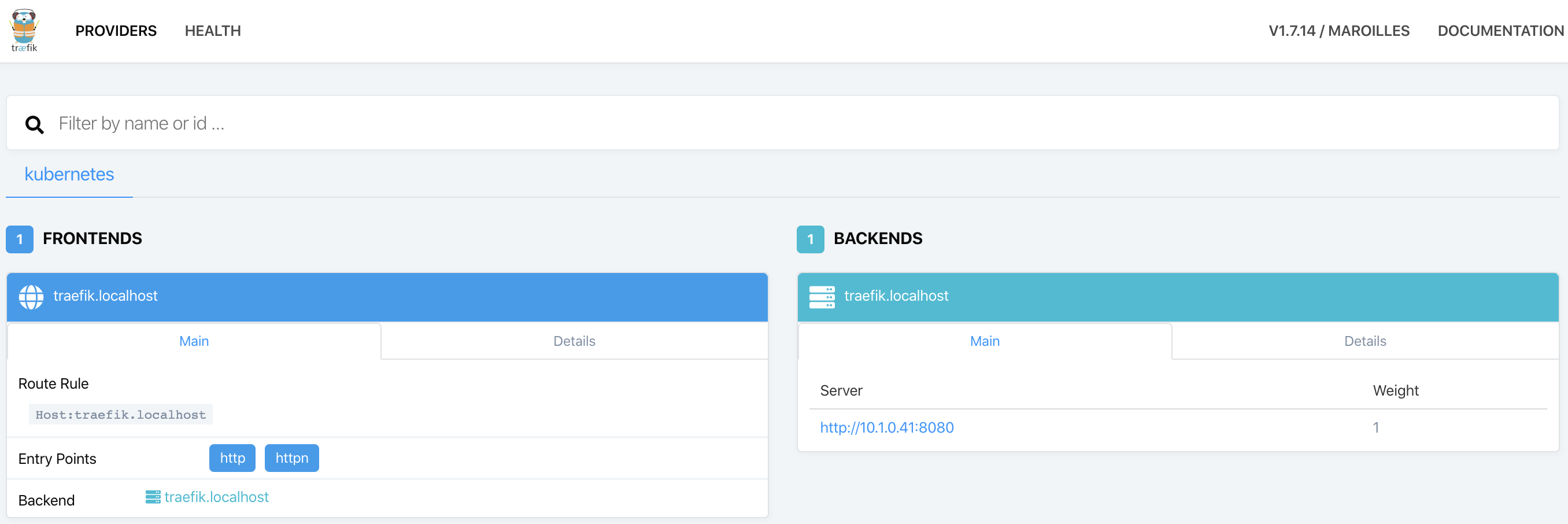
</pre></td></tr></tbody></table></code></pre></div></div> <p>When the deployment ready status is “1/1” (1 ready out of 1 required), visit <a href="http://traefik.localhost/">http://traefik.localhost/</a> to access the Traefik dashboard and login with previously defined username and password. In the dashboard one can check the entry points (frontends) available to access the deployed services (backends).</p> <p><img src="/assets/k8s-jenkins-example/traefik-dashboard.png" alt="Traefik Dashboard" class="image-center img-thumbnail"/> <em><strong>Figure:</strong> Traefik dashboard.</em></p> <h1 id="kubernetes-dashboard">Kubernetes Dashboard</h1> <p><a href="https://github.com/kubernetes/dashboard">Kubernetes Dashboard</a> is an open-source web interface to quickly manage a Kubernetes cluster, providing user-friendly features to manage and troubleshoot deployed applications. Personally, I prefer <a href="https://www.portainer.io/">Portainer</a> interface and organization, however it is <a href="https://www.portainer.io/2019/07/portainer-kubernetes/">still not supporting Kubernetes</a>. Thus, the following configurations are provided to enable the Traefik ingress and make the dashboard available through <a href="http://dashboard.localhost">http://dashboard.localhost</a>.</p> <div class="language-yaml highlighter-rouge"><div class="highlight"><pre class="highlight"><code><table class="rouge-table"><tbody><tr><td class="rouge-gutter gl"><pre class="lineno">1
2
3
4
5
6
7
8
9
10
11
</pre></td><td class="rouge-code"><pre><span class="na">enableInsecureLogin</span><span class="pi">:</span> <span class="no">true</span>
<span class="na">service</span><span class="pi">:</span>
  <span class="na">externalPort</span><span class="pi">:</span> <span class="m">9090</span>
<span class="na">ingress</span><span class="pi">:</span>
  <span class="na">enabled</span><span class="pi">:</span> <span class="no">true</span>
  <span class="na">hosts</span><span class="pi">:</span> 
    <span class="pi">-</span> <span class="s">dashboard.localhost</span>
  <span class="na">paths</span><span class="pi">:</span> 
    <span class="pi">-</span> <span class="s">/</span>
  <span class="na">annotations</span><span class="pi">:</span>
    <span class="na">kubernetes.io/ingress.class</span><span class="pi">:</span> <span class="s">traefik</span>
</pre></td></tr></tbody></table></code></pre></div></div> <p><em><strong>Code:</strong> Configuration values to use with Kubernetes Dashboard Helm chart.</em></p> <p>Similarly to Traefik, the Dashboard can be installed using the <a href="https://github.com/helm/charts/tree/master/stable/kubernetes-dashboard">official Kubernetes Dashboard Helm chart</a> through the command:</p> <div class="language-bash highlighter-rouge"><div class="highlight"><pre class="highlight"><code><table class="rouge-table"><tbody><tr><td class="rouge-gutter gl"><pre class="lineno">1
</pre></td><td class="rouge-code"><pre>helm <span class="nb">install </span>stable/kubernetes-dashboard <span class="nt">--name</span> dashboard <span class="nt">--values</span> dashboard-values.yml
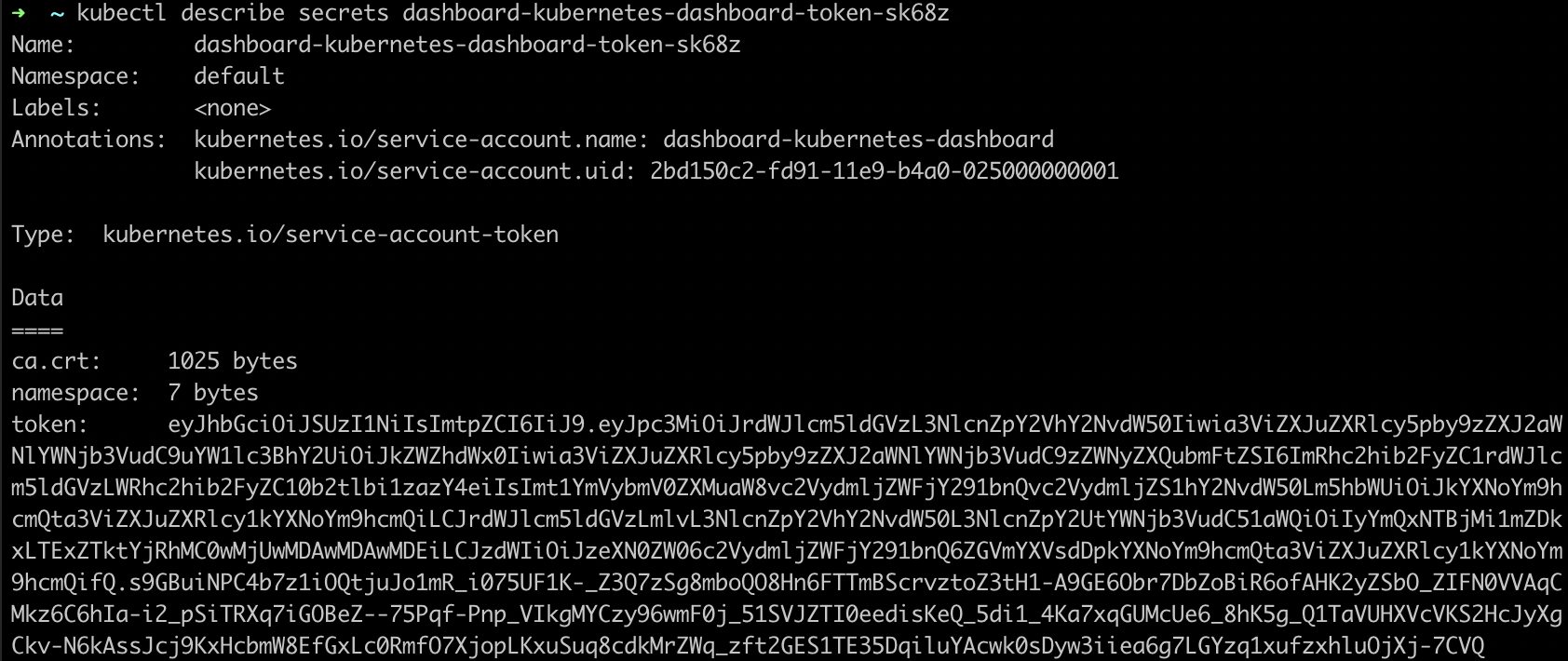
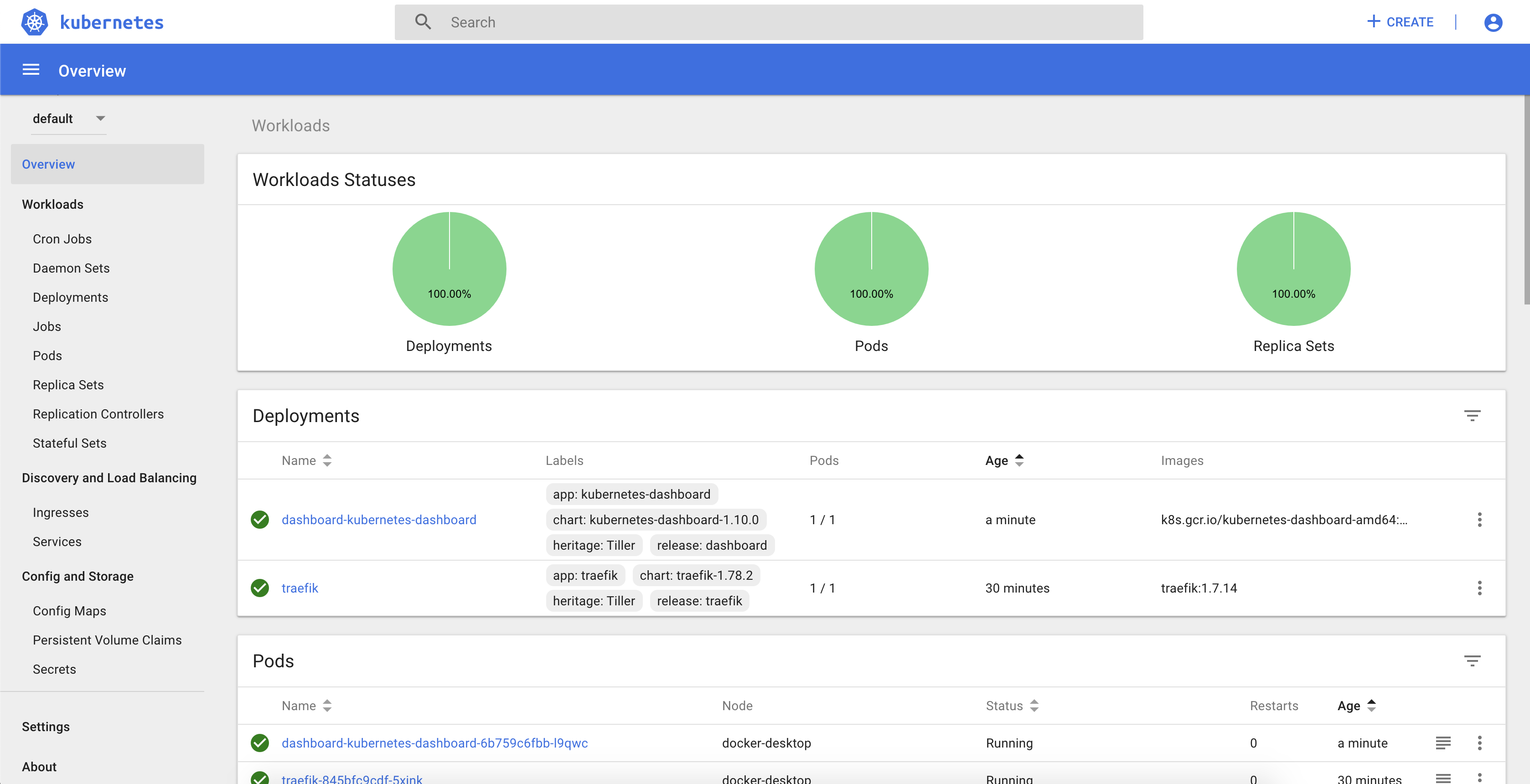
</pre></td></tr></tbody></table></code></pre></div></div> <p>In order to login, the helm chart already creates a service account with the appropriate permissions. The token to login with such service account is available in kubernetes secrets. To get the list of available secrets just run <code class="language-plaintext highlighter-rouge">kubectl get secrets</code>:</p> <p><img src="/assets/k8s-jenkins-example/kubernetes-secrets.png" alt="Kubernetes Secrets" class="image-center img-thumbnail" width="65%"/> <em><strong>Figure:</strong> Kubernetes secrets.</em></p> <p>To get the secret value, lets describe the secret that contains the dashboard token with <code class="language-plaintext highlighter-rouge">kubectl describe secrets dashboard-kubernetes-dashboard-token-sk68z</code>:</p> <p><img src="/assets/k8s-jenkins-example/kubernetes-secret.png" alt="Kubernetes Secret" class="image-center img-thumbnail" width="80%"/> <em><strong>Figure:</strong> Kubernetes secret with token.</em></p> <p>Finally, go to <a href="http://dashboard.localhost">http://dashboard.localhost</a>, and use the previous token value to login in the Kubernetes Dashboard:</p> <p><img src="/assets/k8s-jenkins-example/kubernetes-dashboard.png" alt="Kubernetes Dashboard" class="image-center img-thumbnail"/> <em><strong>Figure:</strong> Kubernetes Dashboard.</em></p> <h1 id="jenkins">Jenkins</h1> <p><a href="https://jenkins.io">Jenkins</a> is the most widely used open-source tool to automatically build, test and deploy software applications. Thus, with Jenkins we can specify a processing pipeline describing exactly how our application will be built and deployed automatically after each commit.</p> <p>To install Jenkins, we will take advantage of the <a href="https://github.com/helm/charts/tree/master/stable/jenkins">official Jenkins Helm chart</a>, providing the following configurations to specify login credentials and install the plugins to integrate with GitHub and Kubernetes:</p> <div class="language-yaml highlighter-rouge"><div class="highlight"><pre class="highlight"><code><table class="rouge-table"><tbody><tr><td class="rouge-gutter gl"><pre class="lineno">1
2
3
4
5
6
7
8
9
10
11
12
13
14
15
16
17
18
19
20
21
</pre></td><td class="rouge-code"><pre><span class="na">master</span><span class="pi">:</span>
  <span class="na">useSecurity</span><span class="pi">:</span> <span class="no">true</span>
  <span class="na">adminUser</span><span class="pi">:</span> <span class="s">admin</span>
  <span class="na">adminPassword</span><span class="pi">:</span> <span class="s">admin</span>
  <span class="na">numExecutors</span><span class="pi">:</span> <span class="m">1</span>
  <span class="na">installPlugins</span><span class="pi">:</span>
    <span class="pi">-</span> <span class="s">kubernetes:1.21.1</span>
    <span class="pi">-</span> <span class="s">workflow-job:2.36</span>
    <span class="pi">-</span> <span class="s">workflow-aggregator:2.6</span>
    <span class="pi">-</span> <span class="s">credentials-binding:1.20</span>
    <span class="pi">-</span> <span class="s">git:3.12.1</span>
    <span class="pi">-</span> <span class="s">command-launcher:1.3</span>
    <span class="pi">-</span> <span class="s">github-branch-source:2.5.8</span>
    <span class="pi">-</span> <span class="s">docker-workflow:1.21</span>
    <span class="pi">-</span> <span class="s">pipeline-utility-steps:2.3.1</span>
  <span class="na">overwritePlugins</span><span class="pi">:</span> <span class="no">true</span>
  <span class="na">ingress</span><span class="pi">:</span>
    <span class="na">enabled</span><span class="pi">:</span> <span class="no">true</span>
    <span class="na">hostName</span><span class="pi">:</span> <span class="s">jenkins.localhost</span>
    <span class="na">annotations</span><span class="pi">:</span>
      <span class="na">kubernetes.io/ingress.class</span><span class="pi">:</span> <span class="s">traefik</span>
</pre></td></tr></tbody></table></code></pre></div></div> <p><em><strong>Code:</strong> Configuration values to use with Jenkins Helm chart.</em></p> <p>To perform installation, execute the following command and check the progress with <code class="language-plaintext highlighter-rouge">kubectl get deployments</code>:</p> <div class="language-bash highlighter-rouge"><div class="highlight"><pre class="highlight"><code><table class="rouge-table"><tbody><tr><td class="rouge-gutter gl"><pre class="lineno">1
</pre></td><td class="rouge-code"><pre>helm <span class="nb">install </span>stable/jenkins <span class="nt">--name</span> jenkins <span class="nt">--values</span> jenkins-values.yml
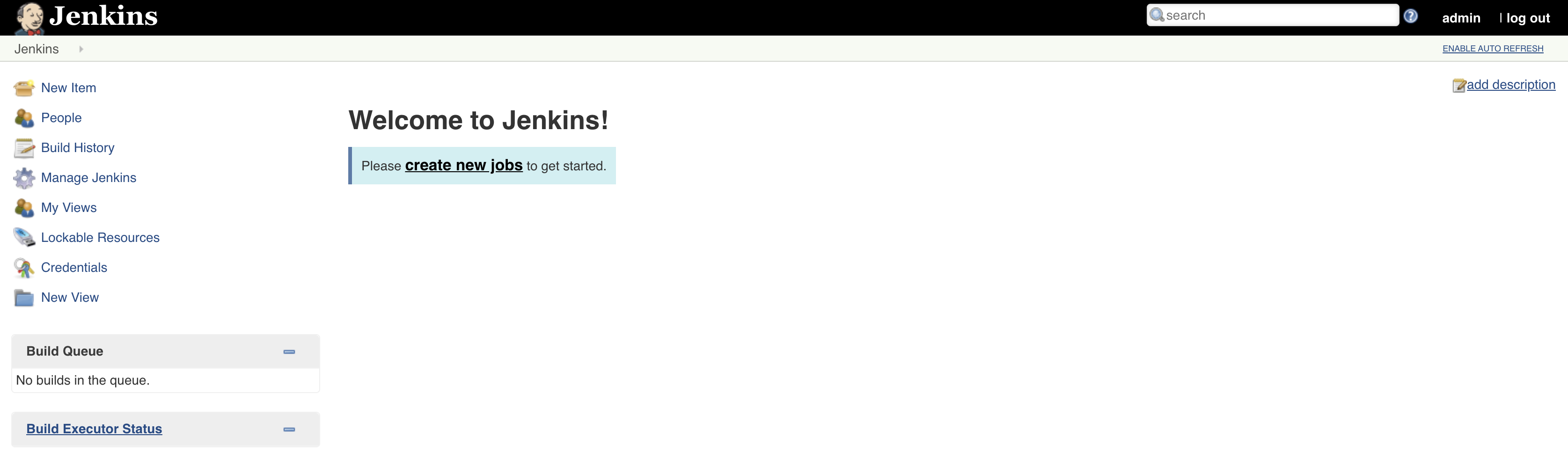
</pre></td></tr></tbody></table></code></pre></div></div> <p>When required pods are running, go to <a href="http://jenkins.localhost">http://jenkins.localhost</a> to access Jenkins and login with the previously provided credentials:</p> <p><img src="/assets/k8s-jenkins-example/jenkins-dashboard.png" alt="Jenkins Dashboard" class="image-center img-thumbnail"/> <em><strong>Figure:</strong> Jenkins Dashboard.</em></p> <h1 id="application">Application</h1> <p>Since all required tools are installed and running successfully, we are now ready to create the sample application to be built and deployed automatically. Such application will be developed in <a href="https://kotlinlang.org">Kotlin</a> using the <a href="https://spring.io/projects/spring-boot">Spring Boot</a> framework. <a href="https://start.spring.io">Spring Initializr</a> is used to create the initial application, using the following configurations:</p> <p><img src="/assets/k8s-jenkins-example/spring-initializr.png" alt="Spring Initializr" class="image-center img-thumbnail" width="85%"/> <em><strong>Figure:</strong> Spring Initializr configuration.</em></p> <p>The <strong>core functionality</strong> will be in the <strong><code class="language-plaintext highlighter-rouge">GreetingController</code></strong>, which simply provides a <strong>GET REST endpoint to provide a greeting based on input argument</strong>, provided environment variable and overall counter to differentiate between different calls.</p> <div class="language-kotlin highlighter-rouge"><div class="highlight"><pre class="highlight"><code><table class="rouge-table"><tbody><tr><td class="rouge-gutter gl"><pre class="lineno">1
2
3
4
5
6
7
8
9
10
</pre></td><td class="rouge-code"><pre><span class="nd">@RestController</span>
<span class="kd">class</span> <span class="nc">GreetingController</span> <span class="p">{</span>
    <span class="kd">val</span> <span class="py">counter</span> <span class="p">=</span> <span class="nc">AtomicLong</span><span class="p">()</span>
    
    <span class="nd">@GetMapping</span><span class="p">(</span><span class="s">"/greeting"</span><span class="p">)</span>
    <span class="k">fun</span> <span class="nf">greeting</span><span class="p">(</span><span class="nd">@RequestParam</span><span class="p">(</span><span class="n">value</span> <span class="p">=</span> <span class="s">"name"</span><span class="p">,</span> <span class="n">defaultValue</span> <span class="p">=</span> <span class="s">"World"</span><span class="p">)</span> <span class="n">name</span><span class="p">:</span> <span class="nc">String</span><span class="p">):</span> <span class="nc">Greeting</span> <span class="p">{</span>
        <span class="kd">val</span> <span class="py">envVar</span><span class="p">:</span> <span class="nc">String</span> <span class="p">=</span> <span class="nc">System</span><span class="p">.</span><span class="nf">getenv</span><span class="p">(</span><span class="s">"EXAMPLE_VALUE"</span><span class="p">)</span> <span class="o">?:</span> <span class="s">"default_value"</span>
        <span class="k">return</span> <span class="nc">Greeting</span><span class="p">(</span><span class="n">counter</span><span class="p">.</span><span class="nf">incrementAndGet</span><span class="p">(),</span> <span class="s">"Hello, $name"</span><span class="p">,</span> <span class="n">envVar</span><span class="p">)</span>
    <span class="p">}</span>
<span class="p">}</span>
</pre></td></tr></tbody></table></code></pre></div></div> <p>Additionally, keep in mind to add the <strong><code class="language-plaintext highlighter-rouge">actuator</code></strong> dependency to enable the <strong>health endpoint</strong> at <code class="language-plaintext highlighter-rouge">/actuator/health</code>, which will be used to <strong>provide application health information</strong> to Kubernetes:</p> <div class="language-xml highlighter-rouge"><div class="highlight"><pre class="highlight"><code><table class="rouge-table"><tbody><tr><td class="rouge-gutter gl"><pre class="lineno">1
2
3
4
</pre></td><td class="rouge-code"><pre><span class="nt">&lt;dependency&gt;</span>
    <span class="nt">&lt;groupId&gt;</span>org.springframework.boot<span class="nt">&lt;/groupId&gt;</span>
    <span class="nt">&lt;artifactId&gt;</span>spring-boot-starter-actuator<span class="nt">&lt;/artifactId&gt;</span>
<span class="nt">&lt;/dependency&gt;</span>
</pre></td></tr></tbody></table></code></pre></div></div> <h2 id="dockerfile">Dockerfile</h2> <p>To <strong>run the application</strong> in Kubernetes, a <strong>Docker image of the application is required</strong>, which can be described with the following <code class="language-plaintext highlighter-rouge">Dockerfile</code>:</p> <div class="language-dockerfile highlighter-rouge"><div class="highlight"><pre class="highlight"><code><table class="rouge-table"><tbody><tr><td class="rouge-gutter gl"><pre class="lineno">1
2
3
4
</pre></td><td class="rouge-code"><pre><span class="k">FROM</span><span class="s"> openjdk:8-jdk-alpine</span>
<span class="k">EXPOSE</span><span class="s"> 8090</span>
<span class="k">ADD</span><span class="s"> /target/k8s-jenkins-example*.jar k8s-jenkins-example.jar</span>
<span class="k">ENTRYPOINT</span><span class="s"> ["java", "-jar", "k8s-jenkins-example.jar"]</span>
</pre></td></tr></tbody></table></code></pre></div></div> <h2 id="helm-chart">Helm chart</h2> <p>To create the helm chart for the sample application, one can take advantage of the <code class="language-plaintext highlighter-rouge">helm</code> CLI tool to create a baseline that we can adapt for the sample application. Such baseline can be created by running <code class="language-plaintext highlighter-rouge">helm create helm</code> on your terminal, which creates the templates of the required Kubernetes components to run and properly configure the application. Considering our goal, the following files are the ones that require most attention:</p> <ul> <li><code class="language-plaintext highlighter-rouge">Chart.yaml</code>: chart properties such as name, description and version;</li> <li><code class="language-plaintext highlighter-rouge">values.yaml</code>: default configuration values provided to chart;</li> <li><code class="language-plaintext highlighter-rouge">templates/deplyment.yaml</code>: template of Kubernetes deployment specification, to <strong>configure the application pod and replication characteristics</strong>;</li> <li><code class="language-plaintext highlighter-rouge">templates/service.yaml</code>: template of Kubernetes service specification, to <strong>configure the application interface for other applications</strong>;</li> <li><code class="language-plaintext highlighter-rouge">templates/ingress.yaml</code>: template of Kubernetes ingress specification, to <strong>expose service for external access</strong>.</li> </ul> <p>Helm charts use ` {{}} ` for templating, which means that whatever that is inside will be interpreted to provide an output value. More details on several templating options in the <a href="https://helm.sh/docs/chart_template_guide/">official guide</a>. For the template that we are creating, the following are the most important examples:</p> <ul> <li>` {{ .Values.replicaCount }} ` to get configuration <code class="language-plaintext highlighter-rouge">replicaCount</code> from provided values file;</li> <li> <table> <tbody> <tr> <td>` {{- toYaml .</td> <td>nindent 8 }} `: copies the referred yaml tree (dot refers to the current structure reference) into outcome with an indent of 8 white spaces.</td> </tr> </tbody> </table> </li> </ul> <p>The <strong>following values</strong> were defined to configure the application, which will be used in the chart templates. Important to refer the provided docker image reference, the service port and the ingress configuration to use Traefik:</p> <div class="language-yaml highlighter-rouge"><div class="highlight"><pre class="highlight"><code><table class="rouge-table"><tbody><tr><td class="rouge-gutter gl"><pre class="lineno">1
2
3
4
5
6
7
8
9
10
11
12
13
14
15
16
17
18
19
20
21
</pre></td><td class="rouge-code"><pre><span class="na">image</span><span class="pi">:</span>
  <span class="na">repository</span><span class="pi">:</span> <span class="s">davidcampos/k8s-jenkins-example</span>
  <span class="na">tag</span><span class="pi">:</span> <span class="s">latest</span>
  <span class="na">pullPolicy</span><span class="pi">:</span> <span class="s">Always</span>

<span class="na">name</span><span class="pi">:</span> <span class="s2">"</span><span class="s">example"</span>
<span class="na">domain</span><span class="pi">:</span> <span class="s2">"</span><span class="s">localhost"</span>

<span class="na">replicaCount</span><span class="pi">:</span> <span class="m">1</span>

<span class="na">service</span><span class="pi">:</span>
  <span class="na">port</span><span class="pi">:</span> <span class="m">8090</span>

<span class="na">ingress</span><span class="pi">:</span>
  <span class="na">enabled</span><span class="pi">:</span> <span class="no">true</span>
  <span class="na">annotations</span><span class="pi">:</span>
    <span class="na">kubernetes.io/ingress.class</span><span class="pi">:</span> <span class="s">traefik</span>
  <span class="na">hosts</span><span class="pi">:</span>
    <span class="pi">-</span> <span class="na">host</span><span class="pi">:</span>
      <span class="na">paths</span><span class="pi">:</span>
        <span class="pi">-</span> <span class="s">/</span>
</pre></td></tr></tbody></table></code></pre></div></div> <p><em><strong>Code:</strong> Helm chart configuration values.</em></p> <p>Below you can find the <strong>deployment template</strong>, which configures the replica set and how it should be updated, sets up the container together with health probes, and finally specifies where the pods should be deployed:</p> <div class="language-yaml highlighter-rouge"><div class="highlight"><pre class="highlight"><code><table class="rouge-table"><tbody><tr><td class="rouge-gutter gl"><pre class="lineno">1
2
3
4
5
6
7
8
9
10
11
12
13
14
15
16
17
18
19
20
21
22
23
24
25
26
27
28
29
30
31
32
33
34
35
36
37
38
39
40
41
42
43
44
45
46
47
48
49
50
51
52
53
</pre></td><td class="rouge-code"><pre>
<span class="na">apiVersion</span><span class="pi">:</span> <span class="s">extensions/v1beta1</span>
<span class="na">kind</span><span class="pi">:</span> <span class="s">Deployment</span>
<span class="na">metadata</span><span class="pi">:</span>
  <span class="na">name</span><span class="pi">:</span> <span class="pi">{{</span> <span class="nv">.Values.name</span> <span class="pi">}}</span><span class="s">-deployment</span>
<span class="na">spec</span><span class="pi">:</span>
  <span class="na">replicas</span><span class="pi">:</span> <span class="pi">{{</span> <span class="nv">.Values.replicaCount</span> <span class="pi">}}</span>
  <span class="na">revisionHistoryLimit</span><span class="pi">:</span> <span class="m">2</span>
  <span class="na">selector</span><span class="pi">:</span>
    <span class="na">matchLabels</span><span class="pi">:</span>
      <span class="na">app</span><span class="pi">:</span> <span class="pi">{{</span> <span class="nv">.Values.name</span> <span class="pi">}}</span>
  <span class="na">strategy</span><span class="pi">:</span>
    <span class="na">type</span><span class="pi">:</span> <span class="s">RollingUpdate</span>
    <span class="na">rollingUpdate</span><span class="pi">:</span>
      <span class="na">maxUnavailable</span><span class="pi">:</span> <span class="m">1</span>
      <span class="na">maxSurge</span><span class="pi">:</span> <span class="m">1</span>
  <span class="na">template</span><span class="pi">:</span>
    <span class="na">metadata</span><span class="pi">:</span>
      <span class="na">labels</span><span class="pi">:</span>
        <span class="na">app</span><span class="pi">:</span> <span class="pi">{{</span> <span class="nv">.Values.name</span> <span class="pi">}}</span>
        <span class="na">role</span><span class="pi">:</span> <span class="s">rolling-update</span>
    <span class="na">spec</span><span class="pi">:</span>
    <span class="pi">{{</span><span class="nv">- with .Values.imagePullSecrets</span> <span class="pi">}}</span>
      <span class="na">imagePullSecrets</span><span class="pi">:</span>
        <span class="pi">{{</span><span class="nv">- toYaml . | nindent 8</span> <span class="pi">}}</span>
    <span class="pi">{{</span><span class="nv">- end</span> <span class="pi">}}</span>
      <span class="na">containers</span><span class="pi">:</span>
        <span class="pi">-</span> <span class="na">name</span><span class="pi">:</span> <span class="pi">{{</span> <span class="nv">.Values.name</span> <span class="pi">}}</span><span class="s">-container</span>
          <span class="na">image</span><span class="pi">:</span> <span class="s2">"</span><span class="s">{{</span><span class="nv"> </span><span class="s">.Values.image.repository</span><span class="nv"> </span><span class="s">}}:{{</span><span class="nv"> </span><span class="s">.Values.image.tag</span><span class="nv"> </span><span class="s">}}"</span>
          <span class="na">imagePullPolicy</span><span class="pi">:</span> <span class="pi">{{</span> <span class="nv">.Values.image.pullPolicy</span> <span class="pi">}}</span>
          <span class="na">livenessProbe</span><span class="pi">:</span>
            <span class="na">httpGet</span><span class="pi">:</span>
              <span class="na">path</span><span class="pi">:</span> <span class="s">/actuator/health</span>
              <span class="na">port</span><span class="pi">:</span> <span class="pi">{{</span> <span class="nv">.Values.service.port</span> <span class="pi">}}</span>
          <span class="na">readinessProbe</span><span class="pi">:</span>
            <span class="na">httpGet</span><span class="pi">:</span>
              <span class="na">path</span><span class="pi">:</span> <span class="s">/actuator/health</span>
              <span class="na">port</span><span class="pi">:</span> <span class="pi">{{</span> <span class="nv">.Values.service.port</span> <span class="pi">}}</span>
          <span class="na">resources</span><span class="pi">:</span>
            <span class="pi">{{</span><span class="nv">- toYaml .Values.resources | nindent 12</span> <span class="pi">}}</span>
      <span class="pi">{{</span><span class="nv">- with .Values.nodeSelector</span> <span class="pi">}}</span>
      <span class="na">nodeSelector</span><span class="pi">:</span>
        <span class="pi">{{</span><span class="nv">- toYaml . | nindent 8</span> <span class="pi">}}</span>
      <span class="pi">{{</span><span class="nv">- end</span> <span class="pi">}}</span>
    <span class="pi">{{</span><span class="nv">- with .Values.affinity</span> <span class="pi">}}</span>
      <span class="na">affinity</span><span class="pi">:</span>
        <span class="pi">{{</span><span class="nv">- toYaml . | nindent 8</span> <span class="pi">}}</span>
    <span class="pi">{{</span><span class="nv">- end</span> <span class="pi">}}</span>
    <span class="pi">{{</span><span class="nv">- with .Values.tolerations</span> <span class="pi">}}</span>
      <span class="na">tolerations</span><span class="pi">:</span>
        <span class="pi">{{</span><span class="nv">- toYaml . | nindent 8</span> <span class="pi">}}</span>
    <span class="pi">{{</span><span class="nv">- end</span> <span class="pi">}}</span>

</pre></td></tr></tbody></table></code></pre></div></div> <p><em><strong>Code:</strong> Helm chart deployment template.</em></p> <p>The following template provides the <strong><code class="language-plaintext highlighter-rouge">service</code> configuration</strong>, which refers to the port provided in the deployment:</p> <div class="language-yaml highlighter-rouge"><div class="highlight"><pre class="highlight"><code><table class="rouge-table"><tbody><tr><td class="rouge-gutter gl"><pre class="lineno">1
2
3
4
5
6
7
8
9
10
11
12
13
</pre></td><td class="rouge-code"><pre>
<span class="na">apiVersion</span><span class="pi">:</span> <span class="s">v1</span>
<span class="na">kind</span><span class="pi">:</span> <span class="s">Service</span>
<span class="na">metadata</span><span class="pi">:</span>
  <span class="na">name</span><span class="pi">:</span> <span class="pi">{{</span> <span class="nv">.Values.name</span> <span class="pi">}}</span><span class="s">-service</span>
<span class="na">spec</span><span class="pi">:</span>
  <span class="na">ports</span><span class="pi">:</span>
    <span class="pi">-</span> <span class="na">name</span><span class="pi">:</span> <span class="s">http</span>
      <span class="na">targetPort</span><span class="pi">:</span> <span class="pi">{{</span> <span class="nv">.Values.service.port</span> <span class="pi">}}</span>
      <span class="na">port</span><span class="pi">:</span> <span class="pi">{{</span> <span class="nv">.Values.service.port</span> <span class="pi">}}</span>
  <span class="na">selector</span><span class="pi">:</span>
    <span class="na">app</span><span class="pi">:</span> <span class="pi">{{</span> <span class="nv">.Values.name</span> <span class="pi">}}</span>

</pre></td></tr></tbody></table></code></pre></div></div> <p><em><strong>Code:</strong> Helm chart service template.</em></p> <p>Finally, the <strong>ingress template</strong> configures how the service is exposed for external access, specifying matching rules and TLS properties:</p> <div class="language-yaml highlighter-rouge"><div class="highlight"><pre class="highlight"><code><table class="rouge-table"><tbody><tr><td class="rouge-gutter gl"><pre class="lineno">1
2
3
4
5
6
7
8
9
10
11
12
13
14
15
16
17
18
19
20
21
22
23
24
25
26
27
28
29
30
31
32
33
34
35
36
37
</pre></td><td class="rouge-code"><pre>
<span class="pi">{{</span><span class="nv">- if .Values.ingress.enabled -</span><span class="pi">}}</span>
<span class="pi">{{</span><span class="nv">- $name</span> <span class="pi">:</span><span class="nv">= .Values.name -</span><span class="pi">}}</span>
<span class="pi">{{</span><span class="nv">- $hostname</span> <span class="pi">:</span><span class="nv">= printf "%s.%s" .Values.name .Values.domain -</span><span class="pi">}}</span>
<span class="na">apiVersion</span><span class="pi">:</span> <span class="s">extensions/v1beta1</span>
<span class="na">kind</span><span class="pi">:</span> <span class="s">Ingress</span>
<span class="na">metadata</span><span class="pi">:</span>
  <span class="na">name</span><span class="pi">:</span> <span class="pi">{{</span> <span class="nv">$name</span> <span class="pi">}}</span><span class="s">-ingress</span>
  <span class="pi">{{</span><span class="nv">- with .Values.ingress.annotations</span> <span class="pi">}}</span>
  <span class="na">annotations</span><span class="pi">:</span>
    <span class="pi">{{</span><span class="nv">- toYaml . | nindent 4</span> <span class="pi">}}</span>
  <span class="pi">{{</span><span class="nv">- end</span> <span class="pi">}}</span>
<span class="na">spec</span><span class="pi">:</span>
<span class="pi">{{</span><span class="nv">- if .Values.ingress.tls</span> <span class="pi">}}</span>
  <span class="na">tls</span><span class="pi">:</span>
  <span class="pi">{{</span><span class="nv">- range .Values.ingress.tls</span> <span class="pi">}}</span>
    <span class="pi">-</span> <span class="na">hosts</span><span class="pi">:</span>
      <span class="pi">{{</span><span class="nv">- range .hosts</span> <span class="pi">}}</span>
        <span class="pi">-</span> <span class="pi">{{</span> <span class="nv">$hostname | quote</span><span class="pi">}}</span>
      <span class="pi">{{</span><span class="nv">- end</span> <span class="pi">}}</span>
      <span class="na">secretName</span><span class="pi">:</span> <span class="pi">{{</span> <span class="nv">.secretName</span> <span class="pi">}}</span>
  <span class="pi">{{</span><span class="nv">- end</span> <span class="pi">}}</span>
<span class="pi">{{</span><span class="nv">- end</span> <span class="pi">}}</span>
  <span class="na">rules</span><span class="pi">:</span>
  <span class="pi">{{</span><span class="nv">- range .Values.ingress.hosts</span> <span class="pi">}}</span>
    <span class="pi">-</span> <span class="na">host</span><span class="pi">:</span> <span class="pi">{{</span> <span class="nv">$hostname | quote</span> <span class="pi">}}</span>
      <span class="na">http</span><span class="pi">:</span>
        <span class="na">paths</span><span class="pi">:</span>
        <span class="pi">{{</span><span class="nv">- range .paths</span> <span class="pi">}}</span>
          <span class="pi">-</span> <span class="na">path</span><span class="pi">:</span> <span class="pi">{{</span> <span class="nv">.</span> <span class="pi">}}</span>
            <span class="na">backend</span><span class="pi">:</span>
              <span class="na">serviceName</span><span class="pi">:</span> <span class="pi">{{</span> <span class="nv">$name</span> <span class="pi">}}</span><span class="s">-service</span>
              <span class="na">servicePort</span><span class="pi">:</span> <span class="s">http</span>
        <span class="pi">{{</span><span class="nv">- end</span> <span class="pi">}}</span>
  <span class="pi">{{</span><span class="nv">- end</span> <span class="pi">}}</span>
<span class="pi">{{</span><span class="nv">- end</span> <span class="pi">}}</span>

</pre></td></tr></tbody></table></code></pre></div></div> <p><em><strong>Code:</strong> Helm chart ingress template.</em></p> <p>In order to <strong>check</strong> if the helm <strong>chart</strong> is <strong>working properly</strong>, we can install it and check if the several components where deployed properly:</p> <div class="language-bash highlighter-rouge"><div class="highlight"><pre class="highlight"><code><table class="rouge-table"><tbody><tr><td class="rouge-gutter gl"><pre class="lineno">1
2
3
4
5
</pre></td><td class="rouge-code"><pre>helm <span class="nb">install </span>example ./helm
kubectl get deployment
kubectl get pod
kubectl get service
kubectl get ingress
</pre></td></tr></tbody></table></code></pre></div></div> <h2 id="pipeline">Pipeline</h2> <p>The goal is to build the <strong>pipeline</strong> taking <strong>full advantage of Kubernetes</strong>, building the required artifacts on dedicated agents executed on-demand. Such approach provides high flexibility and independency for <strong>developers</strong>, which are in <strong>full control of their building pipelines</strong> and without dependencies to whatever is installed on the Jenkins host machine. As a result, the Jenkins machine will not be polluted with many different tools and versions. For instance, if one team needs Java 8 and another needs Java 13, the Jenkins host machine does not need to have both installed, since each team pipeline will run on its own Jenkins agent that is deployed on-demand for each run. To achieve that, we used the <a href="https://github.com/jenkinsci/kubernetes-plugin">Kubernetes Jenkins plugin</a>, which allows to <strong>define a pod with containers with required tools</strong>. Then, we just have to mention that we want to run a specific step inside a specific container by referencing its name.</p> <p>Keep in mind that a <strong>workspace volume is automatically created and shared between containers</strong> in the pod, which means that any change on the workspace will be available for other containers. For instance, if we use the maven container to create the packaged jar file, it will be available for the docker container to create the docker image. Moreover, in order to speed up the building process, do not forget to create a volume for the maven <code class="language-plaintext highlighter-rouge">~/.m2</code> folder, in order to share downloaded dependencies between job runs.</p> <p>Since <code class="language-plaintext highlighter-rouge">maven</code>, <code class="language-plaintext highlighter-rouge">docker</code> and <code class="language-plaintext highlighter-rouge">helm</code> tools are required to properly build and deploy the sample application, the following pod specification is provided in the <code class="language-plaintext highlighter-rouge">build.yaml</code> file:</p> <div class="language-yaml highlighter-rouge"><div class="highlight"><pre class="highlight"><code><table class="rouge-table"><tbody><tr><td class="rouge-gutter gl"><pre class="lineno">1
2
3
4
5
6
7
8
9
10
11
12
13
14
15
16
17
18
19
20
21
22
23
24
25
26
27
28
29
30
31
32
33
34
35
36
</pre></td><td class="rouge-code"><pre><span class="na">apiVersion</span><span class="pi">:</span> <span class="s">v1</span>
<span class="na">kind</span><span class="pi">:</span> <span class="s">Pod</span>
<span class="na">metadata</span><span class="pi">:</span>
  <span class="na">labels</span><span class="pi">:</span>
    <span class="na">some-label</span><span class="pi">:</span> <span class="s">pod</span>
<span class="na">spec</span><span class="pi">:</span>
  <span class="na">containers</span><span class="pi">:</span>
    <span class="pi">-</span> <span class="na">name</span><span class="pi">:</span> <span class="s">maven</span>
      <span class="na">image</span><span class="pi">:</span> <span class="s">maven:3.3.9-jdk-8-alpine</span>
      <span class="na">command</span><span class="pi">:</span>
        <span class="pi">-</span> <span class="s">cat</span>
      <span class="na">tty</span><span class="pi">:</span> <span class="no">true</span>
      <span class="na">volumeMounts</span><span class="pi">:</span>
        <span class="pi">-</span> <span class="na">name</span><span class="pi">:</span> <span class="s">m2</span>
          <span class="na">mountPath</span><span class="pi">:</span> <span class="s">/root/.m2</span>
    <span class="pi">-</span> <span class="na">name</span><span class="pi">:</span> <span class="s">docker</span>
      <span class="na">image</span><span class="pi">:</span> <span class="s">docker:19.03</span>
      <span class="na">command</span><span class="pi">:</span>
        <span class="pi">-</span> <span class="s">cat</span>
      <span class="na">tty</span><span class="pi">:</span> <span class="no">true</span>
      <span class="na">privileged</span><span class="pi">:</span> <span class="no">true</span>
      <span class="na">volumeMounts</span><span class="pi">:</span>
        <span class="pi">-</span> <span class="na">name</span><span class="pi">:</span> <span class="s">dockersock</span>
          <span class="na">mountPath</span><span class="pi">:</span> <span class="s">/var/run/docker.sock</span>
    <span class="pi">-</span> <span class="na">name</span><span class="pi">:</span> <span class="s">helm</span>
      <span class="na">image</span><span class="pi">:</span> <span class="s">lachlanevenson/k8s-helm:v3.1.1</span>
      <span class="na">command</span><span class="pi">:</span>
        <span class="pi">-</span> <span class="s">cat</span>
      <span class="na">tty</span><span class="pi">:</span> <span class="no">true</span>
  <span class="na">volumes</span><span class="pi">:</span>
    <span class="pi">-</span> <span class="na">name</span><span class="pi">:</span> <span class="s">dockersock</span>
      <span class="na">hostPath</span><span class="pi">:</span>
        <span class="na">path</span><span class="pi">:</span> <span class="s">/var/run/docker.sock</span>
    <span class="pi">-</span> <span class="na">name</span><span class="pi">:</span> <span class="s">m2</span>
      <span class="na">hostPath</span><span class="pi">:</span>
        <span class="na">path</span><span class="pi">:</span> <span class="s">/root/.m2</span>
</pre></td></tr></tbody></table></code></pre></div></div> <p>Before jumping into the pipeline, we need to define the credentials that will be used to access GitHub source code and Docker Hub images. Such credentials can be stored on Jenkins credentials, which later can be referenced from the pipeline using respective identifiers:</p> <p><img src="/assets/k8s-jenkins-example/jenkins-credentials.png" alt="Jenkins Credentials" class="image-center img-thumbnail" width="70%"/> <em><strong>Figure:</strong> Jenkins credentials.</em></p> <p>For the pipeline I decided to use the <a href="https://jenkins.io/doc/book/pipeline/syntax/">declarative syntax</a> instead of scripted, which is a better fit for simple pipelines and easier to read and understand. However, the more restrictive syntax can be a limitation if we want to perform more advanced tasks. For such cases, <a href="https://jenkins.io/doc/book/pipeline/syntax/#script">a script block can be defined in a declarative pipeline</a>. In summary, the CI/CD declarative pipeline for the sample application will have the following stages:</p> <ol> <li><strong>Build</strong>: build application package using maven;</li> <li><strong>Docker Build</strong>: build docker image using previously created Dockerfile;</li> <li><strong>Docker Publish</strong>: publish built docker image to Docker Hub;</li> <li><strong>Kubernetes Deploy</strong>: deploy application using previously created helm chart, by installing or upgrading respective Kubernetes components.</li> </ol> <p>On top of the stages, two different deployment environments will be created: production (<a href="https://example.localhost">https://example.localhost</a>) and staging (<a href="https://example-staging.localhost">https://example-staging.localhost</a>), which are related with master and develop branches respectively. Thus, if the branch is not master or develop, the docker image is not built and the application is not deployed to Kubernetes. Moreover, all application artifacts have the same version, which is loaded from the POM file using the <a href="https://jenkins.io/doc/pipeline/steps/pipeline-utility-steps/">Pipeline Utility steps Jenkins library</a>.</p> <p>Find below the <strong>Jenkins declarative pipeline</strong> for the sample application, which also setups the agent using the pod described on the <code class="language-plaintext highlighter-rouge">build.yaml</code> file and automatically checkouts the source code from GitHub on each job run:</p> <div class="language-groovy highlighter-rouge"><div class="highlight"><pre class="highlight"><code><table class="rouge-table"><tbody><tr><td class="rouge-gutter gl"><pre class="lineno">1
2
3
4
5
6
7
8
9
10
11
12
13
14
15
16
17
18
19
20
21
22
23
24
25
26
27
28
29
30
31
32
33
34
35
36
37
38
39
40
41
42
43
44
45
46
47
48
49
50
51
52
53
54
55
56
57
</pre></td><td class="rouge-code"><pre><span class="n">pipeline</span> <span class="o">{</span>
    <span class="n">environment</span> <span class="o">{</span>
        <span class="n">DEPLOY</span> <span class="o">=</span> <span class="s2">"${env.BRANCH_NAME == "</span><span class="n">master</span><span class="s2">" || env.BRANCH_NAME == "</span><span class="n">develop</span><span class="s2">" ? "</span><span class="kc">true</span><span class="s2">" : "</span><span class="kc">false</span><span class="s2">"}"</span>
        <span class="n">NAME</span> <span class="o">=</span> <span class="s2">"${env.BRANCH_NAME == "</span><span class="n">master</span><span class="s2">" ? "</span><span class="n">example</span><span class="s2">" : "</span><span class="n">example</span><span class="o">-</span><span class="n">staging</span><span class="s2">"}"</span>
        <span class="n">VERSION</span> <span class="o">=</span> <span class="n">readMavenPom</span><span class="o">().</span><span class="na">getVersion</span><span class="o">()</span>
        <span class="n">DOMAIN</span> <span class="o">=</span> <span class="s1">'localhost'</span>
        <span class="n">REGISTRY</span> <span class="o">=</span> <span class="s1">'davidcampos/k8s-jenkins-example'</span>
        <span class="n">REGISTRY_CREDENTIAL</span> <span class="o">=</span> <span class="s1">'dockerhub-davidcampos'</span>
    <span class="o">}</span>
    <span class="n">agent</span> <span class="o">{</span>
        <span class="n">kubernetes</span> <span class="o">{</span>
            <span class="n">defaultContainer</span> <span class="s1">'jnlp'</span>
            <span class="n">yamlFile</span> <span class="s1">'build.yaml'</span>
        <span class="o">}</span>
    <span class="o">}</span>
    <span class="n">stages</span> <span class="o">{</span>
        <span class="n">stage</span><span class="o">(</span><span class="s1">'Build'</span><span class="o">)</span> <span class="o">{</span>
            <span class="n">steps</span> <span class="o">{</span>
                <span class="n">container</span><span class="o">(</span><span class="s1">'maven'</span><span class="o">)</span> <span class="o">{</span>
                    <span class="n">sh</span> <span class="s1">'mvn package'</span>
                <span class="o">}</span>
            <span class="o">}</span>
        <span class="o">}</span>
        <span class="n">stage</span><span class="o">(</span><span class="s1">'Docker Build'</span><span class="o">)</span> <span class="o">{</span>
            <span class="n">when</span> <span class="o">{</span>
                <span class="n">environment</span> <span class="nl">name:</span> <span class="s1">'DEPLOY'</span><span class="o">,</span> <span class="nl">value:</span> <span class="s1">'true'</span>
            <span class="o">}</span>
            <span class="n">steps</span> <span class="o">{</span>
                <span class="n">container</span><span class="o">(</span><span class="s1">'docker'</span><span class="o">)</span> <span class="o">{</span>
                    <span class="n">sh</span> <span class="s2">"docker build -t ${REGISTRY}:${VERSION} ."</span>
                <span class="o">}</span>
            <span class="o">}</span>
        <span class="o">}</span>
        <span class="n">stage</span><span class="o">(</span><span class="s1">'Docker Publish'</span><span class="o">)</span> <span class="o">{</span>
            <span class="n">when</span> <span class="o">{</span>
                <span class="n">environment</span> <span class="nl">name:</span> <span class="s1">'DEPLOY'</span><span class="o">,</span> <span class="nl">value:</span> <span class="s1">'true'</span>
            <span class="o">}</span>
            <span class="n">steps</span> <span class="o">{</span>
                <span class="n">container</span><span class="o">(</span><span class="s1">'docker'</span><span class="o">)</span> <span class="o">{</span>
                    <span class="n">withDockerRegistry</span><span class="o">([</span><span class="nl">credentialsId:</span> <span class="s2">"${REGISTRY_CREDENTIAL}"</span><span class="o">,</span> <span class="nl">url:</span> <span class="s2">""</span><span class="o">])</span> <span class="o">{</span>
                        <span class="n">sh</span> <span class="s2">"docker push ${REGISTRY}:${VERSION}"</span>
                    <span class="o">}</span>
                <span class="o">}</span>
            <span class="o">}</span>
        <span class="o">}</span>
        <span class="n">stage</span><span class="o">(</span><span class="s1">'Kubernetes Deploy'</span><span class="o">)</span> <span class="o">{</span>
            <span class="n">when</span> <span class="o">{</span>
                <span class="n">environment</span> <span class="nl">name:</span> <span class="s1">'DEPLOY'</span><span class="o">,</span> <span class="nl">value:</span> <span class="s1">'true'</span>
            <span class="o">}</span>
            <span class="n">steps</span> <span class="o">{</span>
                <span class="n">container</span><span class="o">(</span><span class="s1">'helm'</span><span class="o">)</span> <span class="o">{</span>
                    <span class="n">sh</span> <span class="s2">"helm upgrade --install --force --set name=${NAME} --set image.tag=${VERSION} --set domain=${DOMAIN} ${NAME} ./helm"</span>
                <span class="o">}</span>
            <span class="o">}</span>
        <span class="o">}</span>
    <span class="o">}</span>
<span class="o">}</span>
</pre></td></tr></tbody></table></code></pre></div></div> <h2 id="job">Job</h2> <p>To finalize, let’s create the Jenkins job to run the pipeline using the sample application source code. To achieve that, go to Jenkins and create a new <strong>Multibranch Pipeline</strong> job with the following configurations:</p> <p><img src="/assets/k8s-jenkins-example/jenkins-job.png" alt="Jenkins Job" class="image-center img-thumbnail"/> <em><strong>Figure:</strong> Jenkins job configuration.</em></p> <p>After saving the Jenkins job, you should be able to see it in the list, explore its several branches, and check the pipelines executed for each one:</p> <p><img src="/assets/k8s-jenkins-example/jenkins-jobs.png" alt="Jenkins Jobs" class="image-center img-thumbnail" width="80%"/> <img src="/assets/k8s-jenkins-example/jenkins-branches.png" alt="Jenkins Branches" class="image-center img-thumbnail" width="80%"/> <img src="/assets/k8s-jenkins-example/jenkins-master.png" alt="Jenkins Master" class="image-center img-thumbnail" width="80%"/> <em><strong>Figure:</strong> Jenkins list of jobs, branches and pipeline runs for master branch.</em></p> <h1 id="validate">Validate</h1> <p>Now that all pieces are running together and we checked the core functionality, let’s validate if the solution is up for a typical <a href="https://nvie.com/posts/a-successful-git-branching-model/">GitFlow</a> development process:</p> <ol> <li>Build master branch Jenkins job;</li> <li><strong>Check</strong> that <strong>production deploy</strong> is running and provides the expected value: <div class="language-bash highlighter-rouge"><div class="highlight"><pre class="highlight"><code><table class="rouge-table"><tbody><tr><td class="rouge-gutter gl"><pre class="lineno">1

2
</pre></td><td class="rouge-code"><pre>➜  ~ curl <span class="nt">-k</span> <span class="nt">-w</span> <span class="s1">'\n'</span> <span class="nt">--request</span> GET <span class="s1">'https://example.localhost/greeting'</span>
<span class="o">{</span><span class="s2">"id"</span>:1,<span class="s2">"content"</span>:<span class="s2">"Hello, World"</span>,<span class="s2">"env"</span>:<span class="s2">"default_value"</span><span class="o">}</span>
</pre></td></tr></tbody></table></code></pre></div> </div> </li> <li>Create develop branch and build respective Jenkins job;</li> <li><strong>Check</strong> if <strong>staging deployment</strong> is running properly: <div class="language-bash highlighter-rouge"><div class="highlight"><pre class="highlight"><code><table class="rouge-table"><tbody><tr><td class="rouge-gutter gl"><pre class="lineno">1
2
</pre></td><td class="rouge-code"><pre>➜  ~ curl <span class="nt">-k</span> <span class="nt">-w</span> <span class="s1">'\n'</span> <span class="nt">--request</span> GET <span class="s1">'https://example-staging.localhost/greeting'</span>
<span class="o">{</span><span class="s2">"id"</span>:1,<span class="s2">"content"</span>:<span class="s2">"Hello, World"</span>,<span class="s2">"env"</span>:<span class="s2">"default_value"</span><span class="o">}</span>
</pre></td></tr></tbody></table></code></pre></div> </div> </li> <li>Checkout develop branch, and <strong>change the default <code class="language-plaintext highlighter-rouge">name</code> argument value</strong> of the greeting method from “World” to “<strong>World!</strong>”;</li> <li>Commit and wait for Jenkins job to finish, in order to update the staging deployment;</li> <li><strong>Check</strong> that default value is changed on <strong>staging deployment</strong>: <div class="language-bash highlighter-rouge"><div class="highlight"><pre class="highlight"><code><table class="rouge-table"><tbody><tr><td class="rouge-gutter gl"><pre class="lineno">1
2
</pre></td><td class="rouge-code"><pre>➜  ~ curl <span class="nt">-k</span> <span class="nt">-w</span> <span class="s1">'\n'</span> <span class="nt">--request</span> GET <span class="s1">'https://example-staging.localhost/greeting'</span>
<span class="o">{</span><span class="s2">"id"</span>:1,<span class="s2">"content"</span>:<span class="s2">"Hello, World!"</span>,<span class="s2">"env"</span>:<span class="s2">"default_value"</span><span class="o">}</span>
</pre></td></tr></tbody></table></code></pre></div> </div> </li> <li><strong>Merge develop branch into master</strong> branch;</li> <li>Wait for master Jenkins job to finish and update production deployment;</li> <li><strong>Check</strong> if <strong>production deployment</strong> is properly updated: <div class="language-bash highlighter-rouge"><div class="highlight"><pre class="highlight"><code><table class="rouge-table"><tbody><tr><td class="rouge-gutter gl"><pre class="lineno">1
2
</pre></td><td class="rouge-code"><pre>➜  ~ curl <span class="nt">-k</span> <span class="nt">-w</span> <span class="s1">'\n'</span> <span class="nt">--request</span> GET <span class="s1">'https://example.localhost/greeting'</span>
<span class="o">{</span><span class="s2">"id"</span>:1,<span class="s2">"content"</span>:<span class="s2">"Hello, World!"</span>,<span class="s2">"env"</span>:<span class="s2">"default_value"</span><span class="o">}</span>
</pre></td></tr></tbody></table></code></pre></div> </div> </li> <li><strong>Yes, everything is working automagically!</strong> <img src="/assets/k8s-jenkins-example/fun.gif" alt="GIF" class="image-center"/></li> </ol> <h1 id="conclusion">Conclusion</h1> <p>The approach presented in this post allows teams to <strong>automatically and continuously integrate, deploy, validate and share the performed work</strong>, <strong>fostering</strong> enhanced product <strong>quality</strong>, developer <strong>independency</strong> and team <strong>collaboration</strong>. It is definitely nothing completely new, but the path to achieve it was not so straightforward as initially expected, which required a lot of try and error. Just out of curiosity, check below the Jenkins project status with the required runs until it was executed successfully:</p> <p><img src="/assets/k8s-jenkins-example/conclusion.png" alt="Success" class="image-center img-thumbnail"/> <em><strong>Figure:</strong> The path to success.</em></p> <p><strong>All in all, I hope this post helps you and your team to easily build your CI/CD pipelines with Jenkins and Kubernetes.</strong></p> <p>Please remember that your comments, suggestions and contributions are more than welcome.</p> <p><strong>Let’s automate all the things! :sunglasses: :muscle:</strong></p>]]></content><author><name>David Campos</name><email>me@davidcampos.org</email></author><category term="kubernetes"/><category term="k8s"/><category term="cluster"/><category term="helm"/><category term="traefik"/><category term="ingress"/><category term="continuos"/><category term="integration"/><category term="deployment"/><category term="ci/cd"/><category term="jenkins"/><category term="kotlin"/><summary type="html"><![CDATA[TL;DR Let’s create a CI/CD (Continuous Integration and Continuos Deployment) solution on top of Kubernetes, using Jenkins as building tool and Traefik as ingress for flexible application deployment and routing.]]></summary></entry><entry><title type="html">Apache Cassandra with JPA: Achilles vs. Datastax vs. Kundera</title><link href="https://davidcampos.org/blog/2019/01/13/cassandra-jpa-example.html" rel="alternate" type="text/html" title="Apache Cassandra with JPA: Achilles vs. Datastax vs. Kundera"/><published>2019-01-13T09:00:00+00:00</published><updated>2019-01-13T09:00:00+00:00</updated><id>https://davidcampos.org/blog/2019/01/13/cassandra-jpa-example</id><content type="html" xml:base="https://davidcampos.org/blog/2019/01/13/cassandra-jpa-example.html"><![CDATA[<h1 id="tldr">TL;DR</h1> <p>Use JPA libraries to communicate with Apache Cassandra comparing Achilles, Datastax and Kundera. The last one presents the better processing speeds with lower computational resources consumption.</p> <p><strong>Source code is available on <a href="https://github.com/davidcampos/cassandra-jpa-example" target="_blank">Github</a></strong> with detailed documentation on how to build and run the tests using Docker.</p> <h1 id="goal">Goal</h1> <p>With the overwhelming amounts of data being generated in nowadays technological solutions, one of the main challenges is to find the best solutions to properly store, manage and serve huge amounts of data. Apache Cassandra is one of such solutions, which is a NoSQL database designed for large-scale data management with high availability, consistency and performance. When performing millions of operations per day on top of such databases, every millisecond counts with significant impact on overall system behavior.</p> <p><strong>The main goal of this project is to use different JPA libraries to communicate with Cassandra, comparing usage complexity, processing speeds and resources usage</strong>. The following architecture is proposed to achieve the aforementioned goal, which contains the following components and interfaces:</p> <ul> <li><strong>Cassandra</strong>: database for large-scale data management;</li> <li><strong>Datastax Native</strong>: Java library to communicate with Cassandra;</li> <li><strong>Datastax ORM</strong>: JPA library to communicate with Cassandra;</li> <li><strong>Kundera</strong>: JPA library to communicate with Cassandra;</li> <li><strong>Achilles</strong>: JPA library to communicate with Cassandra.</li> </ul> <p><img src="/assets/cassandra-jpa-example/architecture.svg" alt="Architecture" class="image-center"/> <em><strong>Figure:</strong> Illustration of the implementation architecture of Cassandra and JPA clients.</em></p> <p>The architecture is implemented using following technologies:</p> <ul> <li><strong>Jave 8</strong>: main programming language for experiment;</li> <li><strong>Maven</strong>: dependency management and package building;</li> <li><strong>Docker</strong>: components containerization, orchestration and setup;</li> <li><strong>Docker Compose</strong>: simplify running multi-container solutions with dependencies.</li> </ul> <h1 id="apache-cassandra">Apache Cassandra</h1> <p><a href="http://cassandra.apache.org" target="_blank">Apache Cassandra</a> is an open-source and distributed column-based database, designed for large-scale applications and to handle large amounts of data with high availability with no single point of failure. It was initially developed at Facebook and is currently part of the Apache Software Foundation. Nowadays, Apache Cassandra is one of the most used NoSQL databases, as we can see in the Figure below:</p> <p><img src="/assets/cassandra-jpa-example/nosql_popularity.png" alt="NoSQL Popularity" class="image-center image-rounded-corners image-width-justify-70"/> <em><strong>Figure:</strong> Popularity of several NoSQL databases from <a href="https://db-engines.com" target="_blank">DB-Engines</a>.</em></p> <p>When comparing Cassandra with other NoSQL databases, various studies already present a detailed evaluation and comparison, such as: <a href="http://www.datastax.com/wp-content/themes/datastax-2014-08/files/NoSQL_Benchmarks_EndPoint.pdf" target="_blank">End Point</a>, <a href="https://info.couchbase.com/rs/302-GJY-034/images/2018Altoros_NoSQL_Performance_Benchmark.pdf" target="_blank">Altoros</a>, and <a href="https://www.researchgate.net/profile/Murat_Saran/publication/321622083_A_Comparison_of_NoSQL_Database_Systems_A_Study_on_MongoDB_Apache_Hbase_and_Apache_Cassandra/links/5a29173a4585155dd42796db/A-Comparison-of-NoSQL-Database-Systems-A-Study-on-MongoDB-Apache-Hbase-and-Apache-Cassandra.pdf" target="_blank">Çankaya University</a>. Overall, Cassandra presents top results when used with large amounts of data and with multiple nodes, achieving high throughput with low latency. Thus, Cassandra might be recommended when:</p> <ul> <li>Run on more than one server node, specially with a geographically distributed cluster;</li> <li>Data can be partitioned via a key, which allows the database to be spread across multiple nodes;</li> <li>Writes exceed reads by a large margin;</li> <li>Read access is performed by a known primary key;</li> <li>Data is rarely updated;</li> <li>There is no need to perform join or aggregate operations (e.g., sum, min, or max), since they must be pre-computed and stored.</li> </ul> <p>Many companies are effectively using Cassandra as the core data storage and management solution, such as <a href="https://www.datastax.com/customers/capital-one" target="_blank">CapitalOne</a>, <a href="https://www.datastax.com/resources/casestudies/coursera" target="_blank">Coursera</a>, <a href="https://www.datastax.com/resources/casestudies/ebay" target="_blank">eBay</a>, <a href="https://www.datastax.com/resources/casestudies/hulu" target="_blank">Hulu</a> and <a href="https://www.datastax.com/2012/08/the-five-minute-interview-nasa" target="_blank">NASA</a>. Such examples show that Cassandra can be used with different types of data and targeting different purposes, such as financial, health, entertainment, web analytics and IoT.</p> <p>Apache Cassandra is available in major cloud providers, such as Amazon AWS, Microsoft Azure and Google Cloud. However, both Amazon and Microsoft provide their own NoSQL database implementations (<a href="https://aws.amazon.com/dynamodb" target="_blank">DynamoDB</a> and <a href="https://docs.microsoft.com/en-us/azure/cosmos-db/" target="_blank">CosmosDB</a>), with support for Cassandra APIs and migration. Other companies provide enterprise support for on-premises or cloud installation and maintenance, such as <a href="https://www.datastax.com/products/datastax-distribution-of-apache-cassandra" target="_blank">Datastax</a> and <a href="https://bitnami.com/stack/cassandra" target="_blank">Bitnami</a>.</p> <h1 id="jpa-libraries-for-cassandra">JPA libraries for Cassandra</h1> <p>The <a href="http://cassandra.apache.org/doc/latest/getting_started/drivers.html" target="_blank">official Cassandra documentation page</a> presents a comprehensive list of available libraries to communicate with Cassandra using Java. A brief analysis shows that only some projects are active and have significant community support:</p> <ul> <li><strong><a href="https://github.com/doanduyhai/Achilles" target="_blank">Achilles</a></strong>: active project with small community;</li> <li><strong><a href="https://github.com/Netflix/astyanax" target="_blank">Astyanax</a></strong>: deprecated and is no longer supported;</li> <li><strong><a href="https://github.com/noorq/casser" target="_blank">Casser</a></strong>: very small community and is not clear if project is still active;</li> <li><strong><a href="https://github.com/datastax/java-driver" target="_blank">Datastax</a></strong>: active project with large community and enterprise interest;</li> <li><strong><a href="https://github.com/Impetus/Kundera" target="_blank">Kundera</a></strong>: active project with large community;</li> <li><strong><a href="https://github.com/deanhiller/playorm" target="_blank">PlayORM</a></strong>: specific for Play Framework and project does not look active.</li> </ul> <p>Based on such analysis, <strong>Achilles</strong>, <strong>Datastax</strong> and <strong>Kundera</strong> are the JPA libraries that will be considered during this analysis. To have a point of comparison, both <strong>Datastax Native</strong> and <strong>Datastax ORM</strong> implementations will be used.</p> <h1 id="how-to-compare-jpa-libraries">How to compare JPA libraries?</h1> <p>In order to have a fair performance and resources usage comparison of the several JPA libraries for Cassandra, it is important to consider and analyse several questions in detail, such as:</p> <ul> <li>Which database operations should be executed and compared?</li> <li>What type of data should be considered?</li> <li>What is the data complexity?</li> <li>What are the relevant performance indicators?</li> <li>How to measure and collect the performance indicators?</li> <li>How to collect consistent results without interferences and outliers?</li> </ul> <p>Taking the previous topics into consideration, the following testing guidelines were defined:</p> <ul> <li><strong>Operation types</strong>: write, read, update and delete;</li> <li><strong>Data type</strong>: single table with simple fields and without relations;</li> <li><strong>Data singularity</strong>: all operations should be performed with unique data values to avoid caching;</li> <li><strong>Performance measurement</strong>: elapsed time to perform each operation;</li> <li><strong>Resources usage measurement</strong>: CPU and RAM usage of client and server applications;</li> <li><strong>Repetition factor</strong>: all tests should be repeated several times to collect average values instead of results from single executions.</li> </ul> <p>A simplistic approach will be followed for the data definition. The following Figure illustrates the <code class="language-plaintext highlighter-rouge">User</code> class that will be used during the tests, which contains only four textual attributes (unique identifier, first name, last name and city). In summary, everytime an operation is performed, an instance of the User class is being written, read, updated or deleted on Cassandra.</p> <p><img src="/assets/cassandra-jpa-example/user.svg" alt="User" class="image-center"/> <em><strong>Figure:</strong> Illustration of the simple <code class="language-plaintext highlighter-rouge">User</code> class and respective attributes.</em></p> <p>The following pseudocode presents the algorithm applied to collect the processing times for each library and operation types, using a set of users with different attributes. For each library and test cycle, each operation type (write, read, update and delete) will be executed \(O\) times (TOTAL_OPERATIONS), which is repeated \(R\) times (TOTAL_REPETITIONS) to calculate the average of total processing times. If multiple cycles are defined, the previous process is repeated \(C\) times (TOTAL_CYCLES) to collect average values of all repetitions. In the end, average times of all cycles and repetitions are collected per library and operation type. That way, all tasks are repeated to make sure external interferences have no impact on compared processing times.</p> <div class="language-ruby highlighter-rouge"><div class="highlight"><pre class="highlight"><code><table class="rouge-table"><tbody><tr><td class="rouge-gutter gl"><pre class="lineno">1
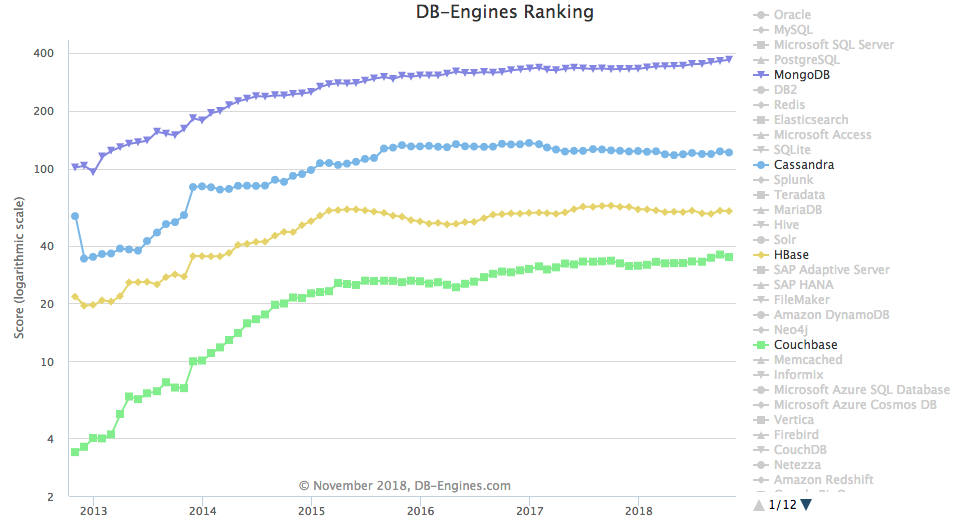
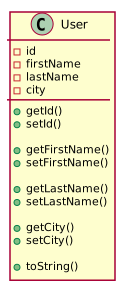
2
3
4
5
6
7
8
9
10
11
12
13
14
15
16
17
18
</pre></td><td class="rouge-code"><pre><span class="no">FOR</span> <span class="no">EACH</span> <span class="n">library</span> <span class="k">in</span> <span class="p">[</span><span class="n">datastax_native</span><span class="p">,</span> <span class="n">datastax_orm</span><span class="p">,</span> <span class="n">kundera</span><span class="p">,</span> <span class="n">achilles</span><span class="p">]</span>
	<span class="no">FOR</span> <span class="no">EACH</span> <span class="n">cycle</span> <span class="k">in</span> <span class="no">TOTAL_CYCLES</span> <span class="p">(</span><span class="no">C</span><span class="p">)</span>
		<span class="no">SET</span> <span class="n">users</span> <span class="n">of</span> <span class="n">size</span> <span class="no">TOTAL_REPETITIONS</span><span class="o">*</span><span class="no">TOTAL_OPERATIONS</span>
		<span class="no">FOR</span> <span class="no">EACH</span> <span class="n">operation</span> <span class="n">type</span> <span class="k">in</span> <span class="p">[</span><span class="n">write</span><span class="p">,</span> <span class="n">read</span><span class="p">,</span> <span class="n">update</span><span class="p">,</span> <span class="n">delete</span><span class="p">]</span>
			<span class="no">FOR</span> <span class="no">EACH</span> <span class="n">repetition</span> <span class="k">in</span> <span class="no">TOTAL_REPETITIONS</span> <span class="p">(</span><span class="no">R</span><span class="p">)</span>
				<span class="no">FOR</span> <span class="no">EACH</span> <span class="n">operation</span> <span class="k">in</span> <span class="no">TOTAL_OPERATIONS</span> <span class="p">(</span><span class="no">O</span><span class="p">)</span>
				    <span class="no">GET</span> <span class="n">unique</span> <span class="n">user</span> <span class="n">from</span> <span class="n">users</span>
					<span class="no">CALL</span> <span class="n">operation</span> <span class="n">with</span> <span class="n">unique</span> <span class="n">user</span> <span class="n">instance</span>
					<span class="no">GET</span> <span class="n">operation</span> <span class="n">processing</span> <span class="n">time</span>
				<span class="k">END</span> <span class="no">FOR</span>
				<span class="no">GET</span> <span class="n">total</span> <span class="n">time</span> <span class="n">of</span> <span class="n">all</span> <span class="n">operations</span>
			<span class="k">END</span> <span class="no">FOR</span>
			<span class="no">GET</span> <span class="n">average</span> <span class="n">of</span> <span class="n">repeated</span> <span class="n">total</span> <span class="n">times</span>
		<span class="k">END</span> <span class="no">FOR</span>
		<span class="no">GET</span> <span class="n">average</span> <span class="n">times</span> <span class="n">per</span> <span class="n">operation</span> <span class="n">type</span>
	<span class="k">END</span> <span class="no">FOR</span>
	<span class="no">GET</span> <span class="n">average</span> <span class="n">times</span> <span class="n">per</span> <span class="n">library</span> <span class="n">and</span> <span class="n">operation</span> <span class="n">type</span>
<span class="k">END</span> <span class="no">FOR</span>
</pre></td></tr></tbody></table></code></pre></div></div> <p><em><strong>Pseudocode:</strong> Algorithm defined to perform JPA libraries tests.</em></p> <p>While executing the operations in the Java application, CPU and RAM resources usage will be collected on both client and server applications. By doing this we are able to evaluate if there is any significant impact of each JPA library on the Java application and Cassandra server resources usage.</p> <p>If you would like to check the results right away, you can jump to the <a href="#results">Results</a> section below.</p> <h1 id="implementation">Implementation</h1> <p>The Java application implementation was performed to minimize code replication as much as possible. However, different <code class="language-plaintext highlighter-rouge">User</code> classes are required to provide the specific Java annotations. Thus, the following Figure illustrates how the <code class="language-plaintext highlighter-rouge">User</code> interface is used to make sure different <code class="language-plaintext highlighter-rouge">User</code> classes implement the required methods.</p> <p><img src="/assets/cassandra-jpa-example/code_user.svg" alt="Architecture" class="image-center"/> <em><strong>Figure:</strong> Illustration of the <code class="language-plaintext highlighter-rouge">User</code> implementation.</em></p> <p>To minimize complexity and to make sure that the different tests have the same core behavior, the <code class="language-plaintext highlighter-rouge">Run</code> abstract class implements methods to run write, read, update and delete tests using the configured number of operations, repetitions and cycles. That way, specific run classes only have to implement core methods to perform atomic operations using each JPA library. The following Figure illustrates such implementation details.</p> <p><img src="/assets/cassandra-jpa-example/code_run.svg" alt="Architecture" class="image-center"/> <em><strong>Figure:</strong> Illustration of the <code class="language-plaintext highlighter-rouge">Run</code> implementation.</em></p> <p>Finally, the main application just needs to take advantage of the <code class="language-plaintext highlighter-rouge">run()</code> methods to execute all the designed tests, as presented in the following Figure.</p> <p><img src="/assets/cassandra-jpa-example/code_main.svg" alt="Architecture" class="image-center"/> <em><strong>Figure:</strong> Illustration of the <code class="language-plaintext highlighter-rouge">Main</code> implementation.</em></p> <h2 id="cassandra-server">Cassandra Server</h2> <p>Before starting with implementation details, it is crucial to have a Cassandra server running, towards developing and testing the code. The following Docker Compose YML file is provided to run the Cassandra server with an attached network.</p> <div class="language-yml highlighter-rouge"><div class="highlight"><pre class="highlight"><code><table class="rouge-table"><tbody><tr><td class="rouge-gutter gl"><pre class="lineno">1
2
3
4
5
6
7
8
9
10
11
12
13
14
15
16
</pre></td><td class="rouge-code"><pre><span class="na">version</span><span class="pi">:</span> <span class="s1">'</span><span class="s">3.6'</span>

<span class="na">networks</span><span class="pi">:</span>
  <span class="na">bridge</span><span class="pi">:</span>
    <span class="na">driver</span><span class="pi">:</span> <span class="s">bridge</span>

<span class="na">services</span><span class="pi">:</span>
  <span class="na">cassandra</span><span class="pi">:</span>
    <span class="na">image</span><span class="pi">:</span> <span class="s">cassandra:3.11</span>
    <span class="na">environment</span><span class="pi">:</span>
      <span class="na">CASSANDRA_START_RPC</span><span class="pi">:</span> <span class="s2">"</span><span class="s">true"</span>
      <span class="na">CASSANDRA_CLUSTER_NAME</span><span class="pi">:</span> <span class="s">cassandra</span>
    <span class="na">networks</span><span class="pi">:</span>
      <span class="na">bridge</span><span class="pi">:</span>
        <span class="na">aliases</span><span class="pi">:</span>
        <span class="pi">-</span> <span class="s">cassandra</span>
</pre></td></tr></tbody></table></code></pre></div></div> <p><em><strong>Code:</strong> <code class="language-plaintext highlighter-rouge">docker-compose.yml</code> file for running Cassandra.</em></p> <p>Unfortunately it was not possible to find any good web-based tool to access and manage Cassandra. In order to validate if operations were performed properly, a <a href="https://razorsql.com" target="_blank">RazorSQL</a> trial license was used instead. Let me know if you know any good web-based alternative :blush:.</p> <p>Finally, the Cassandra server can be started using the <code class="language-plaintext highlighter-rouge">docker compose</code> tool as following:</p> <div class="language-bash highlighter-rouge"><div class="highlight"><pre class="highlight"><code><table class="rouge-table"><tbody><tr><td class="rouge-gutter gl"><pre class="lineno">1
</pre></td><td class="rouge-code"><pre>docker-compose up <span class="nt">-d</span>
</pre></td></tr></tbody></table></code></pre></div></div> <h2 id="datastax-native">Datastax Native</h2> <p>To use Datastax Native, the core Java dependency is required and should be defined in the project POM file.</p> <div class="language-xml highlighter-rouge"><div class="highlight"><pre class="highlight"><code><table class="rouge-table"><tbody><tr><td class="rouge-gutter gl"><pre class="lineno">1
2
3
4
5
</pre></td><td class="rouge-code"><pre><span class="nt">&lt;dependency&gt;</span>
	<span class="nt">&lt;groupId&gt;</span>com.datastax.cassandra<span class="nt">&lt;/groupId&gt;</span>
	<span class="nt">&lt;artifactId&gt;</span>cassandra-driver-core<span class="nt">&lt;/artifactId&gt;</span>
	<span class="nt">&lt;version&gt;</span>3.6.0<span class="nt">&lt;/version&gt;</span>
<span class="nt">&lt;/dependency&gt;</span>
</pre></td></tr></tbody></table></code></pre></div></div> <p><em><strong>Code:</strong> Maven dependency for Datastax Native implementation.</em></p> <p>The code snippet below exemplifies how Datastax Native <code class="language-plaintext highlighter-rouge">QueryBuilder</code> can be used to connect, write, read, update and delete <code class="language-plaintext highlighter-rouge">User</code> data to/from Cassandra.</p> <div class="language-java highlighter-rouge"><div class="highlight"><pre class="highlight"><code><table class="rouge-table"><tbody><tr><td class="rouge-gutter gl"><pre class="lineno">1
2
3
4
5
6
7
8
9
10
11
12
13
14
15
16
17
18
19
20
21
22
23
24
25
26
27
28
29
30
31
32
33
34
35
36
37
38
</pre></td><td class="rouge-code"><pre><span class="c1">// Connect</span>
<span class="nc">Cluster</span> <span class="n">cluster</span> <span class="o">=</span> <span class="nc">Cluster</span><span class="o">.</span><span class="na">builder</span><span class="o">()</span>
		<span class="o">.</span><span class="na">addContactPoint</span><span class="o">(</span><span class="nc">Commons</span><span class="o">.</span><span class="na">EXAMPLE_CASSANDRA_HOST</span><span class="o">)</span>
		<span class="o">.</span><span class="na">build</span><span class="o">();</span>
<span class="nc">Session</span> <span class="n">session</span> <span class="o">=</span> <span class="n">cluster</span><span class="o">.</span><span class="na">connect</span><span class="o">();</span>

<span class="c1">// Write</span>
<span class="nc">Insert</span> <span class="n">insert</span> <span class="o">=</span> <span class="nc">QueryBuilder</span>
		<span class="o">.</span><span class="na">insertInto</span><span class="o">(</span><span class="s">"example"</span><span class="o">,</span> <span class="s">"user"</span><span class="o">)</span>
		<span class="o">.</span><span class="na">value</span><span class="o">(</span><span class="s">"id"</span><span class="o">,</span> <span class="n">uuid</span><span class="o">)</span>
		<span class="o">.</span><span class="na">value</span><span class="o">(</span><span class="s">"first_name"</span><span class="o">,</span> <span class="s">"John"</span><span class="o">)</span>
		<span class="o">.</span><span class="na">value</span><span class="o">(</span><span class="s">"last_name"</span><span class="o">,</span> <span class="s">"Smith"</span><span class="o">)</span>
		<span class="o">.</span><span class="na">value</span><span class="o">(</span><span class="s">"city"</span><span class="o">,</span> <span class="s">"London"</span><span class="o">);</span>
<span class="n">session</span><span class="o">.</span><span class="na">execute</span><span class="o">(</span><span class="n">insert</span><span class="o">);</span>

<span class="c1">// Read</span>
<span class="nc">Select</span><span class="o">.</span><span class="na">Where</span> <span class="n">select</span> <span class="o">=</span> <span class="nc">QueryBuilder</span>
		<span class="o">.</span><span class="na">select</span><span class="o">(</span><span class="s">"id"</span><span class="o">,</span> <span class="s">"first_name"</span><span class="o">,</span> <span class="s">"last_name"</span><span class="o">,</span> <span class="s">"city"</span><span class="o">)</span>
		<span class="o">.</span><span class="na">from</span><span class="o">(</span><span class="s">"example"</span><span class="o">,</span> <span class="s">"user"</span><span class="o">)</span>
		<span class="o">.</span><span class="na">where</span><span class="o">(</span><span class="nc">QueryBuilder</span><span class="o">.</span><span class="na">eq</span><span class="o">(</span><span class="s">"id"</span><span class="o">,</span> <span class="n">uuid</span><span class="o">));</span>
<span class="nc">ResultSet</span> <span class="n">rs</span> <span class="o">=</span> <span class="n">session</span><span class="o">.</span><span class="na">execute</span><span class="o">(</span><span class="n">select</span><span class="o">);</span>

<span class="c1">// Update</span>
<span class="nc">Update</span><span class="o">.</span><span class="na">Where</span> <span class="n">update</span> <span class="o">=</span> <span class="nc">QueryBuilder</span>
		<span class="o">.</span><span class="na">update</span><span class="o">(</span><span class="s">"example"</span><span class="o">,</span> <span class="s">"user"</span><span class="o">)</span>
		<span class="o">.</span><span class="na">with</span><span class="o">(</span><span class="nc">QueryBuilder</span><span class="o">.</span><span class="na">set</span><span class="o">(</span><span class="s">"first_name"</span><span class="o">,</span> <span class="s">"___u"</span><span class="o">))</span>
		<span class="o">.</span><span class="na">and</span><span class="o">(</span><span class="nc">QueryBuilder</span><span class="o">.</span><span class="na">set</span><span class="o">(</span><span class="s">"last_name"</span><span class="o">,</span> <span class="s">"___u"</span><span class="o">))</span>
		<span class="o">.</span><span class="na">and</span><span class="o">(</span><span class="nc">QueryBuilder</span><span class="o">.</span><span class="na">set</span><span class="o">(</span><span class="s">"city"</span><span class="o">,</span> <span class="s">"___u"</span><span class="o">))</span>
		<span class="o">.</span><span class="na">where</span><span class="o">(</span><span class="nc">QueryBuilder</span><span class="o">.</span><span class="na">eq</span><span class="o">(</span><span class="s">"id"</span><span class="o">,</span> <span class="n">uuid</span><span class="o">));</span>
<span class="nc">ResultSet</span> <span class="n">rs</span> <span class="o">=</span> <span class="n">session</span><span class="o">.</span><span class="na">execute</span><span class="o">(</span><span class="n">update</span><span class="o">);</span>

<span class="c1">// Delete</span>
<span class="nc">Delete</span><span class="o">.</span><span class="na">Where</span> <span class="n">delete</span> <span class="o">=</span> <span class="nc">QueryBuilder</span>
		<span class="o">.</span><span class="na">delete</span><span class="o">()</span>
		<span class="o">.</span><span class="na">from</span><span class="o">(</span><span class="s">"example"</span><span class="o">,</span> <span class="s">"user"</span><span class="o">)</span>
		<span class="o">.</span><span class="na">where</span><span class="o">(</span><span class="nc">QueryBuilder</span><span class="o">.</span><span class="na">eq</span><span class="o">(</span><span class="s">"id"</span><span class="o">,</span> <span class="n">uuid</span><span class="o">));</span>
<span class="n">session</span><span class="o">.</span><span class="na">execute</span><span class="o">(</span><span class="n">delete</span><span class="o">);</span>

</pre></td></tr></tbody></table></code></pre></div></div> <p><em><strong>Code:</strong> Example code to perform connect, write, read, update and delete operations using Datastax Native.</em></p> <h2 id="datastax-orm">Datastax ORM</h2> <p>In addition to the core Datastax dependency, the mapping dependency is also required to support the ORM implementation:</p> <div class="language-xml highlighter-rouge"><div class="highlight"><pre class="highlight"><code><table class="rouge-table"><tbody><tr><td class="rouge-gutter gl"><pre class="lineno">1
2
3
4
5
</pre></td><td class="rouge-code"><pre><span class="nt">&lt;dependency&gt;</span>
	<span class="nt">&lt;groupId&gt;</span>com.datastax.cassandra<span class="nt">&lt;/groupId&gt;</span>
	<span class="nt">&lt;artifactId&gt;</span>cassandra-driver-mapping<span class="nt">&lt;/artifactId&gt;</span>
	<span class="nt">&lt;version&gt;</span>3.5.1<span class="nt">&lt;/version&gt;</span>
<span class="nt">&lt;/dependency&gt;</span>
</pre></td></tr></tbody></table></code></pre></div></div> <p><em><strong>Code:</strong> Maven dependency for Datastax ORM implementation.</em></p> <p>The <code class="language-plaintext highlighter-rouge">UserDatastax</code> class is defined using the Java annotations provided by Datastax, which allow to define table and column characteristics, such as name and primary key.</p> <div class="language-java highlighter-rouge"><div class="highlight"><pre class="highlight"><code><table class="rouge-table"><tbody><tr><td class="rouge-gutter gl"><pre class="lineno">1
2
3
4
5
6
7
8
9
10
11
12
13
14
15
16
17
18
19
20
</pre></td><td class="rouge-code"><pre><span class="nd">@Table</span><span class="o">(</span><span class="n">keyspace</span> <span class="o">=</span> <span class="s">"example"</span><span class="o">,</span> <span class="n">name</span> <span class="o">=</span> <span class="s">"user"</span><span class="o">,</span>
        <span class="n">readConsistency</span> <span class="o">=</span> <span class="s">"QUORUM"</span><span class="o">,</span>
        <span class="n">writeConsistency</span> <span class="o">=</span> <span class="s">"QUORUM"</span><span class="o">,</span>
        <span class="n">caseSensitiveKeyspace</span> <span class="o">=</span> <span class="kc">false</span><span class="o">,</span>
        <span class="n">caseSensitiveTable</span> <span class="o">=</span> <span class="kc">false</span><span class="o">)</span>
<span class="kd">public</span> <span class="kd">class</span> <span class="nc">UserDatastax</span> <span class="kd">implements</span> <span class="nc">User</span> <span class="o">{</span>
    <span class="nd">@Column</span><span class="o">(</span><span class="n">name</span> <span class="o">=</span> <span class="s">"id"</span><span class="o">)</span>
    <span class="nd">@PartitionKey</span>
    <span class="kd">private</span> <span class="no">UUID</span> <span class="n">id</span><span class="o">;</span>

    <span class="nd">@Column</span><span class="o">(</span><span class="n">name</span> <span class="o">=</span> <span class="s">"first_name"</span><span class="o">)</span>
    <span class="kd">private</span> <span class="nc">String</span> <span class="n">firstName</span><span class="o">;</span>

    <span class="nd">@Column</span><span class="o">(</span><span class="n">name</span> <span class="o">=</span> <span class="s">"last_name"</span><span class="o">)</span>
    <span class="kd">private</span> <span class="nc">String</span> <span class="n">lastName</span><span class="o">;</span>

    <span class="nd">@Column</span><span class="o">(</span><span class="n">name</span> <span class="o">=</span> <span class="s">"city"</span><span class="o">)</span>
    <span class="kd">private</span> <span class="nc">String</span> <span class="n">city</span><span class="o">;</span>
<span class="o">...</span>
<span class="o">}</span>
</pre></td></tr></tbody></table></code></pre></div></div> <p><em><strong>Code:</strong> Datastax User implementation.</em></p> <p>The code snippet below shows how simple is to perform connect, write, read, update and delete operations using Datastax ORM.</p> <div class="language-java highlighter-rouge"><div class="highlight"><pre class="highlight"><code><table class="rouge-table"><tbody><tr><td class="rouge-gutter gl"><pre class="lineno">1
2
3
4
5
6
7
8
9
10
11
12
13
14
15
16
17
18
19
20
21
22
23
</pre></td><td class="rouge-code"><pre><span class="c1">// Connect</span>
<span class="nc">Cluster</span> <span class="n">cluster</span> <span class="o">=</span> <span class="nc">Cluster</span><span class="o">.</span><span class="na">builder</span><span class="o">()</span>
		<span class="o">.</span><span class="na">addContactPoint</span><span class="o">(</span><span class="nc">Commons</span><span class="o">.</span><span class="na">EXAMPLE_CASSANDRA_HOST</span><span class="o">)</span>
		<span class="o">.</span><span class="na">build</span><span class="o">();</span>
<span class="nc">Session</span> <span class="n">session</span> <span class="o">=</span> <span class="n">cluster</span><span class="o">.</span><span class="na">connect</span><span class="o">();</span>

<span class="c1">// Write</span>
<span class="nc">UserDatastax</span> <span class="n">user</span> <span class="o">=</span> <span class="k">new</span> <span class="nc">UserDatastax</span><span class="o">(</span><span class="n">uuid</span><span class="o">,</span> <span class="s">"John"</span><span class="o">,</span> <span class="s">"Smith"</span><span class="o">,</span> <span class="s">"London"</span><span class="o">);</span>
<span class="n">mapper</span><span class="o">.</span><span class="na">save</span><span class="o">(</span><span class="n">user</span><span class="o">);</span>

<span class="c1">// Read</span>
<span class="nc">UserDatastax</span> <span class="n">user</span> <span class="o">=</span> <span class="o">(</span><span class="nc">UserDatastax</span><span class="o">)</span> <span class="n">mapper</span><span class="o">.</span><span class="na">get</span><span class="o">(</span><span class="n">uuid</span><span class="o">);</span>

<span class="c1">// Update</span>
<span class="nc">UserDatastax</span> <span class="n">user</span> <span class="o">=</span> <span class="n">users</span><span class="o">.</span><span class="na">get</span><span class="o">(</span><span class="n">uuid</span><span class="o">);</span>
<span class="n">user</span><span class="o">.</span><span class="na">setFirstName</span><span class="o">(</span><span class="n">user</span><span class="o">.</span><span class="na">getFirstName</span><span class="o">()</span> <span class="o">+</span> <span class="s">"___u"</span><span class="o">);</span>
<span class="n">user</span><span class="o">.</span><span class="na">setLastName</span><span class="o">(</span><span class="n">user</span><span class="o">.</span><span class="na">getLastName</span><span class="o">()</span> <span class="o">+</span> <span class="s">"___u"</span><span class="o">);</span>
<span class="n">user</span><span class="o">.</span><span class="na">setCity</span><span class="o">(</span><span class="n">user</span><span class="o">.</span><span class="na">getCity</span><span class="o">()</span> <span class="o">+</span> <span class="s">"___u"</span><span class="o">);</span>
<span class="n">mapper</span><span class="o">.</span><span class="na">save</span><span class="o">(</span><span class="n">user</span><span class="o">);</span>

<span class="c1">// Delete</span>
<span class="nc">UserDatastax</span> <span class="n">user</span> <span class="o">=</span> <span class="n">users</span><span class="o">.</span><span class="na">get</span><span class="o">(</span><span class="n">uuid</span><span class="o">);</span>
<span class="n">mapper</span><span class="o">.</span><span class="na">delete</span><span class="o">(</span><span class="n">user</span><span class="o">);</span>
</pre></td></tr></tbody></table></code></pre></div></div> <p><em><strong>Code:</strong> Example code to perform connect, write, read, update and delete operations using Datastax ORM.</em></p> <h2 id="kundera">Kundera</h2> <p>The following Java dependencies are added to use Kundera:</p> <div class="language-xml highlighter-rouge"><div class="highlight"><pre class="highlight"><code><table class="rouge-table"><tbody><tr><td class="rouge-gutter gl"><pre class="lineno">1
2
3
4
5
6
7
8
9
10
</pre></td><td class="rouge-code"><pre><span class="nt">&lt;dependency&gt;</span>
	<span class="nt">&lt;groupId&gt;</span>com.impetus.kundera.core<span class="nt">&lt;/groupId&gt;</span>
	<span class="nt">&lt;artifactId&gt;</span>kundera-core<span class="nt">&lt;/artifactId&gt;</span>
	<span class="nt">&lt;version&gt;</span>3.13<span class="nt">&lt;/version&gt;</span>
<span class="nt">&lt;/dependency&gt;</span>
<span class="nt">&lt;dependency&gt;</span>
	<span class="nt">&lt;groupId&gt;</span>com.impetus.kundera.client<span class="nt">&lt;/groupId&gt;</span>
	<span class="nt">&lt;artifactId&gt;</span>kundera-cassandra<span class="nt">&lt;/artifactId&gt;</span>
	<span class="nt">&lt;version&gt;</span>3.13<span class="nt">&lt;/version&gt;</span>
<span class="nt">&lt;/dependency&gt;</span>
</pre></td></tr></tbody></table></code></pre></div></div> <p><em><strong>Code:</strong> Maven dependencies for Kundera implementation.</em></p> <p>Persistence configuration of Kundera is performed using the <code class="language-plaintext highlighter-rouge">persistence.xml</code> file, in order to specify how connectivity is performed to Cassandra and identify the classes that should be mapped. In order to automatically create the database, change the <code class="language-plaintext highlighter-rouge">kundera.ddl.auto.prepare</code> property from <code class="language-plaintext highlighter-rouge">update</code> to <code class="language-plaintext highlighter-rouge">create</code>.</p> <div class="language-xml highlighter-rouge"><div class="highlight"><pre class="highlight"><code><table class="rouge-table"><tbody><tr><td class="rouge-gutter gl"><pre class="lineno">1
2
3
4
5
6
7
8
9
10
11
12
13
14
15
16
17
18
19
</pre></td><td class="rouge-code"><pre><span class="nt">&lt;persistence</span> <span class="na">xmlns=</span><span class="s">"http://java.sun.com/xml/ns/persistence"</span> <span class="na">xmlns:xsi=</span><span class="s">"http://www.w3.org/2001/XMLSchema-instance"</span>
             <span class="na">xsi:schemaLocation=</span><span class="s">"http://java.sun.com/xml/ns/persistence
	http://java.sun.com/xml/ns/persistence/persistence_2_0.xsd"</span>
             <span class="na">version=</span><span class="s">"2.0"</span><span class="nt">&gt;</span>
    <span class="nt">&lt;persistence-unit</span> <span class="na">name=</span><span class="s">"cassandra_pu"</span><span class="nt">&gt;</span>
        <span class="nt">&lt;provider&gt;</span>com.impetus.kundera.KunderaPersistence<span class="nt">&lt;/provider&gt;</span>
        <span class="nt">&lt;class&gt;</span>org.davidcampos.cassandra.kundera.UserKundera<span class="nt">&lt;/class&gt;</span>
        <span class="nt">&lt;exclude-unlisted-classes&gt;</span>true<span class="nt">&lt;/exclude-unlisted-classes&gt;</span>
        <span class="nt">&lt;properties&gt;</span>
            <span class="nt">&lt;property</span> <span class="na">name=</span><span class="s">"kundera.nodes"</span> <span class="na">value=</span><span class="s">"cassandra"</span><span class="nt">/&gt;</span>
            <span class="nt">&lt;property</span> <span class="na">name=</span><span class="s">"kundera.port"</span> <span class="na">value=</span><span class="s">"9160"</span><span class="nt">/&gt;</span>
            <span class="nt">&lt;property</span> <span class="na">name=</span><span class="s">"kundera.keyspace"</span> <span class="na">value=</span><span class="s">"example"</span><span class="nt">/&gt;</span>
            <span class="nt">&lt;property</span> <span class="na">name=</span><span class="s">"kundera.dialect"</span> <span class="na">value=</span><span class="s">"cassandra"</span><span class="nt">/&gt;</span>
            <span class="nt">&lt;property</span> <span class="na">name=</span><span class="s">"kundera.ddl.auto.prepare"</span> <span class="na">value=</span><span class="s">"update"</span><span class="nt">/&gt;</span>
            <span class="nt">&lt;property</span> <span class="na">name=</span><span class="s">"kundera.client.lookup.class"</span>
                      <span class="na">value=</span><span class="s">"com.impetus.client.cassandra.thrift.ThriftClientFactory"</span><span class="nt">/&gt;</span>
        <span class="nt">&lt;/properties&gt;</span>
    <span class="nt">&lt;/persistence-unit&gt;</span>
<span class="nt">&lt;/persistence&gt;</span>
</pre></td></tr></tbody></table></code></pre></div></div> <p><em><strong>Code:</strong> Kundera persistence configuration.</em></p> <p>Adding Cassandra connectivity configurations to <code class="language-plaintext highlighter-rouge">persistence.xml</code> reduces the required properties in the <code class="language-plaintext highlighter-rouge">UserKundera</code> class. Special attention to the <code class="language-plaintext highlighter-rouge">schema</code> property that makes the link with the <code class="language-plaintext highlighter-rouge">persistence-unit</code> previously defined in the XML file.</p> <div class="language-java highlighter-rouge"><div class="highlight"><pre class="highlight"><code><table class="rouge-table"><tbody><tr><td class="rouge-gutter gl"><pre class="lineno">1
2
3
4
5
6
7
8
9
10
11
12
13
14
15
16
17
</pre></td><td class="rouge-code"><pre><span class="nd">@Entity</span>
<span class="nd">@Table</span><span class="o">(</span><span class="n">name</span> <span class="o">=</span> <span class="s">"user"</span><span class="o">,</span> <span class="n">schema</span> <span class="o">=</span> <span class="s">"example@cassandra_pu"</span><span class="o">)</span>
<span class="kd">public</span> <span class="kd">class</span> <span class="nc">UserKundera</span> <span class="kd">implements</span> <span class="nc">User</span> <span class="o">{</span>
    <span class="nd">@Id</span>
    <span class="nd">@Column</span><span class="o">(</span><span class="n">name</span> <span class="o">=</span> <span class="s">"id"</span><span class="o">)</span>
    <span class="kd">private</span> <span class="no">UUID</span> <span class="n">id</span><span class="o">;</span>

    <span class="nd">@Column</span><span class="o">(</span><span class="n">name</span> <span class="o">=</span> <span class="s">"first_name"</span><span class="o">)</span>
    <span class="kd">private</span> <span class="nc">String</span> <span class="n">firstName</span><span class="o">;</span>

    <span class="nd">@Column</span><span class="o">(</span><span class="n">name</span> <span class="o">=</span> <span class="s">"last_name"</span><span class="o">)</span>
    <span class="kd">private</span> <span class="nc">String</span> <span class="n">lastName</span><span class="o">;</span>

    <span class="nd">@Column</span><span class="o">(</span><span class="n">name</span> <span class="o">=</span> <span class="s">"city"</span><span class="o">)</span>
    <span class="kd">private</span> <span class="nc">String</span> <span class="n">city</span><span class="o">;</span>
<span class="o">...</span>
<span class="o">}</span>
</pre></td></tr></tbody></table></code></pre></div></div> <p><em><strong>Code:</strong> Kundera User implementation.</em></p> <p>The following code snippet presents how Kundera can be used to perform connect, write, read, update and delete operations on Cassandra.</p> <div class="language-java highlighter-rouge"><div class="highlight"><pre class="highlight"><code><table class="rouge-table"><tbody><tr><td class="rouge-gutter gl"><pre class="lineno">1
2
3
4
5
6
7
8
9
10
11
12
13
14
15
16
17
18
19
20
21
22
23
24
</pre></td><td class="rouge-code"><pre><span class="c1">// Connect</span>
<span class="nc">Map</span><span class="o">&lt;</span><span class="nc">String</span><span class="o">,</span> <span class="nc">String</span><span class="o">&gt;</span> <span class="n">props</span> <span class="o">=</span> <span class="k">new</span> <span class="nc">HashMap</span><span class="o">&lt;&gt;();</span>
<span class="n">props</span><span class="o">.</span><span class="na">put</span><span class="o">(</span><span class="nc">CassandraConstants</span><span class="o">.</span><span class="na">CQL_VERSION</span><span class="o">,</span> <span class="nc">CassandraConstants</span><span class="o">.</span><span class="na">CQL_VERSION_3_0</span><span class="o">);</span>

<span class="nc">EntityManagerFactory</span> <span class="n">emf</span> <span class="o">=</span> <span class="nc">Persistence</span><span class="o">.</span><span class="na">createEntityManagerFactory</span><span class="o">(</span><span class="s">"cassandra_pu"</span><span class="o">,</span> <span class="n">props</span><span class="o">);</span>
<span class="nc">EntityManager</span> <span class="n">em</span> <span class="o">=</span> <span class="n">emf</span><span class="o">.</span><span class="na">createEntityManager</span><span class="o">();</span>

<span class="c1">// Write</span>
<span class="nc">UserKundera</span> <span class="n">user</span> <span class="o">=</span> <span class="k">new</span> <span class="nc">UserKundera</span><span class="o">(</span><span class="n">uuid</span><span class="o">,</span> <span class="s">"John"</span><span class="o">,</span> <span class="s">"Smith"</span><span class="o">,</span> <span class="s">"London"</span><span class="o">);</span>
<span class="n">em</span><span class="o">.</span><span class="na">persist</span><span class="o">(</span><span class="n">user</span><span class="o">);</span>

<span class="c1">// Read</span>
<span class="nc">UserKundera</span> <span class="n">user</span> <span class="o">=</span> <span class="n">em</span><span class="o">.</span><span class="na">find</span><span class="o">(</span><span class="nc">UserKundera</span><span class="o">.</span><span class="na">class</span><span class="o">,</span> <span class="n">uuid</span><span class="o">);</span>

<span class="c1">// Update</span>
<span class="nc">UserKundera</span> <span class="n">user</span> <span class="o">=</span> <span class="n">users</span><span class="o">.</span><span class="na">get</span><span class="o">(</span><span class="n">uuid</span><span class="o">);</span>
<span class="n">user</span><span class="o">.</span><span class="na">setFirstName</span><span class="o">(</span><span class="n">user</span><span class="o">.</span><span class="na">getFirstName</span><span class="o">()</span> <span class="o">+</span> <span class="s">"___u"</span><span class="o">);</span>
<span class="n">user</span><span class="o">.</span><span class="na">setLastName</span><span class="o">(</span><span class="n">user</span><span class="o">.</span><span class="na">getLastName</span><span class="o">()</span> <span class="o">+</span> <span class="s">"___u"</span><span class="o">);</span>
<span class="n">user</span><span class="o">.</span><span class="na">setCity</span><span class="o">(</span><span class="n">user</span><span class="o">.</span><span class="na">getCity</span><span class="o">()</span> <span class="o">+</span> <span class="s">"___u"</span><span class="o">);</span>
<span class="n">em</span><span class="o">.</span><span class="na">merge</span><span class="o">(</span><span class="n">user</span><span class="o">);</span>

<span class="c1">// Delete</span>
<span class="nc">UserKundera</span> <span class="n">user</span> <span class="o">=</span> <span class="n">users</span><span class="o">.</span><span class="na">get</span><span class="o">(</span><span class="n">uuid</span><span class="o">);</span>
<span class="n">em</span><span class="o">.</span><span class="na">remove</span><span class="o">(</span><span class="n">user</span><span class="o">);</span>
</pre></td></tr></tbody></table></code></pre></div></div> <p><em><strong>Code:</strong> Example code to perform connect, write, read, update and delete operations using Kundera.</em></p> <p>By default Kundera provides a considerable amount of logging information, which can be minimized by adding the following <code class="language-plaintext highlighter-rouge">logback.xml</code> file to the <code class="language-plaintext highlighter-rouge">resources</code> folder.</p> <div class="language-xml highlighter-rouge"><div class="highlight"><pre class="highlight"><code><table class="rouge-table"><tbody><tr><td class="rouge-gutter gl"><pre class="lineno">1
2
3
</pre></td><td class="rouge-code"><pre><span class="nt">&lt;configuration&gt;</span>
    <span class="nt">&lt;root</span> <span class="na">level=</span><span class="s">"ERROR"</span><span class="nt">&gt;&lt;/root&gt;</span>
<span class="nt">&lt;/configuration&gt;</span>
</pre></td></tr></tbody></table></code></pre></div></div> <h2 id="achilles">Achilles</h2> <p>Achilles requires the following Java dependency to be added to the POM file:</p> <div class="language-xml highlighter-rouge"><div class="highlight"><pre class="highlight"><code><table class="rouge-table"><tbody><tr><td class="rouge-gutter gl"><pre class="lineno">1
2
3
4
5
</pre></td><td class="rouge-code"><pre><span class="nt">&lt;dependency&gt;</span>
	<span class="nt">&lt;groupId&gt;</span>info.archinnov<span class="nt">&lt;/groupId&gt;</span>
	<span class="nt">&lt;artifactId&gt;</span>achilles-core<span class="nt">&lt;/artifactId&gt;</span>
	<span class="nt">&lt;version&gt;</span>6.0.0<span class="nt">&lt;/version&gt;</span>
<span class="nt">&lt;/dependency&gt;</span>
</pre></td></tr></tbody></table></code></pre></div></div> <p><em><strong>Code:</strong> Maven dependency for Achilles implementation.</em></p> <p>As presented below, the <code class="language-plaintext highlighter-rouge">UserAchilles</code> class is defined with the respective Java annotations.</p> <div class="language-java highlighter-rouge"><div class="highlight"><pre class="highlight"><code><table class="rouge-table"><tbody><tr><td class="rouge-gutter gl"><pre class="lineno">1
2
3
4
5
6
7
8
9
10
11
12
13
14
15
16
</pre></td><td class="rouge-code"><pre><span class="nd">@Table</span><span class="o">(</span><span class="n">table</span> <span class="o">=</span> <span class="s">"user"</span><span class="o">)</span>
<span class="kd">public</span> <span class="kd">class</span> <span class="nc">UserAchilles</span> <span class="kd">implements</span> <span class="nc">User</span> <span class="o">{</span>
    <span class="nd">@Column</span><span class="o">(</span><span class="n">value</span> <span class="o">=</span> <span class="s">"id"</span><span class="o">)</span>
    <span class="nd">@PartitionKey</span>
    <span class="kd">private</span> <span class="no">UUID</span> <span class="n">id</span><span class="o">;</span>

    <span class="nd">@Column</span><span class="o">(</span><span class="n">value</span> <span class="o">=</span> <span class="s">"first_name"</span><span class="o">)</span>
    <span class="kd">private</span> <span class="nc">String</span> <span class="n">firstName</span><span class="o">;</span>

    <span class="nd">@Column</span><span class="o">(</span><span class="n">value</span> <span class="o">=</span> <span class="s">"last_name"</span><span class="o">)</span>
    <span class="kd">private</span> <span class="nc">String</span> <span class="n">lastName</span><span class="o">;</span>

    <span class="nd">@Column</span><span class="o">(</span><span class="n">value</span> <span class="o">=</span> <span class="s">"city"</span><span class="o">)</span>
    <span class="kd">private</span> <span class="nc">String</span> <span class="n">city</span><span class="o">;</span>
<span class="o">...</span>
<span class="o">}</span>
</pre></td></tr></tbody></table></code></pre></div></div> <p><em><strong>Code:</strong> Achilles User implementation.</em></p> <p>After the definition of the entity classes, Achilles requires to build the project to automatically generate the manager classes that allow to interact with Cassandra. If any change is performed in any entity class, the project needs to be built again to generate the manager classes again. To enable source code auto-complete of such classes on IntelliJ IDEA, the generated classes need to be added as sources of the project, as we can see in the Figure below.</p> <p><img src="/assets/cassandra-jpa-example/achilles_source_configurations.png" alt="Architecture" class="image-center image-rounded-corners image-width-justify-70"/> <em><strong>Figure:</strong> Project sources configuration on IntelliJ IDEA.</em></p> <p>The following code snippet presents how to perform connect, write, read, update and delete operations using the <code class="language-plaintext highlighter-rouge">UserAchilles_Manager</code> class generated by Achilles.</p> <div class="language-java highlighter-rouge"><div class="highlight"><pre class="highlight"><code><table class="rouge-table"><tbody><tr><td class="rouge-gutter gl"><pre class="lineno">1
2
3
4
5
6
7
8
9
10
11
12
13
14
15
16
17
18
19
20
21
22
23
24
25
26
27
28
29
30
31
32
</pre></td><td class="rouge-code"><pre><span class="c1">// Connect</span>
<span class="nc">Cluster</span> <span class="n">cluster</span> <span class="o">=</span> <span class="nc">Cluster</span><span class="o">.</span><span class="na">builder</span><span class="o">()</span>
		<span class="o">.</span><span class="na">addContactPoint</span><span class="o">(</span><span class="nc">Commons</span><span class="o">.</span><span class="na">EXAMPLE_CASSANDRA_HOST</span><span class="o">)</span>
		<span class="o">.</span><span class="na">build</span><span class="o">();</span>

<span class="nc">Session</span> <span class="n">session</span> <span class="o">=</span> <span class="n">cluster</span><span class="o">.</span><span class="na">connect</span><span class="o">();</span>

<span class="nc">ManagerFactory</span> <span class="n">managerFactory</span> <span class="o">=</span> <span class="nc">ManagerFactoryBuilder</span>
		<span class="o">.</span><span class="na">builder</span><span class="o">(</span><span class="n">cluster</span><span class="o">)</span>
		<span class="o">.</span><span class="na">withDefaultKeyspaceName</span><span class="o">(</span><span class="s">"example"</span><span class="o">)</span>
		<span class="o">.</span><span class="na">doForceSchemaCreation</span><span class="o">(</span><span class="kc">true</span><span class="o">)</span>
		<span class="o">.</span><span class="na">build</span><span class="o">();</span>

<span class="n">UserAchilles_Manager</span> <span class="n">manager</span> <span class="o">=</span> <span class="n">managerFactory</span><span class="o">.</span><span class="na">forUserAchilles</span><span class="o">();</span>

<span class="c1">// Write</span>
<span class="nc">UserAchilles</span> <span class="n">user</span> <span class="o">=</span> <span class="k">new</span> <span class="nc">UserAchilles</span><span class="o">(</span><span class="n">uuid</span><span class="o">,</span> <span class="s">"John"</span><span class="o">,</span> <span class="s">"Smith"</span><span class="o">,</span> <span class="s">"London"</span><span class="o">);</span>
<span class="n">manager</span><span class="o">.</span><span class="na">crud</span><span class="o">().</span><span class="na">insert</span><span class="o">(</span><span class="n">user</span><span class="o">).</span><span class="na">execute</span><span class="o">();</span>

<span class="c1">// Read</span>
<span class="nc">UserAchilles</span> <span class="n">user</span> <span class="o">=</span> <span class="n">manager</span><span class="o">.</span><span class="na">crud</span><span class="o">().</span><span class="na">findById</span><span class="o">(</span><span class="n">uuid</span><span class="o">).</span><span class="na">get</span><span class="o">();</span>

<span class="c1">// Update</span>
<span class="nc">UserAchilles</span> <span class="n">user</span> <span class="o">=</span> <span class="n">users</span><span class="o">.</span><span class="na">get</span><span class="o">(</span><span class="n">uuid</span><span class="o">);</span>
<span class="n">user</span><span class="o">.</span><span class="na">setFirstName</span><span class="o">(</span><span class="n">user</span><span class="o">.</span><span class="na">getFirstName</span><span class="o">()</span> <span class="o">+</span> <span class="s">"___u"</span><span class="o">);</span>
<span class="n">user</span><span class="o">.</span><span class="na">setLastName</span><span class="o">(</span><span class="n">user</span><span class="o">.</span><span class="na">getLastName</span><span class="o">()</span> <span class="o">+</span> <span class="s">"___u"</span><span class="o">);</span>
<span class="n">user</span><span class="o">.</span><span class="na">setCity</span><span class="o">(</span><span class="n">user</span><span class="o">.</span><span class="na">getCity</span><span class="o">()</span> <span class="o">+</span> <span class="s">"___u"</span><span class="o">);</span>
<span class="n">manager</span><span class="o">.</span><span class="na">crud</span><span class="o">().</span><span class="na">update</span><span class="o">(</span><span class="n">user</span><span class="o">).</span><span class="na">execute</span><span class="o">();</span>

<span class="c1">// Delete</span>
<span class="nc">UserAchilles</span> <span class="n">user</span> <span class="o">=</span> <span class="n">users</span><span class="o">.</span><span class="na">get</span><span class="o">(</span><span class="n">uuid</span><span class="o">);</span>
<span class="n">manager</span><span class="o">.</span><span class="na">crud</span><span class="o">().</span><span class="na">delete</span><span class="o">(</span><span class="n">user</span><span class="o">).</span><span class="na">execute</span><span class="o">();</span>
</pre></td></tr></tbody></table></code></pre></div></div> <p><em><strong>Code:</strong> Example code to perform connect, write, read, update and delete operations using Achilles.</em></p> <h2 id="elapsed-time-measurement">Elapsed time measurement</h2> <p>The measurement of the elapsed time is performed to check the execution of the atomic operation only. This means that the time required to create or get <code class="language-plaintext highlighter-rouge">User</code> objects will not be considered. In the following code example we can check that a <code class="language-plaintext highlighter-rouge">Stopwatch</code> is used to measure the elapsed time of the <code class="language-plaintext highlighter-rouge">persist</code> operation only.</p> <div class="language-java highlighter-rouge"><div class="highlight"><pre class="highlight"><code><table class="rouge-table"><tbody><tr><td class="rouge-gutter gl"><pre class="lineno">1
2
3
4
5
6
7
8
9
10
11
12
13
14
15
16
</pre></td><td class="rouge-code"><pre><span class="c1">// Get UUID</span>
<span class="no">UUID</span> <span class="n">uuid</span> <span class="o">=</span> <span class="nc">Commons</span><span class="o">.</span><span class="na">uuids</span><span class="o">.</span><span class="na">get</span><span class="o">(</span><span class="n">repetition</span> <span class="o">*</span> <span class="nc">Commons</span><span class="o">.</span><span class="na">OPERATIONS</span> <span class="o">+</span> <span class="n">i</span><span class="o">);</span>

<span class="c1">// Create user</span>
<span class="nc">UserKundera</span> <span class="n">user</span> <span class="o">=</span> <span class="k">new</span> <span class="nc">UserKundera</span><span class="o">(</span>
		<span class="n">uuid</span><span class="o">,</span>
		<span class="s">"John"</span> <span class="o">+</span> <span class="n">i</span><span class="o">,</span>
		<span class="s">"Smith"</span> <span class="o">+</span> <span class="n">i</span><span class="o">,</span>
		<span class="s">"London"</span> <span class="o">+</span> <span class="n">i</span>
<span class="o">);</span>
<span class="n">users</span><span class="o">.</span><span class="na">put</span><span class="o">(</span><span class="n">uuid</span><span class="o">,</span> <span class="n">user</span><span class="o">);</span>

<span class="c1">// Store user</span>
<span class="nc">Commons</span><span class="o">.</span><span class="na">resumeOrStartStopWatch</span><span class="o">(</span><span class="n">stopwatch</span><span class="o">);</span>
<span class="n">em</span><span class="o">.</span><span class="na">persist</span><span class="o">(</span><span class="n">user</span><span class="o">);</span>
<span class="n">stopwatch</span><span class="o">.</span><span class="na">suspend</span><span class="o">();</span>
</pre></td></tr></tbody></table></code></pre></div></div> <p><em><strong>Code:</strong> Example code to measure the operation elapsed time.</em></p> <h2 id="main">Main</h2> <p>To get everything together, the <code class="language-plaintext highlighter-rouge">Main</code> application is created to run the tests for each JPA library, considering the configurations provided in environment variables.</p> <div class="language-java highlighter-rouge"><div class="highlight"><pre class="highlight"><code><table class="rouge-table"><tbody><tr><td class="rouge-gutter gl"><pre class="lineno">1
2
3
4
5
6
7
8
9
10
11
12
13
14
15
</pre></td><td class="rouge-code"><pre><span class="kd">public</span> <span class="kd">class</span> <span class="nc">Main</span> <span class="o">{</span>
    <span class="kd">public</span> <span class="kd">static</span> <span class="kt">void</span> <span class="nf">main</span><span class="o">(</span><span class="kd">final</span> <span class="nc">String</span><span class="o">...</span> <span class="n">args</span><span class="o">)</span> <span class="kd">throws</span> <span class="nc">InterruptedException</span> <span class="o">{</span>
        <span class="nc">RunDatastaxNative</span> <span class="n">runDatastaxNative</span> <span class="o">=</span> <span class="k">new</span> <span class="nc">RunDatastaxNative</span><span class="o">();</span>
        <span class="n">runDatastaxNative</span><span class="o">.</span><span class="na">run</span><span class="o">();</span>

        <span class="nc">RunDatastax</span> <span class="n">runDatastax</span> <span class="o">=</span> <span class="k">new</span> <span class="nc">RunDatastax</span><span class="o">();</span>
        <span class="n">runDatastax</span><span class="o">.</span><span class="na">run</span><span class="o">();</span>

        <span class="nc">RunKundera</span> <span class="n">runKundera</span> <span class="o">=</span> <span class="k">new</span> <span class="nc">RunKundera</span><span class="o">();</span>
        <span class="n">runKundera</span><span class="o">.</span><span class="na">run</span><span class="o">();</span>

        <span class="nc">RunAchilles</span> <span class="n">runAchilles</span> <span class="o">=</span> <span class="k">new</span> <span class="nc">RunAchilles</span><span class="o">();</span>
        <span class="n">runAchilles</span><span class="o">.</span><span class="na">run</span><span class="o">();</span>
    <span class="o">}</span>
<span class="o">}</span>
</pre></td></tr></tbody></table></code></pre></div></div> <p><em><strong>Code:</strong> Main program to run the tests for each JPA library.</em></p> <h2 id="configurations">Configurations</h2> <p>The following configurations are required to connect with the Apache Cassandra server and configure the tests properly:</p> <ul> <li>“EXAMPLE_CASSANDRA_HOST” and “EXAMPLE_CASSANDRA_PORT”: Cassandra host and port;</li> <li>“EXAMPLE_OPERATIONS”: number of operations to run;</li> <li>“EXAMPLE_REPETITIONS”: number of times to repeat operations execution and average values;</li> <li>“EXAMPLE_CYCLES”: number of times to repeat tests execution and average values.</li> </ul> <p>Such configurations will be loaded from environment variables using the Commons class, which assumes default values if no environment variables are defined. Moreover, unique identifiers are also generated to perform each operation using an UUID that was never used before, creating <code class="language-plaintext highlighter-rouge">EXAMPLE_OPERATIONS*EXAMPLE_REPETITIONS</code> unique identifiers.</p> <div class="language-java highlighter-rouge"><div class="highlight"><pre class="highlight"><code><table class="rouge-table"><tbody><tr><td class="rouge-gutter gl"><pre class="lineno">1
2
3
4
5
6
7
8
9
10
11
12
13
14
15
16
</pre></td><td class="rouge-code"><pre><span class="kd">public</span> <span class="kd">final</span> <span class="kd">static</span> <span class="kt">int</span> <span class="no">OPERATIONS</span> <span class="o">=</span> <span class="nc">System</span><span class="o">.</span><span class="na">getenv</span><span class="o">(</span><span class="s">"EXAMPLE_OPERATIONS"</span><span class="o">)</span> <span class="o">!=</span> <span class="kc">null</span> <span class="o">?</span>
		<span class="nc">Integer</span><span class="o">.</span><span class="na">parseInt</span><span class="o">(</span><span class="nc">System</span><span class="o">.</span><span class="na">getenv</span><span class="o">(</span><span class="s">"EXAMPLE_OPERATIONS"</span><span class="o">))</span> <span class="o">:</span> <span class="mi">1000</span><span class="o">;</span>

<span class="kd">public</span> <span class="kd">final</span> <span class="kd">static</span> <span class="kt">int</span> <span class="no">REPETITIONS</span> <span class="o">=</span> <span class="nc">System</span><span class="o">.</span><span class="na">getenv</span><span class="o">(</span><span class="s">"EXAMPLE_REPETITIONS"</span><span class="o">)</span> <span class="o">!=</span> <span class="kc">null</span> <span class="o">?</span>
		<span class="nc">Integer</span><span class="o">.</span><span class="na">parseInt</span><span class="o">(</span><span class="nc">System</span><span class="o">.</span><span class="na">getenv</span><span class="o">(</span><span class="s">"EXAMPLE_REPETITIONS"</span><span class="o">))</span> <span class="o">:</span> <span class="mi">5</span><span class="o">;</span>

<span class="kd">public</span> <span class="kd">final</span> <span class="kd">static</span> <span class="kt">int</span> <span class="no">CYCLES</span> <span class="o">=</span> <span class="nc">System</span><span class="o">.</span><span class="na">getenv</span><span class="o">(</span><span class="s">"EXAMPLE_CYCLES"</span><span class="o">)</span> <span class="o">!=</span> <span class="kc">null</span> <span class="o">?</span>
		<span class="nc">Integer</span><span class="o">.</span><span class="na">parseInt</span><span class="o">(</span><span class="nc">System</span><span class="o">.</span><span class="na">getenv</span><span class="o">(</span><span class="s">"EXAMPLE_CYCLES"</span><span class="o">))</span> <span class="o">:</span> <span class="mi">5</span><span class="o">;</span>

<span class="kd">public</span> <span class="kd">static</span> <span class="nc">List</span><span class="o">&lt;</span><span class="no">UUID</span><span class="o">&gt;</span> <span class="n">uuids</span> <span class="o">=</span> <span class="n">generateUUIDs</span><span class="o">();</span>

<span class="kd">public</span> <span class="kd">final</span> <span class="kd">static</span> <span class="nc">String</span> <span class="no">EXAMPLE_CASSANDRA_HOST</span> <span class="o">=</span> <span class="nc">System</span><span class="o">.</span><span class="na">getenv</span><span class="o">(</span><span class="s">"EXAMPLE_CASSANDRA_HOST"</span><span class="o">)</span> <span class="o">!=</span> <span class="kc">null</span> <span class="o">?</span>
		<span class="nc">System</span><span class="o">.</span><span class="na">getenv</span><span class="o">(</span><span class="s">"EXAMPLE_CASSANDRA_HOST"</span><span class="o">)</span> <span class="o">:</span> <span class="s">"cassandra"</span><span class="o">;</span>

<span class="kd">public</span> <span class="kd">final</span> <span class="kd">static</span> <span class="nc">String</span> <span class="no">EXAMPLE_CASSANDRA_PORT</span> <span class="o">=</span> <span class="nc">System</span><span class="o">.</span><span class="na">getenv</span><span class="o">(</span><span class="s">"EXAMPLE_CASSANDRA_PORT"</span><span class="o">)</span> <span class="o">!=</span> <span class="kc">null</span> <span class="o">?</span>
		<span class="nc">System</span><span class="o">.</span><span class="na">getenv</span><span class="o">(</span><span class="s">"EXAMPLE_CASSANDRA_PORT"</span><span class="o">)</span> <span class="o">:</span> <span class="s">"9160"</span><span class="o">;</span>
</pre></td></tr></tbody></table></code></pre></div></div> <p><em><strong>Code:</strong> Commons class to load project configurations from environment variables.</em></p> <h1 id="packaging">Packaging</h1> <p>To build fat JAR file with all dependencies included, the Maven Assembly Plugin was used with the following configurations:</p> <div class="language-xml highlighter-rouge"><div class="highlight"><pre class="highlight"><code><table class="rouge-table"><tbody><tr><td class="rouge-gutter gl"><pre class="lineno">1
2
3
4
5
6
7
8
9
10
11
12
13
14
15
16
17
18
19
20
21
22
23
24
25
26
27
</pre></td><td class="rouge-code"><pre><span class="nt">&lt;build&gt;</span>
	<span class="nt">&lt;plugins&gt;</span>
		<span class="nt">&lt;plugin&gt;</span>
			<span class="nt">&lt;artifactId&gt;</span>maven-assembly-plugin<span class="nt">&lt;/artifactId&gt;</span>
			<span class="nt">&lt;version&gt;</span>3.1.0<span class="nt">&lt;/version&gt;</span>
			<span class="nt">&lt;configuration&gt;</span>
				<span class="nt">&lt;descriptorRefs&gt;</span>
					<span class="nt">&lt;descriptorRef&gt;</span>jar-with-dependencies<span class="nt">&lt;/descriptorRef&gt;</span>
				<span class="nt">&lt;/descriptorRefs&gt;</span>
				<span class="nt">&lt;archive&gt;</span>
					<span class="nt">&lt;manifest&gt;</span>
						<span class="nt">&lt;mainClass&gt;</span>org.davidcampos.cassandra.main.Main<span class="nt">&lt;/mainClass&gt;</span>
					<span class="nt">&lt;/manifest&gt;</span>
				<span class="nt">&lt;/archive&gt;</span>
			<span class="nt">&lt;/configuration&gt;</span>
			<span class="nt">&lt;executions&gt;</span>
				<span class="nt">&lt;execution&gt;</span>
					<span class="nt">&lt;id&gt;</span>make-assembly<span class="nt">&lt;/id&gt;</span>
					<span class="nt">&lt;phase&gt;</span>package<span class="nt">&lt;/phase&gt;</span>
					<span class="nt">&lt;goals&gt;</span>
						<span class="nt">&lt;goal&gt;</span>single<span class="nt">&lt;/goal&gt;</span>
					<span class="nt">&lt;/goals&gt;</span>
				<span class="nt">&lt;/execution&gt;</span>
			<span class="nt">&lt;/executions&gt;</span>
		<span class="nt">&lt;/plugin&gt;</span>
	<span class="nt">&lt;/plugins&gt;</span>
<span class="nt">&lt;/build&gt;</span>
</pre></td></tr></tbody></table></code></pre></div></div> <p>Since several classes have the <code class="language-plaintext highlighter-rouge">@Table</code> Java annotation in the same JAR package, Kundera will consider all annotated classes as persistence entities, which will cause an error similar to:</p> <div class="language-plaintext highlighter-rouge"><div class="highlight"><pre class="highlight"><code><table class="rouge-table"><tbody><tr><td class="rouge-gutter gl"><pre class="lineno">1
2
3
4
5
6
7
8
9
10
</pre></td><td class="rouge-code"><pre>Exception in thread "main" com.impetus.kundera.loader.MetamodelLoaderException: Error while retrieving and storing entity metadata
	at com.impetus.kundera.configure.MetamodelConfiguration.loadEntityMetadata(MetamodelConfiguration.java:238)
	at com.impetus.kundera.configure.MetamodelConfiguration.configure(MetamodelConfiguration.java:112)
	at com.impetus.kundera.persistence.EntityManagerFactoryImpl.configure(EntityManagerFactoryImpl.java:158)
	at com.impetus.kundera.persistence.EntityManagerFactoryImpl.&lt;init&gt;(EntityManagerFactoryImpl.java:135)
	at com.impetus.kundera.KunderaPersistence.createEntityManagerFactory(KunderaPersistence.java:85)
	at javax.persistence.Persistence.createEntityManagerFactory(Persistence.java:79)
	at org.davidcampos.cassandra.kundera.KunderaExample.runWrites(KunderaExample.java:37)
	at org.davidcampos.cassandra.kundera.KunderaExample.main(KunderaExample.java:21)
	at org.davidcampos.cassandra.Main.main(Main.java:12)
</pre></td></tr></tbody></table></code></pre></div></div> <p>To fix the error, please make sure Kundera excludes non-expected entity classes, adding the following configuration to the <code class="language-plaintext highlighter-rouge">persistence.xml</code> file:</p> <div class="language-xml highlighter-rouge"><div class="highlight"><pre class="highlight"><code><table class="rouge-table"><tbody><tr><td class="rouge-gutter gl"><pre class="lineno">1
</pre></td><td class="rouge-code"><pre><span class="nt">&lt;exclude-unlisted-classes&gt;</span>true<span class="nt">&lt;/exclude-unlisted-classes&gt;</span>
</pre></td></tr></tbody></table></code></pre></div></div> <p>Finally, to build the fat JAR, please run <code class="language-plaintext highlighter-rouge">mvn clean package</code> in the project folder, which stores the resulting JAR <code class="language-plaintext highlighter-rouge">cassandra-jpa-example-1.0-SNAPSHOT-jar-with-dependencies.jar</code> in the <code class="language-plaintext highlighter-rouge">target</code> folder.</p> <h1 id="docker-image">Docker image</h1> <p>To build the Docker Image for the Java application, the following <code class="language-plaintext highlighter-rouge">Dockerfile</code> was built using the <a href="https://hub.docker.com/_/openjdk/" target="_blank">OpenJDK</a> image as baseline:</p> <div class="language-dockerfile highlighter-rouge"><div class="highlight"><pre class="highlight"><code><table class="rouge-table"><tbody><tr><td class="rouge-gutter gl"><pre class="lineno">1
2
3
4
5
6
7
8
9
10
11
12
13
</pre></td><td class="rouge-code"><pre><span class="k">FROM</span><span class="s"> openjdk:8u151-jdk-alpine3.7</span>
<span class="k">MAINTAINER</span><span class="s"> David Campos (david.marques.campos@gmail.com)</span>

<span class="c"># Install Bash</span>
<span class="k">RUN </span>apk add <span class="nt">--no-cache</span> bash

<span class="c"># Copy resources</span>
<span class="k">WORKDIR</span><span class="s"> /</span>
<span class="k">COPY</span><span class="s"> wait-for-it.sh wait-for-it.sh</span>
<span class="k">COPY</span><span class="s"> target/cassandra-jpa-example-1.0-SNAPSHOT-jar-with-dependencies.jar cassandra-jpa-example.jar</span>

<span class="c"># Wait for Cassandra and Kafka to be available and run application</span>
<span class="k">CMD</span><span class="s"> ./wait-for-it.sh -s -t 180 $EXAMPLE_CASSANDRA_HOST:$EXAMPLE_CASSANDRA_PORT -- java -Xmx512m -jar cassandra-jpa-example.jar</span>
</pre></td></tr></tbody></table></code></pre></div></div> <p><em><strong>Code:</strong> Dockerfile to build Java application Docker image.</em></p> <p><a href="https://github.com/vishnubob/wait-for-it" target="_blank"><code class="language-plaintext highlighter-rouge">wait-for-it.sh</code></a> is used to check if a Cassandra host and port is available and only run the Java application when connectivity is established. To <strong>build the docker image</strong>, run the following command in the project folder:</p> <div class="language-bash highlighter-rouge"><div class="highlight"><pre class="highlight"><code><table class="rouge-table"><tbody><tr><td class="rouge-gutter gl"><pre class="lineno">1
</pre></td><td class="rouge-code"><pre>docker build <span class="nt">-t</span> cassandra-jpa-example <span class="nb">.</span>
</pre></td></tr></tbody></table></code></pre></div></div> <h1 id="docker-compose">Docker compose</h1> <p>To create the container to run the Java application with the tests, the previous Docker Compose YML file should be extended adding the application configurations. The environment variables that provide the Cassandra and Test configurations are also provided.</p> <div class="language-yml highlighter-rouge"><div class="highlight"><pre class="highlight"><code><table class="rouge-table"><tbody><tr><td class="rouge-gutter gl"><pre class="lineno">1
2
3
4
5
6
7
8
9
10
11
12
</pre></td><td class="rouge-code"><pre>  <span class="na">java</span><span class="pi">:</span>
    <span class="na">image</span><span class="pi">:</span> <span class="s">cassandra-jpa-example</span>
    <span class="na">depends_on</span><span class="pi">:</span>
    <span class="pi">-</span> <span class="s">cassandra</span>
    <span class="na">environment</span><span class="pi">:</span>
      <span class="na">EXAMPLE_CASSANDRA_HOST</span><span class="pi">:</span> <span class="s2">"</span><span class="s">cassandra"</span>
      <span class="na">EXAMPLE_CASSANDRA_PORT</span><span class="pi">:</span> <span class="s2">"</span><span class="s">9160"</span>
      <span class="na">EXAMPLE_REQUEST_WAIT</span><span class="pi">:</span> <span class="m">0</span>
      <span class="na">EXAMPLE_ITERATIONS</span><span class="pi">:</span> <span class="m">10000</span>
      <span class="na">EXAMPLE_REPETITIONS</span><span class="pi">:</span> <span class="m">3</span>
    <span class="na">networks</span><span class="pi">:</span>
    <span class="pi">-</span> <span class="s">bridge</span>
</pre></td></tr></tbody></table></code></pre></div></div> <p><em><strong>Code:</strong> Part of <code class="language-plaintext highlighter-rouge">docker-compose.yml</code> file for running Java application.</em></p> <h1 id="cpu-and-ram-usage">CPU and RAM usage</h1> <p>To collect resources usage of Cassandra and Java application separately, we decided to take advantage of the <a href="https://docs.docker.com/engine/reference/commandline/stats/" target="_blank"><code class="language-plaintext highlighter-rouge">docker stats</code></a> utility, which provides detailed RAM and CPU usage of a target container and also allows to customize the output data format. The following script allows to continuously collect Cassandra’s container resources usage and store the results in the TSV file <code class="language-plaintext highlighter-rouge">stats-cassandra.tsv</code>.</p> <div class="language-bash highlighter-rouge"><div class="highlight"><pre class="highlight"><code><table class="rouge-table"><tbody><tr><td class="rouge-gutter gl"><pre class="lineno">1
2
</pre></td><td class="rouge-code"><pre><span class="c">#!/usr/bin/env bash</span>
 <span class="k">while </span><span class="nb">true</span><span class="p">;</span> <span class="k">do </span>docker stats <span class="nt">--no-stream</span> cassandra-jpa-example_cassandra_1 <span class="nt">--format</span> <span class="s2">"</span><span class="se">\t</span><span class="s2">{{.MemUsage}}</span><span class="se">\t</span><span class="s2">{{.MemPerc}}</span><span class="se">\t</span><span class="s2">{{.CPUPerc}}"</span> | ts <span class="o">&gt;&gt;</span> stats-cassandra.tsv<span class="p">;</span> <span class="k">done</span> 
</pre></td></tr></tbody></table></code></pre></div></div> <p><em><strong>Code:</strong> Script to collect RAM and CPU usage of a docker container.</em></p> <h1 id="run">Run</h1> <p>Now that everything is in place, it is time to start the containers using the <code class="language-plaintext highlighter-rouge">docker-compose</code> tool, passing the <code class="language-plaintext highlighter-rouge">-d</code> argument to detach and run the containers in the background:</p> <div class="language-bash highlighter-rouge"><div class="highlight"><pre class="highlight"><code><table class="rouge-table"><tbody><tr><td class="rouge-gutter gl"><pre class="lineno">1
</pre></td><td class="rouge-code"><pre>docker-compose up <span class="nt">-d</span>
</pre></td></tr></tbody></table></code></pre></div></div> <p>Such execution will provide detailed feedback regarding the success of creating and running each container and network:</p> <div class="language-bash highlighter-rouge"><div class="highlight"><pre class="highlight"><code><table class="rouge-table"><tbody><tr><td class="rouge-gutter gl"><pre class="lineno">1
2
3
</pre></td><td class="rouge-code"><pre>Creating network <span class="s2">"cassandra-jpa-example_bridge"</span> with driver <span class="s2">"bridge"</span>
Creating cassandra-jpa-example_cassandra_1 ... <span class="k">done
</span>Creating cassandra-jpa-example_java_1      ... <span class="k">done</span>
</pre></td></tr></tbody></table></code></pre></div></div> <p>In order to check if everything is working properly, we can take advantage of the <code class="language-plaintext highlighter-rouge">docker logs</code> tool to analyse the output being generated on each container.</p> <div class="language-shell highlighter-rouge"><div class="highlight"><pre class="highlight"><code><table class="rouge-table"><tbody><tr><td class="rouge-gutter gl"><pre class="lineno">1
</pre></td><td class="rouge-code"><pre>docker logs kafka-spark-flink-example_kafka-producer_1 <span class="nt">-f</span>
</pre></td></tr></tbody></table></code></pre></div></div> <p>Output should be similar to the following example:</p> <div class="language-bash highlighter-rouge"><div class="highlight"><pre class="highlight"><code><table class="rouge-table"><tbody><tr><td class="rouge-gutter gl"><pre class="lineno">1
2
3
4
5
6
</pre></td><td class="rouge-code"><pre>wait-for-it.sh: waiting 180 seconds <span class="k">for </span>cassandra:9160
wait-for-it.sh: cassandra:9160 is available after 17 seconds
17:19:24.002 <span class="o">[</span>main] INFO  org.davidcampos.cassandra.datastax_native.RunDatastaxNative - 	WRITE	3	38102	16434	10255	12700.666666666666
17:20:02.617 <span class="o">[</span>main] INFO  org.davidcampos.cassandra.datastax_native.RunDatastaxNative - 	READ	3	35910	14873	10247	11970.0
17:20:35.775 <span class="o">[</span>main] INFO  org.davidcampos.cassandra.datastax_native.RunDatastaxNative - 	UPDATE	3	30508	11592	9240	10169.333333333334
17:21:08.828 <span class="o">[</span>main] INFO  org.davidcampos.cassandra.datastax_native.RunDatastaxNative - 	DELETE	3	30453	10565	9673	10151.0
</pre></td></tr></tbody></table></code></pre></div></div> <p>In parallel run <code class="language-plaintext highlighter-rouge">docker-stats-cassandra.sh</code> and <code class="language-plaintext highlighter-rouge">docker-stats-java.sh</code> scripts to collect results of CPU and RAM usage on Cassandra and Java application containers. Such measurements are stored in TSV files with the following format:</p> <div class="language-bash highlighter-rouge"><div class="highlight"><pre class="highlight"><code><table class="rouge-table"><tbody><tr><td class="rouge-gutter gl"><pre class="lineno">1
2
3
4
5
6
</pre></td><td class="rouge-code"><pre>Dec 15 16:53:46 	1.06GiB / 1.952GiB	54.29%	138.51%
Dec 15 16:53:48 	1.087GiB / 1.952GiB	55.71%	160.26%
Dec 15 16:53:50 	1.141GiB / 1.952GiB	58.44%	218.72%
Dec 15 16:53:52 	1.137GiB / 1.952GiB	58.25%	180.90%
Dec 15 16:53:54 	1.137GiB / 1.952GiB	58.25%	6.11%
Dec 15 16:53:56 	1.117GiB / 1.952GiB	57.23%	4.69%
</pre></td></tr></tbody></table></code></pre></div></div> <h1 id="results">Results</h1> <p>Please keep in mind that the results collected are highly related with the pre-conditions previously described, namely:</p> <ul> <li>Elapsed time measured considering atomic operations only;</li> <li>Single thread application to perform operations;</li> <li>Tests executed on macOS using a MacBook Pro with 4 cores @ 2,3GHz and 16GB RAM;</li> <li>Cassandra and Java Application running on top of Docker;</li> <li>CPU and RAM usage collected using <code class="language-plaintext highlighter-rouge">docker stats</code>.</li> </ul> <p>The results were collected with the following configurations:</p> <ul> <li><strong>Number of operations</strong>: 1000, 5000 and 10000;</li> <li><strong>Number of repetitions</strong>: 3;</li> <li><strong>Number of cycles</strong>: 3.</li> </ul> <p>The Figure below presents the average of the measured times for the several libraries and operation types. Overall, delete operations are the fastest ones, followed by the write tasks. As expected by Cassandra architecture and functionality, read operations are the ones that take longer execution time. When comparing the used JPA libraries, <strong>Kundera presents the fastest performance times in write, read, update and delete operation types</strong>. On the other hand, Achilles presents the worst results. Comparing the best with the worst library, for 10K operations we have an average difference of 3.2 seconds. If we extrapolate for <strong>10M operations</strong>, this execution <strong>time difference can reach almost 1 hour</strong>. In average, Kundera performance is 28% better than Achilles, 19% better than Datastax, and 24% better than Native. It is quite interesting to see that Datastax ORM presents similar or better time measurements than Datastax Native. Keep in mind that the low complexity of the <code class="language-plaintext highlighter-rouge">User</code> data is not adding significant complexity on top of native and ORM solutions.</p> <p><img src="/assets/cassandra-jpa-example/results_time.png" alt="Comparison of Cassandra JPA libraries time" class="image-center image-width-justify-90"/> <em><strong>Figure:</strong> Comparison of Cassandra JPA libraries processing time for the different operation types.</em></p> <p>Jumping into the resources usage analysis, the Figure below presents CPU and RAM consumption of the Java application and Cassandra while performing the tests. Overall, <strong>Kundera presents significant lower CPU usages on both Cassandra and Java application</strong>. Regarding RAM, there is no significant difference or impact on Cassandra when all JPA libraries are being used. However, Kundera and Achilles seem to use more RAM than Datastax libraries. For instance, on the 10K operations test, Kundera presents up to 78% less CPU usage on Cassandra, and up to 41% less CPU consumption on Java application. Regarding RAM usage, Kundera and Achilles use more 7% of RAM than Datastax libraries. Such differences might related with the fact that <strong>Kundera holds operations on RAM before submitting them to Cassandra</strong>, which has a minor impact on RAM but a very significant impact on low CPU consumption both on client and server applications. However, it is still open to clarify if a higher complexity on the stored data will have a higher impact on RAM usage.</p> <p><img src="/assets/cassandra-jpa-example/results_resources.png" alt="Comparison of Cassandra JPA libraries resources" class="image-center image-width-justify-90"/> <em><strong>Figure:</strong> Comparison of Cassandra JPA libraries resources usage.</em></p> <h1 id="conclusion">Conclusion</h1> <p>In conclusion, Kundera presents up to 28% faster performance results with significant lower CPU impact on both client application and Cassandra server. Such interesting results are significant and should be considered while designing your next Cassandra and Java project, in order to reduce resources usage and increase processing throughput. Nevertheless, do not forget to evaluate the behavior of Kundera with your specific data and entities characteristics, requirements and complexity.</p> <p><img src="/assets/cassandra-jpa-example/nice.gif" alt="Nice" class="image-center"/></p> <p>Please tell me if you had different results using this or other JPA libraries. Your comments, suggestions and contributions are more than welcome.</p> <p><strong>Happy new and techy 2019! :smile: :fireworks:</strong></p>]]></content><author><name>David Campos</name><email>me@davidcampos.org</email></author><category term="apache"/><category term="cassandra"/><category term="jpa"/><category term="orm"/><category term="datastax"/><category term="kundera"/><category term="achilles"/><category term="java"/><category term="docker"/><summary type="html"><![CDATA[TL;DR Use JPA libraries to communicate with Apache Cassandra comparing Achilles, Datastax and Kundera. The last one presents the better processing speeds with lower computational resources consumption.]]></summary></entry><entry><title type="html">Kafka streaming with Spark and Flink</title><link href="https://davidcampos.org/blog/2018/11/01/kafka-spark-flink-example.html" rel="alternate" type="text/html" title="Kafka streaming with Spark and Flink"/><published>2018-11-01T19:00:00+00:00</published><updated>2018-11-01T19:00:00+00:00</updated><id>https://davidcampos.org/blog/2018/11/01/kafka-spark-flink-example</id><content type="html" xml:base="https://davidcampos.org/blog/2018/11/01/kafka-spark-flink-example.html"><![CDATA[<h1 id="tldr">TL;DR</h1> <p>Sample project taking advantage of Kafka messages streaming communication platform using:</p> <ul> <li>1 data producer sending random numbers in textual format;</li> <li>3 different data consumers using Kafka, Spark and Flink to count word occurrences.</li> </ul> <p><strong>Source code is available on <a href="https://github.com/davidcampos/kafka-spark-flink-example" target="_blank">Github</a></strong> with detailed documentation on how to build and run the different software components using Docker.</p> <h1 id="goal">Goal</h1> <p>The main goal of this sample project is to mimic the streaming communication of nowadays large-scale solutions. An infrastructure is required to enable communication between components generating data sent to a centralized infrastructure. Such data is later consumed by other components with different purposes. The “Hello World” example project of such solutions is the Word Count problem, were producers send words to a central back-end and consumers count occurrences of each word. The following actors are involved:</p> <ol> <li><strong>Producer sends words</strong> in textual format to <strong>message broker</strong>;</li> <li><strong>Message broker</strong> receives messages and <strong>serves them to registered consumers</strong>;</li> <li><strong>Consumers</strong> process messages and <strong>count occurrences of each word</strong>.</li> </ol> <p>The following architecture is proposed, which contains the following components:</p> <ul> <li><strong>Producer</strong>: send words to message broker;</li> <li><strong>Zookeeper</strong>: service for centralized configuration and synchronization of distributed services. In this case it is required to install and configure Kafka;</li> <li><strong>Kafka</strong>: message broker to receive messages from producer and propagate them to consumers</li> <li><strong>Kafka Consumer</strong>: count word occurrences using Kafka;</li> <li><strong>Spark Consumer</strong>: count work occurrences using Spark;</li> <li><strong>Flink Consumer</strong>: count work occurrences using Flink.</li> </ul> <p><img src="/assets/kafka-spark-flink-example/architecture.svg" alt="Architecture" class="image-center"/> <em><strong>Figure:</strong> Illustration of the implementation architecture of the example project.</em></p> <p>Such infrastructure will run on top of <strong><a href="https://www.docker.com" target="_blank">Docker</a></strong>, which simplifies the orchestration and setup processes. If we would like to scale-up the example, we can deploy it in a large-scale Docker-based orchestration platform, such as <a href="https://docs.docker.com/engine/swarm" target="_blank">Docker Swarm</a> and <a href="https://kubernetes.io" target="_blank">Kubernetes</a>. Additionally, the following technologies are also used:</p> <ul> <li><strong>Java 8</strong> as main programming language for producer and consumers. Actually tried to use Java 10 first, but had several problems with Spark and Flink Scala versions;</li> <li><strong>Maven</strong> for producer and consumers dependency management and build purposes;</li> <li><strong>Docker Compose</strong> to simplify the process of running multi-container solutions with dependencies.</li> </ul> <h1 id="kafka">Kafka</h1> <p><a href="https://kafka.apache.org" target="_blank">Kafka</a> is becoming the <em>de-facto</em> standard messaging platform, enabling large-scale communication between software components producing and consuming streams of data for different purposes. It was originally built at LinkedIn and is currently part of the Apache Software Foundation. The following Figure illustrates the architecture of solutions using Kafka, with multiple components generating data that is consumed by different consumers for different purposes, making Kafka the communication bridge between them.</p> <p><img src="/assets/kafka-spark-flink-example/kafka.png" alt="Kafka" class="image-center"/> <em><strong>Figure:</strong> Illustration of Kafka capabilities as a message broker between heterogeneous producers and consumers. Source <a href="https://kafka.apache.org">https://kafka.apache.org</a>.</em></p> <p><a href="https://cwiki.apache.org/confluence/display/KAFKA/Powered+By" target="_blank">Hundreds of companies</a> already take advantage of Kafka to provide their services, such as Oracle, LinkedIn, Mozilla and Netflix. As a result, it is being used in many different real-life use cases for <a href="https://kafka.apache.org/uses" target="_blank">different purposes</a>, such as messaging, website activity tracking, metrics collection, logs aggregation, stream processing and event sourcing. For instance, in the IoT context, thousands of devices can send streams of operational data to Kafka, which might be processed and stored for many different purposes, such as improved maintenance, enhanced support and functionality optimization. Taking advantage of streaming enables reacting on real-time to relevant changes on connected devices.</p> <h2 id="kafka-anatomy-in-1-minute">Kafka anatomy in 1 minute</h2> <p>To better understand how Kafka works, it is important to understand its main concepts:</p> <ul> <li><strong>Record</strong>: consists of a key, a value and a timestamp;</li> <li><strong>Topic</strong>: category of records;</li> <li><strong>Partition</strong>: subset of records of a topic that can reside in different brokers;</li> <li><strong>Broker</strong>: service in a node with partitions that allows consumers and producers to access the records of a topic;</li> <li><strong>Producer</strong>: service that puts records into a topic;</li> <li><strong>Consumer</strong>: service that reads records from a topic;</li> <li><strong>Consumer group</strong>: set of consumers sharing a common identifier, making sure that all partitions from a topic are read by a consumer group without consumers overlap.</li> </ul> <p>The figure below illustrates the relation between the aforementioned Kafka concepts. In summary, messages that are sent to Kafka are organized into topics. Thus, a producer sends messages to a specific topic and a consumer reads messages from that topic. Each topic is divided into partitions, that can reside in different nodes and enable multiple consumers to read from a topic in parallel. Consumers are organized in consumer groups to make sure that partitions from a topic are consumed at least once, also making sure that each partition is only consumed by a single consumer from the group. Considering the example illustrated in the figure, since Group A has two consumers, each consumer reads records from two different partitions. On the other hand, since Group B has four consumers, each consumer reads records from a single partition only.</p> <p><img src="/assets/kafka-spark-flink-example/kafka-consumer-group.svg" alt="Consumers" class="image-center"/> <em><strong>Figure:</strong> Relation between Kafka producers, topics, partitions, consumers and consumer groups.</em></p> <h1 id="apache-spark-and-apache-flink"><a href="https://spark.apache.org" target="_blank">Apache Spark</a> and <a href="https://flink.apache.org" target="_blank">Apache Flink</a></h1> <p>There are several open-source and commercial tools to simplify and optimize real-time data processing, such as <a href="https://spark.apache.org" target="_blank">Apache Spark</a>, <a href="https://flink.apache.org" target="_blank">Apache Flink</a>, <a href="http://storm.apache.org/" target="_blank">Apache Storm</a>, <a href="http://samza.apache.org" target="_blank">Apache Samza</a> or <a href="https://www.softwareag.com/corporate/products/data_analytics/analytics/default.html" target="_blank">Apama</a>. Considering the current popularity of Spark and Flink-based solutions and respective stream processing characteristics, these are the tools that will be used in this example. Nevertheless, since the source code is available on GitHub, it is straightforward to add additional consumers using one of the aforementioned tools.</p> <p><strong><a href="https://spark.apache.org" target="_blank">Apache Spark</a></strong> is an open-source platform for distributed batch and stream processing, providing features for advanced analytics with high speed and availability. After its first release in 2014, it has been adopted by <a href="https://spark.apache.org/powered-by.html">dozens of companies</a> (e.g., Yahoo!, Nokia and IBM) to process terabytes of data. On the other hand, <strong><a href="https://flink.apache.org" target="_blank">Apache Flink</a></strong> is an open-source framework for distributed stream data processing, mostly focused on providing low latency and high fault tolerance data processing. It started from a fork of the Stratosphere distributed execution engine and it was first released in 2015. It has been used by <a href="https://cwiki.apache.org/confluence/display/FLINK/Powered+by+Flink">several companies</a> (e.g., Ebay, Huawei and Zalando) to process data in real-time.</p> <p>Several blog posts already compare Spark and Flink features, functionality, latency and community. The blog posts from <a href="https://why-not-learn-something.blogspot.com/2018/03/spark-streaming-vs-flink-vs-storm-vs.html" target="_blank">Chandan Prakash</a>, <a href="https://www.digitalocean.com/community/tutorials/hadoop-storm-samza-spark-and-flink-big-data-frameworks-compared" target="_blank">Justin Ellingwood</a> and <a href="https://dzone.com/articles/apache-flink-vs-apache-spark-brewing-codes" target="_blank">Ivan Mushketyk</a> present an interesting analysis, highlighting when one solution might provide added value in comparison with the other. In terms of functionality, the main difference is related with the actual streaming processing support and implementation. In summary, there are two types of stream processing:</p> <ul> <li><strong>Native streaming</strong> (Flink): data records are processed as soon as they arrive, without waiting a specific amount of time for other records;</li> <li><strong>Micro-batching</strong> (Spark): data records are grouped into small batches and processed together with some seconds of delay.</li> </ul> <p>Considering this design difference, if the goal is to react as soon as data is delivered to the back-end infrastructure and every second counts, such behaviour might make a difference. Nonetheless, for most use cases a few seconds of delay is not significantly relevant for business goals.</p> <h1 id="kafka-server">Kafka Server</h1> <p>Before putting our hands on code, we need to have a Kafka server running, in order to develop and test our code. The following <strong>Docker Compose YML</strong> file is provided to run Zookeeper, Kafka and Kafka Manager:</p> <div class="language-yml highlighter-rouge"><div class="highlight"><pre class="highlight"><code><table class="rouge-table"><tbody><tr><td class="rouge-gutter gl"><pre class="lineno">1

2
3
4
5
6
7
8
9
10
11
12
13
14
15
16
17
18
19
20
21
22
23
24
25
26
27
28
29
30
31
32
33
34
35
36
37
38
39
40
41
</pre></td><td class="rouge-code"><pre><span class="na">version</span><span class="pi">:</span> <span class="s1">'</span><span class="s">3.6'</span>

<span class="na">networks</span><span class="pi">:</span>
  <span class="na">bridge</span><span class="pi">:</span>
    <span class="na">driver</span><span class="pi">:</span> <span class="s">bridge</span>

<span class="na">services</span><span class="pi">:</span>
  <span class="na">zookeeper</span><span class="pi">:</span>
    <span class="na">image</span><span class="pi">:</span> <span class="s">confluentinc/cp-zookeeper:latest</span>
    <span class="na">environment</span><span class="pi">:</span>
      <span class="na">ZOOKEEPER_CLIENT_PORT</span><span class="pi">:</span> <span class="m">32181</span>
      <span class="na">ZOOKEEPER_TICK_TIME</span><span class="pi">:</span> <span class="m">2000</span>
    <span class="na">networks</span><span class="pi">:</span>
      <span class="na">bridge</span><span class="pi">:</span>
        <span class="na">aliases</span><span class="pi">:</span>
          <span class="pi">-</span> <span class="s">zookeeper</span>

  <span class="na">kafka</span><span class="pi">:</span>
    <span class="na">image</span><span class="pi">:</span> <span class="s">wurstmeister/kafka:latest</span>
    <span class="na">depends_on</span><span class="pi">:</span>
      <span class="pi">-</span> <span class="s">zookeeper</span>
    <span class="na">environment</span><span class="pi">:</span>
      <span class="na">KAFKA_BROKER_ID</span><span class="pi">:</span> <span class="m">1</span>
      <span class="na">KAFKA_ADVERTISED_HOST_NAME</span><span class="pi">:</span> <span class="s">0.0.0.0</span>
      <span class="na">KAFKA_ZOOKEEPER_CONNECT</span><span class="pi">:</span> <span class="s">zookeeper:32181</span>
      <span class="na">KAFKA_ADVERTISED_LISTENERS</span><span class="pi">:</span> <span class="s">PLAINTEXT://kafka:9092</span>
      <span class="na">KAFKA_OFFSETS_TOPIC_REPLICATION_FACTOR</span><span class="pi">:</span> <span class="m">1</span>
      <span class="na">JMX_PORT</span><span class="pi">:</span> <span class="m">9999</span>
    <span class="na">networks</span><span class="pi">:</span>
      <span class="na">bridge</span><span class="pi">:</span>
        <span class="na">aliases</span><span class="pi">:</span>
          <span class="pi">-</span> <span class="s">kafka</span>
  
  <span class="na">kafka-manager</span><span class="pi">:</span>
    <span class="na">image</span><span class="pi">:</span> <span class="s">sheepkiller/kafka-manager:latest</span>
    <span class="na">environment</span><span class="pi">:</span>
      <span class="na">ZK_HOSTS</span><span class="pi">:</span> <span class="s2">"</span><span class="s">zookeeper:32181"</span>
    <span class="na">ports</span><span class="pi">:</span>
      <span class="pi">-</span> <span class="s">9000:9000</span>
    <span class="na">networks</span><span class="pi">:</span>
      <span class="pi">-</span> <span class="s">bridge</span>
</pre></td></tr></tbody></table></code></pre></div></div> <p><em><strong>Code:</strong> <code class="language-plaintext highlighter-rouge">docker-compose.yml</code> file for running Zookeeper, Kafka and Kafka Manager.</em></p> <p>Kafka Manager is a web-based tool to manage and monitor Kafka configurations, namely clusters, topics, partitions, among others. Such tool will be used to monitor Kafka usage and messages processing rate. A bridge network is also included in the compose file, which will be created to enable communication between the three services, taking advantage of the aliases announced on the network to access each service (“zookeeper” and “kafka”). That way, connection strings provided on environment variables have only the network alias and not the specific IPs, which might vary from deployment to deployment.</p> <p>To start the Kafka and Kafka Manager services, we use the <code class="language-plaintext highlighter-rouge">docker-compose</code> tool passing the <code class="language-plaintext highlighter-rouge">-d</code> argument to detach and run the containers in the background:</p> <div class="language-shell highlighter-rouge"><div class="highlight"><pre class="highlight"><code><table class="rouge-table"><tbody><tr><td class="rouge-gutter gl"><pre class="lineno">1
</pre></td><td class="rouge-code"><pre>docker-compose up <span class="nt">-d</span>
</pre></td></tr></tbody></table></code></pre></div></div> <p>Such execution will provide detailed feedback regarding the success of creating and running each container and network:</p> <div class="language-shell highlighter-rouge"><div class="highlight"><pre class="highlight"><code><table class="rouge-table"><tbody><tr><td class="rouge-gutter gl"><pre class="lineno">1
2
3
4
</pre></td><td class="rouge-code"><pre>Creating network <span class="s2">"kafka-spark-flink-example_bridge"</span> with driver <span class="s2">"bridge"</span>
Creating kafka-spark-flink-example_kafka-manager_1 ... <span class="k">done
</span>Creating kafka-spark-flink-example_zookeeper_1     ... <span class="k">done
</span>Creating kafka-spark-flink-example_kafka_1         ... <span class="k">done</span>
</pre></td></tr></tbody></table></code></pre></div></div> <p>After starting the containers, visit <a href="http://localhost:9000" target="_blank">http://localhost:9000</a> to access the Kafka Manager, which should be similar to the one presented in the figure below:</p> <p><img src="/assets/kafka-spark-flink-example/kafka-manager.png" alt="Kafka Manager" class="image-center img-thumbnail"/> <em><strong>Figure:</strong> Kafka Manager interface to manage a topic and get operation feedback.</em></p> <p>Now that Kafka is running, we are able to start developing and testing the code as soon as we develop it, sending messages and check if they are properly delivered. A single project will be created for the producer and the several consumers, varying the execution goal with environment variables. In fact, all configurations will be provided as environment variables, which simplifies the configuration process when executing Docker containers.</p> <h1 id="configurations">Configurations</h1> <p>The following configurations are required:</p> <ul> <li>“EXAMPLE_KAFKA_SERVER”: Kafka server connection string to send and receive messages;</li> <li>“EXAMPLE_KAFKA_TOPIC”: name of the Kafka topic to send and receive messages;</li> <li>“EXAMPLE_ZOOKEEPER_SERVER”: Zookeeper server connection string to create Kafka topic.</li> </ul> <p>Such configurations will be loaded from environment variables using the Commons class, which assumes default values if no environment variables are defined.</p> <div class="language-java highlighter-rouge"><div class="highlight"><pre class="highlight"><code><table class="rouge-table"><tbody><tr><td class="rouge-gutter gl"><pre class="lineno">1
2
3
4
5
6
7
8
</pre></td><td class="rouge-code"><pre><span class="kd">public</span> <span class="kd">class</span> <span class="nc">Commons</span> <span class="o">{</span>
    <span class="kd">public</span> <span class="kd">final</span> <span class="kd">static</span> <span class="nc">String</span> <span class="no">EXAMPLE_KAFKA_TOPIC</span> <span class="o">=</span> <span class="nc">System</span><span class="o">.</span><span class="na">getenv</span><span class="o">(</span><span class="s">"EXAMPLE_KAFKA_TOPIC"</span><span class="o">)</span> <span class="o">!=</span> <span class="kc">null</span> <span class="o">?</span>
            <span class="nc">System</span><span class="o">.</span><span class="na">getenv</span><span class="o">(</span><span class="s">"EXAMPLE_KAFKA_TOPIC"</span><span class="o">)</span> <span class="o">:</span> <span class="s">"example"</span><span class="o">;</span>
    <span class="kd">public</span> <span class="kd">final</span> <span class="kd">static</span> <span class="nc">String</span> <span class="no">EXAMPLE_KAFKA_SERVER</span> <span class="o">=</span> <span class="nc">System</span><span class="o">.</span><span class="na">getenv</span><span class="o">(</span><span class="s">"EXAMPLE_KAFKA_SERVER"</span><span class="o">)</span> <span class="o">!=</span> <span class="kc">null</span> <span class="o">?</span>
            <span class="nc">System</span><span class="o">.</span><span class="na">getenv</span><span class="o">(</span><span class="s">"EXAMPLE_KAFKA_SERVER"</span><span class="o">)</span> <span class="o">:</span> <span class="s">"localhost:9092"</span><span class="o">;</span>
    <span class="kd">public</span> <span class="kd">final</span> <span class="kd">static</span> <span class="nc">String</span> <span class="no">EXAMPLE_ZOOKEEPER_SERVER</span> <span class="o">=</span> <span class="nc">System</span><span class="o">.</span><span class="na">getenv</span><span class="o">(</span><span class="s">"EXAMPLE_ZOOKEEPER_SERVER"</span><span class="o">)</span> <span class="o">!=</span> <span class="kc">null</span> <span class="o">?</span>
            <span class="nc">System</span><span class="o">.</span><span class="na">getenv</span><span class="o">(</span><span class="s">"EXAMPLE_ZOOKEEPER_SERVER"</span><span class="o">)</span> <span class="o">:</span> <span class="s">"localhost:32181"</span><span class="o">;</span>
<span class="o">}</span>
</pre></td></tr></tbody></table></code></pre></div></div> <p><em><strong>Code:</strong> Commons class to load project configurations from environment variables.</em></p> <h1 id="topic">Topic</h1> <p>In this example each consumer has its specific group associated, which means that <strong>all messages will be delivered to all consumers</strong>. Since it is <strong>not allowed to have multiple consumers reading messages from the same partition</strong>, running multiple containers for the same consumer and consumer group will result in only one consumer receiving the messages. For instance, if we run 3 containers for the Kafka consumer, only one of them will receive the messages.</p> <p><img src="/assets/kafka-spark-flink-example/consumers.svg" alt="Consumers" class="image-center"/> <em><strong>Figure:</strong> Illustration of the topic partition and relation with consumer groups and respective consumers.</em></p> <p>In order to create the Kafka topic, the Zookeeper Client Java dependency is needed and should be added to the Maven POM file:</p> <div class="language-xml highlighter-rouge"><div class="highlight"><pre class="highlight"><code><table class="rouge-table"><tbody><tr><td class="rouge-gutter gl"><pre class="lineno">1
2
3
4
5
6
</pre></td><td class="rouge-code"><pre><span class="c">&lt;!-- Zookeeper --&gt;</span>
<span class="nt">&lt;dependency&gt;</span>
    <span class="nt">&lt;groupId&gt;</span>com.101tec<span class="nt">&lt;/groupId&gt;</span>
    <span class="nt">&lt;artifactId&gt;</span>zkclient<span class="nt">&lt;/artifactId&gt;</span>
    <span class="nt">&lt;version&gt;</span>0.10<span class="nt">&lt;/version&gt;</span>
<span class="nt">&lt;/dependency&gt;</span>
</pre></td></tr></tbody></table></code></pre></div></div> <p><em><strong>Code:</strong> Maven dependency to create a Kafka topic using the Zookeeper client.</em></p> <p>The following code snippet implements the logic to create the Kafka topic if it does not exist. To achieve that, the Zookeeper client is used to establish a connection with the Zookeeper server, and afterwards the topic is created with only one partition and one replica.</p> <div class="language-java highlighter-rouge"><div class="highlight"><pre class="highlight"><code><table class="rouge-table"><tbody><tr><td class="rouge-gutter gl"><pre class="lineno">1
2
3
4
5
6
7
8
9
10
11
12
13
14
15
16
17
18
19
20
21
22
23
24
25
26
27
28
</pre></td><td class="rouge-code"><pre><span class="kd">private</span> <span class="kd">static</span> <span class="kt">void</span> <span class="nf">createTopic</span><span class="o">()</span> <span class="o">{</span>
    <span class="kt">int</span> <span class="n">sessionTimeoutMs</span> <span class="o">=</span> <span class="mi">10</span> <span class="o">*</span> <span class="mi">1000</span><span class="o">;</span>
    <span class="kt">int</span> <span class="n">connectionTimeoutMs</span> <span class="o">=</span> <span class="mi">8</span> <span class="o">*</span> <span class="mi">1000</span><span class="o">;</span>

    <span class="c1">// Create Zookeeper Client</span>
    <span class="nc">ZkClient</span> <span class="n">zkClient</span> <span class="o">=</span> <span class="k">new</span> <span class="nc">ZkClient</span><span class="o">(</span>
            <span class="nc">Commons</span><span class="o">.</span><span class="na">EXAMPLE_ZOOKEEPER_SERVER</span><span class="o">,</span>
            <span class="n">sessionTimeoutMs</span><span class="o">,</span>
            <span class="n">connectionTimeoutMs</span><span class="o">,</span>
            <span class="nc">ZKStringSerializer</span><span class="err">$</span><span class="o">.</span><span class="na">MODULE</span><span class="err">$</span><span class="o">);</span>

    <span class="c1">// Create Zookeeper Utils to perform management tasks</span>
    <span class="kt">boolean</span> <span class="n">isSecureKafkaCluster</span> <span class="o">=</span> <span class="kc">false</span><span class="o">;</span>
    <span class="nc">ZkUtils</span> <span class="n">zkUtils</span> <span class="o">=</span> <span class="k">new</span> <span class="nc">ZkUtils</span><span class="o">(</span><span class="n">zkClient</span><span class="o">,</span> <span class="k">new</span> <span class="nc">ZkConnection</span><span class="o">(</span><span class="nc">Commons</span><span class="o">.</span><span class="na">EXAMPLE_ZOOKEEPER_SERVER</span><span class="o">),</span> <span class="n">isSecureKafkaCluster</span><span class="o">);</span>

    <span class="c1">// Create topic if it does not exist</span>
    <span class="kt">int</span> <span class="n">partitions</span> <span class="o">=</span> <span class="mi">1</span><span class="o">;</span>
    <span class="kt">int</span> <span class="n">replication</span> <span class="o">=</span> <span class="mi">1</span><span class="o">;</span>
    <span class="nc">Properties</span> <span class="n">topicConfig</span> <span class="o">=</span> <span class="k">new</span> <span class="nc">Properties</span><span class="o">();</span>
    <span class="k">if</span> <span class="o">(!</span><span class="nc">AdminUtils</span><span class="o">.</span><span class="na">topicExists</span><span class="o">(</span><span class="n">zkUtils</span><span class="o">,</span> <span class="nc">Commons</span><span class="o">.</span><span class="na">EXAMPLE_KAFKA_TOPIC</span><span class="o">))</span> <span class="o">{</span>
        <span class="nc">AdminUtils</span><span class="o">.</span><span class="na">createTopic</span><span class="o">(</span><span class="n">zkUtils</span><span class="o">,</span> <span class="nc">Commons</span><span class="o">.</span><span class="na">EXAMPLE_KAFKA_TOPIC</span><span class="o">,</span> <span class="n">partitions</span><span class="o">,</span> <span class="n">replication</span><span class="o">,</span> <span class="n">topicConfig</span><span class="o">,</span> <span class="nc">RackAwareMode</span><span class="o">.</span><span class="na">Safe</span><span class="err">$</span><span class="o">.</span><span class="na">MODULE</span><span class="err">$</span><span class="o">);</span>
        <span class="n">logger</span><span class="o">.</span><span class="na">info</span><span class="o">(</span><span class="s">"Topic {} created."</span><span class="o">,</span> <span class="nc">Commons</span><span class="o">.</span><span class="na">EXAMPLE_KAFKA_TOPIC</span><span class="o">);</span>
    <span class="o">}</span> <span class="k">else</span> <span class="o">{</span>
        <span class="n">logger</span><span class="o">.</span><span class="na">info</span><span class="o">(</span><span class="s">"Topic {} already exists."</span><span class="o">,</span> <span class="nc">Commons</span><span class="o">.</span><span class="na">EXAMPLE_KAFKA_TOPIC</span><span class="o">);</span>
    <span class="o">}</span>

    <span class="n">zkClient</span><span class="o">.</span><span class="na">close</span><span class="o">();</span>
<span class="o">}</span>
</pre></td></tr></tbody></table></code></pre></div></div> <p><em><strong>Code:</strong> Connect to Zookeeper and create the Kafka topic if it does not exist yet.</em></p> <h1 id="producer">Producer</h1> <p>Now that the topic is created, we are able to create the producer to send messages to it. To accomplish that, the Kafka Clients dependency is required in the Maven POM file:</p> <div class="language-xml highlighter-rouge"><div class="highlight"><pre class="highlight"><code><table class="rouge-table"><tbody><tr><td class="rouge-gutter gl"><pre class="lineno">1
2
3
4
5
6
</pre></td><td class="rouge-code"><pre><span class="c">&lt;!-- Kafka --&gt;</span>
<span class="nt">&lt;dependency&gt;</span>
    <span class="nt">&lt;groupId&gt;</span>org.apache.kafka<span class="nt">&lt;/groupId&gt;</span>
    <span class="nt">&lt;artifactId&gt;</span>kafka-clients<span class="nt">&lt;/artifactId&gt;</span>
    <span class="nt">&lt;version&gt;</span>1.1.0<span class="nt">&lt;/version&gt;</span>
<span class="nt">&lt;/dependency&gt;</span>
</pre></td></tr></tbody></table></code></pre></div></div> <p><em><strong>Code:</strong> Maven dependency to create a Kafka Producer.</em></p> <p>To create the Kafka Producer, four different configurations are required:</p> <ul> <li><strong>Kafka Server</strong>: host name and port of Kafka server (e.g., “localhost:9092”)</li> <li><strong>Producer identifier</strong>: unique identifier of the Kafka client (e.g., “KafkaProducerExample”);</li> <li><strong>Key and Value Serializers</strong>: serializers allow defining how objects are translated to and from the byte-stream format used by Kafka. In this example, since both key and values are <code class="language-plaintext highlighter-rouge">Strings</code>, the <code class="language-plaintext highlighter-rouge">StringSerializer</code> class already provided by Kafka can be used.</li> </ul> <p>The <code class="language-plaintext highlighter-rouge">createProducer</code> method provides a Kafka Producer instance properly configured with the previously mentioned properties:</p> <div class="language-java highlighter-rouge"><div class="highlight"><pre class="highlight"><code><table class="rouge-table"><tbody><tr><td class="rouge-gutter gl"><pre class="lineno">1
2
3
4
5
6
7
8
</pre></td><td class="rouge-code"><pre><span class="kd">private</span> <span class="kd">static</span> <span class="nc">Producer</span><span class="o">&lt;</span><span class="nc">String</span><span class="o">,</span> <span class="nc">String</span><span class="o">&gt;</span> <span class="nf">createProducer</span><span class="o">()</span> <span class="o">{</span>
    <span class="nc">Properties</span> <span class="n">props</span> <span class="o">=</span> <span class="k">new</span> <span class="nc">Properties</span><span class="o">();</span>
    <span class="n">props</span><span class="o">.</span><span class="na">put</span><span class="o">(</span><span class="nc">ProducerConfig</span><span class="o">.</span><span class="na">BOOTSTRAP_SERVERS_CONFIG</span><span class="o">,</span> <span class="nc">Commons</span><span class="o">.</span><span class="na">EXAMPLE_KAFKA_SERVER</span><span class="o">);</span>
    <span class="n">props</span><span class="o">.</span><span class="na">put</span><span class="o">(</span><span class="nc">ProducerConfig</span><span class="o">.</span><span class="na">CLIENT_ID_CONFIG</span><span class="o">,</span> <span class="s">"KafkaProducerExample"</span><span class="o">);</span>
    <span class="n">props</span><span class="o">.</span><span class="na">put</span><span class="o">(</span><span class="nc">ProducerConfig</span><span class="o">.</span><span class="na">KEY_SERIALIZER_CLASS_CONFIG</span><span class="o">,</span> <span class="nc">StringSerializer</span><span class="o">.</span><span class="na">class</span><span class="o">.</span><span class="na">getName</span><span class="o">());</span>
    <span class="n">props</span><span class="o">.</span><span class="na">put</span><span class="o">(</span><span class="nc">ProducerConfig</span><span class="o">.</span><span class="na">VALUE_SERIALIZER_CLASS_CONFIG</span><span class="o">,</span> <span class="nc">StringSerializer</span><span class="o">.</span><span class="na">class</span><span class="o">.</span><span class="na">getName</span><span class="o">());</span>
    <span class="k">return</span> <span class="k">new</span> <span class="nc">KafkaProducer</span><span class="o">&lt;&gt;(</span><span class="n">props</span><span class="o">);</span>
<span class="o">}</span>
</pre></td></tr></tbody></table></code></pre></div></div> <p><em><strong>Code:</strong> Create a Kafka Producer.</em></p> <p>To finish the Producer logic, we need to continuously send words to Kafka. The following code snippet implements that logic, sending a random word from the <code class="language-plaintext highlighter-rouge">words</code> array every <code class="language-plaintext highlighter-rouge">EXAMPLE_PRODUCER_INTERVAL</code> milliseconds (default value is 100ms). The code snippet is properly commented to make it self-explanatory.</p> <div class="language-java highlighter-rouge"><div class="highlight"><pre class="highlight"><code><table class="rouge-table"><tbody><tr><td class="rouge-gutter gl"><pre class="lineno">1
2
3
4
5
6
7
8
9
10
11
12
13
14
15
16
17
18
19
20
21
22
23
24
25
26
27
28
29
30
31
32
33
34
35
36
37
38
39
40
41
42
</pre></td><td class="rouge-code"><pre><span class="kd">public</span> <span class="kd">static</span> <span class="kt">void</span> <span class="nf">main</span><span class="o">(</span><span class="kd">final</span> <span class="nc">String</span><span class="o">...</span> <span class="n">args</span><span class="o">)</span> <span class="o">{</span>
    <span class="c1">// Create topic</span>
    <span class="n">createTopic</span><span class="o">();</span>

    <span class="c1">// Create array of words</span>
    <span class="nc">String</span><span class="o">[]</span> <span class="n">words</span> <span class="o">=</span> <span class="k">new</span> <span class="nc">String</span><span class="o">[]{</span><span class="s">"one"</span><span class="o">,</span> <span class="s">"two"</span><span class="o">,</span> <span class="s">"three"</span><span class="o">,</span> <span class="s">"four"</span><span class="o">,</span> <span class="s">"five"</span><span class="o">,</span> <span class="s">"six"</span><span class="o">,</span> <span class="s">"seven"</span><span class="o">,</span> <span class="s">"eight"</span><span class="o">,</span> <span class="s">"nine"</span><span class="o">,</span> <span class="s">"ten"</span><span class="o">};</span>

    <span class="c1">// Create random</span>
    <span class="nc">Random</span> <span class="n">ran</span> <span class="o">=</span> <span class="k">new</span> <span class="nc">Random</span><span class="o">(</span><span class="nc">System</span><span class="o">.</span><span class="na">currentTimeMillis</span><span class="o">());</span>

    <span class="c1">// Create producer</span>
    <span class="kd">final</span> <span class="nc">Producer</span><span class="o">&lt;</span><span class="nc">String</span><span class="o">,</span> <span class="nc">String</span><span class="o">&gt;</span> <span class="n">producer</span> <span class="o">=</span> <span class="n">createProducer</span><span class="o">();</span>

    <span class="c1">// Get time interval to send words</span>
    <span class="kt">int</span> <span class="no">EXAMPLE_PRODUCER_INTERVAL</span> <span class="o">=</span> <span class="nc">System</span><span class="o">.</span><span class="na">getenv</span><span class="o">(</span><span class="s">"EXAMPLE_PRODUCER_INTERVAL"</span><span class="o">)</span> <span class="o">!=</span> <span class="kc">null</span> <span class="o">?</span>
            <span class="nc">Integer</span><span class="o">.</span><span class="na">parseInt</span><span class="o">(</span><span class="nc">System</span><span class="o">.</span><span class="na">getenv</span><span class="o">(</span><span class="s">"EXAMPLE_PRODUCER_INTERVAL"</span><span class="o">))</span> <span class="o">:</span> <span class="mi">100</span><span class="o">;</span>

    <span class="k">try</span> <span class="o">{</span>
        <span class="k">while</span> <span class="o">(</span><span class="kc">true</span><span class="o">)</span> <span class="o">{</span>
            <span class="c1">// Get random word and unique identifier</span>
            <span class="nc">String</span> <span class="n">word</span> <span class="o">=</span> <span class="n">words</span><span class="o">[</span><span class="n">ran</span><span class="o">.</span><span class="na">nextInt</span><span class="o">(</span><span class="n">words</span><span class="o">.</span><span class="na">length</span><span class="o">)];</span>
            <span class="nc">String</span> <span class="n">uuid</span> <span class="o">=</span> <span class="no">UUID</span><span class="o">.</span><span class="na">randomUUID</span><span class="o">().</span><span class="na">toString</span><span class="o">();</span>

            <span class="c1">// Build record to send</span>
            <span class="nc">ProducerRecord</span><span class="o">&lt;</span><span class="nc">String</span><span class="o">,</span> <span class="nc">String</span><span class="o">&gt;</span> <span class="n">record</span> <span class="o">=</span> <span class="k">new</span> <span class="nc">ProducerRecord</span><span class="o">&lt;&gt;(</span><span class="nc">Commons</span><span class="o">.</span><span class="na">EXAMPLE_KAFKA_TOPIC</span><span class="o">,</span> <span class="n">uuid</span><span class="o">,</span> <span class="n">word</span><span class="o">);</span>
            
            <span class="c1">// Send record to producer</span>
            <span class="nc">RecordMetadata</span> <span class="n">metadata</span> <span class="o">=</span> <span class="n">producer</span><span class="o">.</span><span class="na">send</span><span class="o">(</span><span class="n">record</span><span class="o">).</span><span class="na">get</span><span class="o">();</span>

            <span class="c1">// Log record sent</span>
            <span class="n">logger</span><span class="o">.</span><span class="na">info</span><span class="o">(</span><span class="s">"Sent ({}, {}) to topic {} @ {}."</span><span class="o">,</span> <span class="n">uuid</span><span class="o">,</span> <span class="n">word</span><span class="o">,</span> <span class="nc">Commons</span><span class="o">.</span><span class="na">EXAMPLE_KAFKA_TOPIC</span><span class="o">,</span> <span class="n">metadata</span><span class="o">.</span><span class="na">timestamp</span><span class="o">());</span>

            <span class="c1">// Wait to send next word</span>
            <span class="nc">Thread</span><span class="o">.</span><span class="na">sleep</span><span class="o">(</span><span class="no">EXAMPLE_PRODUCER_INTERVAL</span><span class="o">);</span>
        <span class="o">}</span>
    <span class="o">}</span> <span class="k">catch</span> <span class="o">(</span><span class="nc">InterruptedException</span> <span class="o">|</span> <span class="nc">ExecutionException</span> <span class="n">e</span><span class="o">)</span> <span class="o">{</span>
        <span class="n">logger</span><span class="o">.</span><span class="na">error</span><span class="o">(</span><span class="s">"An error occurred."</span><span class="o">,</span> <span class="n">e</span><span class="o">);</span>
    <span class="o">}</span> <span class="k">finally</span> <span class="o">{</span>
        <span class="n">producer</span><span class="o">.</span><span class="na">flush</span><span class="o">();</span>
        <span class="n">producer</span><span class="o">.</span><span class="na">close</span><span class="o">();</span>
    <span class="o">}</span>
<span class="o">}</span>
</pre></td></tr></tbody></table></code></pre></div></div> <p><em><strong>Code:</strong> Send a random word to Kafka every 100ms (default value).</em></p> <h1 id="consumers">Consumers</h1> <p>Now that we are able to send words to a specific Kafka topic, it is time to develop the consumers that will process the messages and count word occurrences.</p> <h2 id="kafka-consumer">Kafka Consumer</h2> <p>Similar to the producer, the following properties are required to create the Kafka consumer:</p> <ul> <li><strong>Kafka Server</strong>: host name and port of Kafka server (e.g., “localhost:9092”)</li> <li><strong>Consumer Group Identifier</strong>: unique identifier of the consumer group (e.g., “KafkaConsumerGroup”);</li> <li><strong>Key and Value Serializers</strong>: since both key and values are <code class="language-plaintext highlighter-rouge">Strings</code>, the <code class="language-plaintext highlighter-rouge">StringSerializer</code> class is be used.</li> </ul> <p>After creating the consumer, we need to subscribe to the <code class="language-plaintext highlighter-rouge">EXAMPLE_KAFKA_TOPIC</code> topic, in order to receive the messages that are sent to it by the producer:</p> <div class="language-java highlighter-rouge"><div class="highlight"><pre class="highlight"><code><table class="rouge-table"><tbody><tr><td class="rouge-gutter gl"><pre class="lineno">1
2
3
4
5
6
7
8
9
10
11
12
13
14
15
</pre></td><td class="rouge-code"><pre><span class="kd">private</span> <span class="kd">static</span> <span class="nc">Consumer</span><span class="o">&lt;</span><span class="nc">String</span><span class="o">,</span> <span class="nc">String</span><span class="o">&gt;</span> <span class="nf">createConsumer</span><span class="o">()</span> <span class="o">{</span>
    <span class="c1">// Create properties</span>
    <span class="kd">final</span> <span class="nc">Properties</span> <span class="n">props</span> <span class="o">=</span> <span class="k">new</span> <span class="nc">Properties</span><span class="o">();</span>
    <span class="n">props</span><span class="o">.</span><span class="na">put</span><span class="o">(</span><span class="nc">ConsumerConfig</span><span class="o">.</span><span class="na">BOOTSTRAP_SERVERS_CONFIG</span><span class="o">,</span> <span class="nc">Commons</span><span class="o">.</span><span class="na">EXAMPLE_KAFKA_SERVER</span><span class="o">);</span>
    <span class="n">props</span><span class="o">.</span><span class="na">put</span><span class="o">(</span><span class="nc">ConsumerConfig</span><span class="o">.</span><span class="na">GROUP_ID_CONFIG</span><span class="o">,</span> <span class="s">"KafkaConsumerGroup"</span><span class="o">);</span>
    <span class="n">props</span><span class="o">.</span><span class="na">put</span><span class="o">(</span><span class="nc">ConsumerConfig</span><span class="o">.</span><span class="na">KEY_DESERIALIZER_CLASS_CONFIG</span><span class="o">,</span> <span class="nc">StringDeserializer</span><span class="o">.</span><span class="na">class</span><span class="o">.</span><span class="na">getName</span><span class="o">());</span>
    <span class="n">props</span><span class="o">.</span><span class="na">put</span><span class="o">(</span><span class="nc">ConsumerConfig</span><span class="o">.</span><span class="na">VALUE_DESERIALIZER_CLASS_CONFIG</span><span class="o">,</span> <span class="nc">StringDeserializer</span><span class="o">.</span><span class="na">class</span><span class="o">.</span><span class="na">getName</span><span class="o">());</span>

    <span class="c1">// Create the consumer using properties</span>
    <span class="kd">final</span> <span class="nc">Consumer</span><span class="o">&lt;</span><span class="nc">String</span><span class="o">,</span> <span class="nc">String</span><span class="o">&gt;</span> <span class="n">consumer</span> <span class="o">=</span> <span class="k">new</span> <span class="nc">KafkaConsumer</span><span class="o">(</span><span class="n">props</span><span class="o">);</span>

    <span class="c1">// Subscribe to the topic.</span>
    <span class="n">consumer</span><span class="o">.</span><span class="na">subscribe</span><span class="o">(</span><span class="nc">Collections</span><span class="o">.</span><span class="na">singletonList</span><span class="o">(</span><span class="nc">Commons</span><span class="o">.</span><span class="na">EXAMPLE_KAFKA_TOPIC</span><span class="o">));</span>
    <span class="k">return</span> <span class="n">consumer</span><span class="o">;</span>
<span class="o">}</span>
</pre></td></tr></tbody></table></code></pre></div></div> <p><em><strong>Code:</strong> Create Kafka consumer subscribing to topic.</em></p> <p>To continuously collect the records sent to the topic, we can take advantage of the <code class="language-plaintext highlighter-rouge">poll</code> method provided in the consumer, polling a specific number of records from the topic. After that, we can process each record and count the number of word occurrences using a <code class="language-plaintext highlighter-rouge">ConcurrentHashMap</code>.</p> <div class="language-java highlighter-rouge"><div class="highlight"><pre class="highlight"><code><table class="rouge-table"><tbody><tr><td class="rouge-gutter gl"><pre class="lineno">1
2
3
4
5
6
7
8
9
10
11
12
13
14
15
16
17
18
19
20
21
22
23
</pre></td><td class="rouge-code"><pre><span class="kd">public</span> <span class="kd">static</span> <span class="kt">void</span> <span class="nf">main</span><span class="o">(</span><span class="kd">final</span> <span class="nc">String</span><span class="o">...</span> <span class="n">args</span><span class="o">)</span> <span class="o">{</span>
        <span class="c1">// Counters map</span>
        <span class="nc">ConcurrentMap</span><span class="o">&lt;</span><span class="nc">String</span><span class="o">,</span> <span class="nc">Integer</span><span class="o">&gt;</span> <span class="n">counters</span> <span class="o">=</span> <span class="k">new</span> <span class="nc">ConcurrentHashMap</span><span class="o">&lt;&gt;();</span>

        <span class="c1">// Create consumer</span>
        <span class="kd">final</span> <span class="nc">Consumer</span><span class="o">&lt;</span><span class="nc">String</span><span class="o">,</span> <span class="nc">String</span><span class="o">&gt;</span> <span class="n">consumer</span> <span class="o">=</span> <span class="n">createConsumer</span><span class="o">();</span>
        <span class="k">while</span> <span class="o">(</span><span class="kc">true</span><span class="o">)</span> <span class="o">{</span>
            <span class="c1">// Get records</span>
            <span class="kd">final</span> <span class="nc">ConsumerRecords</span><span class="o">&lt;</span><span class="nc">String</span><span class="o">,</span> <span class="nc">String</span><span class="o">&gt;</span> <span class="n">consumerRecords</span> <span class="o">=</span> <span class="n">consumer</span><span class="o">.</span><span class="na">poll</span><span class="o">(</span><span class="mi">1000</span><span class="o">);</span>
            <span class="n">consumerRecords</span><span class="o">.</span><span class="na">forEach</span><span class="o">(</span><span class="n">record</span> <span class="o">-&gt;</span> <span class="o">{</span>
                <span class="c1">// Get word</span>
                <span class="nc">String</span> <span class="n">word</span> <span class="o">=</span> <span class="n">record</span><span class="o">.</span><span class="na">value</span><span class="o">();</span>

                <span class="c1">// Update word occurrences</span>
                <span class="kt">int</span> <span class="n">count</span> <span class="o">=</span> <span class="n">counters</span><span class="o">.</span><span class="na">containsKey</span><span class="o">(</span><span class="n">word</span><span class="o">)</span> <span class="o">?</span> <span class="n">counters</span><span class="o">.</span><span class="na">get</span><span class="o">(</span><span class="n">word</span><span class="o">)</span> <span class="o">:</span> <span class="mi">0</span><span class="o">;</span>
                <span class="n">counters</span><span class="o">.</span><span class="na">put</span><span class="o">(</span><span class="n">word</span><span class="o">,</span> <span class="o">++</span><span class="n">count</span><span class="o">);</span>

                <span class="c1">// Log word number of occurrences</span>
                <span class="n">logger</span><span class="o">.</span><span class="na">info</span><span class="o">(</span><span class="s">"({}, {})"</span><span class="o">,</span> <span class="n">word</span><span class="o">,</span> <span class="n">count</span><span class="o">);</span>
            <span class="o">});</span>
            <span class="n">consumer</span><span class="o">.</span><span class="na">commitAsync</span><span class="o">();</span>
        <span class="o">}</span>
    <span class="o">}</span>
</pre></td></tr></tbody></table></code></pre></div></div> <p><em><strong>Code:</strong> Polling 1000 records from the Kafka topic and count word occurrences.</em></p> <h2 id="spark-stream-consumer">Spark Stream Consumer</h2> <p>To create the Spark Consumer, the following Java dependencies are required and should be added to the POM file. Special attention is required to Scala versions of dependencies (last version number after the underscore on <code class="language-plaintext highlighter-rouge">artifactId</code>), making sure the project and dependencies use the same scala version (in this case <code class="language-plaintext highlighter-rouge">2.11</code>), otherwise nothing will work properly with a huge amount of exceptions of missing classes.</p> <div class="language-xml highlighter-rouge"><div class="highlight"><pre class="highlight"><code><table class="rouge-table"><tbody><tr><td class="rouge-gutter gl"><pre class="lineno">1
2
3
4
5
6
7
8
9
10
11
12
13
14
15
16
</pre></td><td class="rouge-code"><pre><span class="c">&lt;!--Spark--&gt;</span>
<span class="nt">&lt;dependency&gt;</span>
    <span class="nt">&lt;groupId&gt;</span>org.apache.spark<span class="nt">&lt;/groupId&gt;</span>
    <span class="nt">&lt;artifactId&gt;</span>spark-streaming_2.11<span class="nt">&lt;/artifactId&gt;</span>
    <span class="nt">&lt;version&gt;</span>2.3.0<span class="nt">&lt;/version&gt;</span>
<span class="nt">&lt;/dependency&gt;</span>
<span class="nt">&lt;dependency&gt;</span>
    <span class="nt">&lt;groupId&gt;</span>org.apache.spark<span class="nt">&lt;/groupId&gt;</span>
    <span class="nt">&lt;artifactId&gt;</span>spark-streaming-kafka-0-10_2.11<span class="nt">&lt;/artifactId&gt;</span>
    <span class="nt">&lt;version&gt;</span>2.3.0<span class="nt">&lt;/version&gt;</span>
<span class="nt">&lt;/dependency&gt;</span>
<span class="nt">&lt;dependency&gt;</span>
    <span class="nt">&lt;groupId&gt;</span>com.fasterxml.jackson.module<span class="nt">&lt;/groupId&gt;</span>
    <span class="nt">&lt;artifactId&gt;</span>jackson-module-scala_2.11<span class="nt">&lt;/artifactId&gt;</span>
    <span class="nt">&lt;version&gt;</span>2.9.5<span class="nt">&lt;/version&gt;</span>
<span class="nt">&lt;/dependency&gt;</span>
</pre></td></tr></tbody></table></code></pre></div></div> <p><em><strong>Code:</strong> Maven dependencies to create a Spark Consumer.</em></p> <p>Since spark performs micro-batching for stream processing, a temporal batch of <strong>5 seconds</strong> is defined, which means that the words received in the last 5 seconds are processed together in a single batch. To process the input streams of words, the <strong>MapReduce</strong> programming model is used, which has two different processing stages:</p> <ul> <li><strong>Map</strong>: filter and sort input data converting it to tuples (key/value pairs);</li> <li><strong>Reduce</strong>: processes the tuples from the map method and combines them into a smaller set of tuples considering a specific goal.</li> </ul> <p>In this specific WordCount example, the following logic is followed:</p> <ol> <li>Get input stream of words for the last 5 seconds;</li> <li>Map words into tuples &lt;word, occurrence&gt; (e.g., “eight, 1”);</li> <li>Reduce tuples by word summing the occurrences (e.g., “eight, 10”);</li> <li>Print reduced set of tuples with words and total number of occurrences.</li> </ol> <p>The following code snippet implements the previously mentioned algorithm, taking advantage of the Spark <code class="language-plaintext highlighter-rouge">JavaDStream</code> and <code class="language-plaintext highlighter-rouge">JavaPairDStream</code> classes for Streams and MapReduce operations.</p> <div class="language-java highlighter-rouge"><div class="highlight"><pre class="highlight"><code><table class="rouge-table"><tbody><tr><td class="rouge-gutter gl"><pre class="lineno">1
2
3
4
5
6
7
8
9
10
11
12
13
14
15
16
17
18
19
20
21
22
23
24
25
26
27
28
29
30
31
32
33
34
35
36
37
38
39
40
41
42
43
</pre></td><td class="rouge-code"><pre><span class="kd">public</span> <span class="kd">static</span> <span class="kt">void</span> <span class="nf">main</span><span class="o">(</span><span class="kd">final</span> <span class="nc">String</span><span class="o">...</span> <span class="n">args</span><span class="o">)</span> <span class="o">{</span>
    <span class="c1">// Configure Spark to connect to Kafka running on local machine</span>
    <span class="nc">Map</span><span class="o">&lt;</span><span class="nc">String</span><span class="o">,</span> <span class="nc">Object</span><span class="o">&gt;</span> <span class="n">kafkaParams</span> <span class="o">=</span> <span class="k">new</span> <span class="nc">HashMap</span><span class="o">&lt;&gt;();</span>
    <span class="n">kafkaParams</span><span class="o">.</span><span class="na">put</span><span class="o">(</span><span class="nc">ConsumerConfig</span><span class="o">.</span><span class="na">BOOTSTRAP_SERVERS_CONFIG</span><span class="o">,</span> <span class="nc">Commons</span><span class="o">.</span><span class="na">EXAMPLE_KAFKA_SERVER</span><span class="o">);</span>
    <span class="n">kafkaParams</span><span class="o">.</span><span class="na">put</span><span class="o">(</span><span class="nc">ConsumerConfig</span><span class="o">.</span><span class="na">KEY_DESERIALIZER_CLASS_CONFIG</span><span class="o">,</span> <span class="nc">StringDeserializer</span><span class="o">.</span><span class="na">class</span><span class="o">.</span><span class="na">getName</span><span class="o">());</span>
    <span class="n">kafkaParams</span><span class="o">.</span><span class="na">put</span><span class="o">(</span><span class="nc">ConsumerConfig</span><span class="o">.</span><span class="na">VALUE_DESERIALIZER_CLASS_CONFIG</span><span class="o">,</span> <span class="nc">StringDeserializer</span><span class="o">.</span><span class="na">class</span><span class="o">.</span><span class="na">getName</span><span class="o">());</span>
    <span class="n">kafkaParams</span><span class="o">.</span><span class="na">put</span><span class="o">(</span><span class="nc">ConsumerConfig</span><span class="o">.</span><span class="na">GROUP_ID_CONFIG</span><span class="o">,</span> <span class="s">"SparkConsumerGroup"</span><span class="o">);</span>

    <span class="c1">//Configure Spark to listen messages in topic test</span>
    <span class="nc">Collection</span><span class="o">&lt;</span><span class="nc">String</span><span class="o">&gt;</span> <span class="n">topics</span> <span class="o">=</span> <span class="nc">Arrays</span><span class="o">.</span><span class="na">asList</span><span class="o">(</span><span class="nc">Commons</span><span class="o">.</span><span class="na">EXAMPLE_KAFKA_TOPIC</span><span class="o">);</span>

    <span class="nc">SparkConf</span> <span class="n">conf</span> <span class="o">=</span> <span class="k">new</span> <span class="nc">SparkConf</span><span class="o">().</span><span class="na">setMaster</span><span class="o">(</span><span class="s">"local[2]"</span><span class="o">).</span><span class="na">setAppName</span><span class="o">(</span><span class="s">"SparkConsumerApplication"</span><span class="o">);</span>

    <span class="c1">//Read messages in batch of 5 seconds</span>
    <span class="nc">JavaStreamingContext</span> <span class="n">jssc</span> <span class="o">=</span> <span class="k">new</span> <span class="nc">JavaStreamingContext</span><span class="o">(</span><span class="n">conf</span><span class="o">,</span> <span class="nc">Durations</span><span class="o">.</span><span class="na">seconds</span><span class="o">(</span><span class="mi">5</span><span class="o">));</span>

    <span class="c1">// Start reading messages from Kafka and get DStream</span>
    <span class="kd">final</span> <span class="nc">JavaInputDStream</span><span class="o">&lt;</span><span class="nc">ConsumerRecord</span><span class="o">&lt;</span><span class="nc">String</span><span class="o">,</span> <span class="nc">String</span><span class="o">&gt;&gt;</span> <span class="n">stream</span> <span class="o">=</span>
            <span class="nc">KafkaUtils</span><span class="o">.</span><span class="na">createDirectStream</span><span class="o">(</span><span class="n">jssc</span><span class="o">,</span> <span class="nc">LocationStrategies</span><span class="o">.</span><span class="na">PreferConsistent</span><span class="o">(),</span>
                    <span class="nc">ConsumerStrategies</span><span class="o">.</span><span class="na">Subscribe</span><span class="o">(</span><span class="n">topics</span><span class="o">,</span> <span class="n">kafkaParams</span><span class="o">));</span>

    <span class="c1">// Read value of each message from Kafka and return it</span>
    <span class="nc">JavaDStream</span><span class="o">&lt;</span><span class="nc">String</span><span class="o">&gt;</span> <span class="n">lines</span> <span class="o">=</span> <span class="n">stream</span><span class="o">.</span><span class="na">map</span><span class="o">((</span><span class="nc">Function</span><span class="o">&lt;</span><span class="nc">ConsumerRecord</span><span class="o">&lt;</span><span class="nc">String</span><span class="o">,</span> <span class="nc">String</span><span class="o">&gt;,</span> <span class="nc">String</span><span class="o">&gt;)</span> <span class="n">kafkaRecord</span> <span class="o">-&gt;</span> <span class="n">kafkaRecord</span><span class="o">.</span><span class="na">value</span><span class="o">());</span>

    <span class="c1">// Break every message into words and return list of words</span>
    <span class="nc">JavaDStream</span><span class="o">&lt;</span><span class="nc">String</span><span class="o">&gt;</span> <span class="n">words</span> <span class="o">=</span> <span class="n">lines</span><span class="o">.</span><span class="na">flatMap</span><span class="o">((</span><span class="nc">FlatMapFunction</span><span class="o">&lt;</span><span class="nc">String</span><span class="o">,</span> <span class="nc">String</span><span class="o">&gt;)</span> <span class="n">line</span> <span class="o">-&gt;</span> <span class="nc">Arrays</span><span class="o">.</span><span class="na">asList</span><span class="o">(</span><span class="n">line</span><span class="o">.</span><span class="na">split</span><span class="o">(</span><span class="s">" "</span><span class="o">)).</span><span class="na">iterator</span><span class="o">());</span>

    <span class="c1">// Take every word and return Tuple with (word,1)</span>
    <span class="nc">JavaPairDStream</span><span class="o">&lt;</span><span class="nc">String</span><span class="o">,</span> <span class="nc">Integer</span><span class="o">&gt;</span> <span class="n">wordMap</span> <span class="o">=</span> <span class="n">words</span><span class="o">.</span><span class="na">mapToPair</span><span class="o">((</span><span class="nc">PairFunction</span><span class="o">&lt;</span><span class="nc">String</span><span class="o">,</span> <span class="nc">String</span><span class="o">,</span> <span class="nc">Integer</span><span class="o">&gt;)</span> <span class="n">word</span> <span class="o">-&gt;</span> <span class="k">new</span> <span class="nc">Tuple2</span><span class="o">&lt;&gt;(</span><span class="n">word</span><span class="o">,</span> <span class="mi">1</span><span class="o">));</span>

    <span class="c1">// Count occurrence of each word</span>
    <span class="nc">JavaPairDStream</span><span class="o">&lt;</span><span class="nc">String</span><span class="o">,</span> <span class="nc">Integer</span><span class="o">&gt;</span> <span class="n">wordCount</span> <span class="o">=</span> <span class="n">wordMap</span><span class="o">.</span><span class="na">reduceByKey</span><span class="o">((</span><span class="nc">Function2</span><span class="o">&lt;</span><span class="nc">Integer</span><span class="o">,</span> <span class="nc">Integer</span><span class="o">,</span> <span class="nc">Integer</span><span class="o">&gt;)</span> <span class="o">(</span><span class="n">first</span><span class="o">,</span> <span class="n">second</span><span class="o">)</span> <span class="o">-&gt;</span> <span class="n">first</span> <span class="o">+</span> <span class="n">second</span><span class="o">);</span>

    <span class="c1">//Print the word count</span>
    <span class="n">wordCount</span><span class="o">.</span><span class="na">print</span><span class="o">();</span>

    <span class="n">jssc</span><span class="o">.</span><span class="na">start</span><span class="o">();</span>
    <span class="k">try</span> <span class="o">{</span>
        <span class="n">jssc</span><span class="o">.</span><span class="na">awaitTermination</span><span class="o">();</span>
    <span class="o">}</span> <span class="k">catch</span> <span class="o">(</span><span class="nc">InterruptedException</span> <span class="n">e</span><span class="o">)</span> <span class="o">{</span>
        <span class="n">logger</span><span class="o">.</span><span class="na">error</span><span class="o">(</span><span class="s">"An error occurred."</span><span class="o">,</span> <span class="n">e</span><span class="o">);</span>
    <span class="o">}</span>
<span class="o">}</span>
</pre></td></tr></tbody></table></code></pre></div></div> <p><em><strong>Code:</strong> Spark stream consumer to count words occurrences from last 5s.</em></p> <h2 id="flink-stream-consumer">Flink Stream Consumer</h2> <p>To build the Flink consumer, the following dependencies are required in the Maven POM file:</p> <div class="language-xml highlighter-rouge"><div class="highlight"><pre class="highlight"><code><table class="rouge-table"><tbody><tr><td class="rouge-gutter gl"><pre class="lineno">1
2
3
4
5
6
7
8
9
10
11
12
13
14
15
16
17
18
19
20
21
</pre></td><td class="rouge-code"><pre><span class="c">&lt;!--Flink--&gt;</span>
<span class="nt">&lt;dependency&gt;</span>
    <span class="nt">&lt;groupId&gt;</span>org.apache.flink<span class="nt">&lt;/groupId&gt;</span>
    <span class="nt">&lt;artifactId&gt;</span>flink-java<span class="nt">&lt;/artifactId&gt;</span>
    <span class="nt">&lt;version&gt;</span>1.4.2<span class="nt">&lt;/version&gt;</span>
<span class="nt">&lt;/dependency&gt;</span>
<span class="nt">&lt;dependency&gt;</span>
    <span class="nt">&lt;groupId&gt;</span>org.apache.flink<span class="nt">&lt;/groupId&gt;</span>
    <span class="nt">&lt;artifactId&gt;</span>flink-streaming-java_2.11<span class="nt">&lt;/artifactId&gt;</span>
    <span class="nt">&lt;version&gt;</span>1.4.2<span class="nt">&lt;/version&gt;</span>
<span class="nt">&lt;/dependency&gt;</span>
<span class="nt">&lt;dependency&gt;</span>
    <span class="nt">&lt;groupId&gt;</span>org.apache.flink<span class="nt">&lt;/groupId&gt;</span>
    <span class="nt">&lt;artifactId&gt;</span>flink-clients_2.11<span class="nt">&lt;/artifactId&gt;</span>
    <span class="nt">&lt;version&gt;</span>1.4.2<span class="nt">&lt;/version&gt;</span>
<span class="nt">&lt;/dependency&gt;</span>
<span class="nt">&lt;dependency&gt;</span>
    <span class="nt">&lt;groupId&gt;</span>org.apache.flink<span class="nt">&lt;/groupId&gt;</span>
    <span class="nt">&lt;artifactId&gt;</span>flink-connector-kafka-0.10_2.11<span class="nt">&lt;/artifactId&gt;</span>
    <span class="nt">&lt;version&gt;</span>1.4.2<span class="nt">&lt;/version&gt;</span>
<span class="nt">&lt;/dependency&gt;</span>
</pre></td></tr></tbody></table></code></pre></div></div> <p><em><strong>Code:</strong> Maven dependencies to create a Flink Consumer.</em></p> <p>The Flink consumer also takes advantage of the MapReduce programming model, following the same strategy previously presented for the Spark consumer. In this case, the Flink <code class="language-plaintext highlighter-rouge">DataStream</code> class is used, which provides cleaner and easier to understand source code, as we can see below.</p> <div class="language-java highlighter-rouge"><div class="highlight"><pre class="highlight"><code><table class="rouge-table"><tbody><tr><td class="rouge-gutter gl"><pre class="lineno">1
2
3
4
5
6
7
8
9
10
11
12
13
14
15
16
17
18
19
20
21
22
23
24
25
26
27
28
29
30
31
32
33
34
35
36
37
38
39
</pre></td><td class="rouge-code"><pre><span class="kd">public</span> <span class="kd">static</span> <span class="kt">void</span> <span class="nf">main</span><span class="o">(</span><span class="kd">final</span> <span class="nc">String</span><span class="o">...</span> <span class="n">args</span><span class="o">)</span> <span class="o">{</span>
    <span class="c1">// Create execution environment</span>
    <span class="nc">StreamExecutionEnvironment</span> <span class="n">env</span> <span class="o">=</span> <span class="nc">StreamExecutionEnvironment</span><span class="o">.</span><span class="na">getExecutionEnvironment</span><span class="o">();</span>

    <span class="c1">// Properties</span>
    <span class="kd">final</span> <span class="nc">Properties</span> <span class="n">props</span> <span class="o">=</span> <span class="k">new</span> <span class="nc">Properties</span><span class="o">();</span>
    <span class="n">props</span><span class="o">.</span><span class="na">put</span><span class="o">(</span><span class="nc">ConsumerConfig</span><span class="o">.</span><span class="na">BOOTSTRAP_SERVERS_CONFIG</span><span class="o">,</span> <span class="nc">Commons</span><span class="o">.</span><span class="na">EXAMPLE_KAFKA_SERVER</span><span class="o">);</span>
    <span class="n">props</span><span class="o">.</span><span class="na">put</span><span class="o">(</span><span class="nc">ConsumerConfig</span><span class="o">.</span><span class="na">GROUP_ID_CONFIG</span><span class="o">,</span> <span class="s">"FlinkConsumerGroup"</span><span class="o">);</span>

    <span class="nc">DataStream</span><span class="o">&lt;</span><span class="nc">String</span><span class="o">&gt;</span> <span class="n">messageStream</span> <span class="o">=</span> <span class="n">env</span><span class="o">.</span><span class="na">addSource</span><span class="o">(</span><span class="k">new</span> <span class="nc">FlinkKafkaConsumer010</span><span class="o">&lt;&gt;(</span><span class="nc">Commons</span><span class="o">.</span><span class="na">EXAMPLE_KAFKA_TOPIC</span><span class="o">,</span> <span class="k">new</span> <span class="nc">SimpleStringSchema</span><span class="o">(),</span> <span class="n">props</span><span class="o">));</span>
    
    <span class="c1">// Split up the lines in pairs (2-tuples) containing: (word,1)</span>
    <span class="n">messageStream</span><span class="o">.</span><span class="na">flatMap</span><span class="o">(</span><span class="k">new</span> <span class="nc">Tokenizer</span><span class="o">())</span>
            <span class="c1">// group by the tuple field "0" and sum up tuple field "1"</span>
            <span class="o">.</span><span class="na">keyBy</span><span class="o">(</span><span class="mi">0</span><span class="o">)</span>
            <span class="o">.</span><span class="na">sum</span><span class="o">(</span><span class="mi">1</span><span class="o">)</span>
            <span class="o">.</span><span class="na">print</span><span class="o">();</span>

    <span class="k">try</span> <span class="o">{</span>
        <span class="n">env</span><span class="o">.</span><span class="na">execute</span><span class="o">();</span>
    <span class="o">}</span> <span class="k">catch</span> <span class="o">(</span><span class="nc">Exception</span> <span class="n">e</span><span class="o">)</span> <span class="o">{</span>
        <span class="n">logger</span><span class="o">.</span><span class="na">error</span><span class="o">(</span><span class="s">"An error occurred."</span><span class="o">,</span> <span class="n">e</span><span class="o">);</span>
    <span class="o">}</span>
<span class="o">}</span>

<span class="kd">public</span> <span class="kd">static</span> <span class="kd">final</span> <span class="kd">class</span> <span class="nc">Tokenizer</span> <span class="kd">implements</span> <span class="nc">FlatMapFunction</span><span class="o">&lt;</span><span class="nc">String</span><span class="o">,</span> <span class="nc">Tuple2</span><span class="o">&lt;</span><span class="nc">String</span><span class="o">,</span> <span class="nc">Integer</span><span class="o">&gt;&gt;</span> <span class="o">{</span>
    <span class="nd">@Override</span>
    <span class="kd">public</span> <span class="kt">void</span> <span class="nf">flatMap</span><span class="o">(</span><span class="nc">String</span> <span class="n">value</span><span class="o">,</span> <span class="nc">Collector</span><span class="o">&lt;</span><span class="nc">Tuple2</span><span class="o">&lt;</span><span class="nc">String</span><span class="o">,</span> <span class="nc">Integer</span><span class="o">&gt;&gt;</span> <span class="n">out</span><span class="o">)</span> <span class="o">{</span>
        <span class="c1">// normalize and split the line</span>
        <span class="nc">String</span><span class="o">[]</span> <span class="n">tokens</span> <span class="o">=</span> <span class="n">value</span><span class="o">.</span><span class="na">toLowerCase</span><span class="o">().</span><span class="na">split</span><span class="o">(</span><span class="s">"\\W+"</span><span class="o">);</span>

        <span class="c1">// emit the pairs</span>
        <span class="k">for</span> <span class="o">(</span><span class="nc">String</span> <span class="n">token</span> <span class="o">:</span> <span class="n">tokens</span><span class="o">)</span> <span class="o">{</span>
            <span class="k">if</span> <span class="o">(</span><span class="n">token</span><span class="o">.</span><span class="na">length</span><span class="o">()</span> <span class="o">&gt;</span> <span class="mi">0</span><span class="o">)</span> <span class="o">{</span>
                <span class="n">out</span><span class="o">.</span><span class="na">collect</span><span class="o">(</span><span class="k">new</span> <span class="nc">Tuple2</span><span class="o">&lt;&gt;(</span><span class="n">token</span><span class="o">,</span> <span class="mi">1</span><span class="o">));</span>
            <span class="o">}</span>
        <span class="o">}</span>
    <span class="o">}</span>
<span class="o">}</span>
</pre></td></tr></tbody></table></code></pre></div></div> <p><em><strong>Code:</strong> Setup Flink to continuously consume messages and count and print occurrences per word.</em></p> <h1 id="main">Main</h1> <p>To get everything together, the <code class="language-plaintext highlighter-rouge">Main</code> application is created to run a specific application depending on the execution goal. The environment variable <code class="language-plaintext highlighter-rouge">EXAMPLE_GOAL</code> is used to get the goal of the program, i.e., to run a producer or a consumer with Kafka, Spark or Flink. By doing this we can have a single Docker Image to run the 4 different goals, which might vary with the provided environment variable.</p> <div class="language-java highlighter-rouge"><div class="highlight"><pre class="highlight"><code><table class="rouge-table"><tbody><tr><td class="rouge-gutter gl"><pre class="lineno">1
2
3
4
5
6
7
8
9
10
11
12
13
14
15
16
17
18
19
20
21
22
23
24
25
26
27
</pre></td><td class="rouge-code"><pre><span class="kd">public</span> <span class="kd">static</span> <span class="kt">void</span> <span class="nf">main</span><span class="o">(</span><span class="kd">final</span> <span class="nc">String</span><span class="o">...</span> <span class="n">args</span><span class="o">)</span> <span class="o">{</span>
    <span class="nc">String</span> <span class="no">EXAMPLE_GOAL</span> <span class="o">=</span> <span class="nc">System</span><span class="o">.</span><span class="na">getenv</span><span class="o">(</span><span class="s">"EXAMPLE_GOAL"</span><span class="o">)</span> <span class="o">!=</span> <span class="kc">null</span> <span class="o">?</span>
            <span class="nc">System</span><span class="o">.</span><span class="na">getenv</span><span class="o">(</span><span class="s">"EXAMPLE_GOAL"</span><span class="o">)</span> <span class="o">:</span> <span class="s">"producer"</span><span class="o">;</span>

    <span class="n">logger</span><span class="o">.</span><span class="na">info</span><span class="o">(</span><span class="s">"Kafka Topic: {}"</span><span class="o">,</span> <span class="nc">Commons</span><span class="o">.</span><span class="na">EXAMPLE_KAFKA_TOPIC</span><span class="o">);</span>
    <span class="n">logger</span><span class="o">.</span><span class="na">info</span><span class="o">(</span><span class="s">"Kafka Server: {}"</span><span class="o">,</span> <span class="nc">Commons</span><span class="o">.</span><span class="na">EXAMPLE_KAFKA_SERVER</span><span class="o">);</span>
    <span class="n">logger</span><span class="o">.</span><span class="na">info</span><span class="o">(</span><span class="s">"Zookeeper Server: {}"</span><span class="o">,</span> <span class="nc">Commons</span><span class="o">.</span><span class="na">EXAMPLE_ZOOKEEPER_SERVER</span><span class="o">);</span>
    <span class="n">logger</span><span class="o">.</span><span class="na">info</span><span class="o">(</span><span class="s">"GOAL: {}"</span><span class="o">,</span> <span class="no">EXAMPLE_GOAL</span><span class="o">);</span>

    <span class="k">switch</span> <span class="o">(</span><span class="no">EXAMPLE_GOAL</span><span class="o">.</span><span class="na">toLowerCase</span><span class="o">())</span> <span class="o">{</span>
        <span class="k">case</span> <span class="s">"producer"</span><span class="o">:</span>
            <span class="nc">KafkaProducerExample</span><span class="o">.</span><span class="na">main</span><span class="o">();</span>
            <span class="k">break</span><span class="o">;</span>
        <span class="k">case</span> <span class="s">"consumer.kafka"</span><span class="o">:</span>
            <span class="nc">KafkaConsumerExample</span><span class="o">.</span><span class="na">main</span><span class="o">();</span>
            <span class="k">break</span><span class="o">;</span>
        <span class="k">case</span> <span class="s">"consumer.spark"</span><span class="o">:</span>
            <span class="nc">KafkaSparkConsumerExample</span><span class="o">.</span><span class="na">main</span><span class="o">();</span>
            <span class="k">break</span><span class="o">;</span>
        <span class="k">case</span> <span class="s">"consumer.flink"</span><span class="o">:</span>
            <span class="nc">KafkaFlinkConsumerExample</span><span class="o">.</span><span class="na">main</span><span class="o">();</span>
            <span class="k">break</span><span class="o">;</span>
        <span class="k">default</span><span class="o">:</span>
            <span class="n">logger</span><span class="o">.</span><span class="na">error</span><span class="o">(</span><span class="s">"No valid goal to run."</span><span class="o">);</span>
            <span class="k">break</span><span class="o">;</span>
    <span class="o">}</span>
<span class="o">}</span>
</pre></td></tr></tbody></table></code></pre></div></div> <p><em><strong>Code:</strong> Main program to select which program to run.</em></p> <h1 id="build-package">Build package</h1> <p>Finally, in order to build fat JAR file with all dependencies included, the <a href="https://maven.apache.org/plugins/maven-shade-plugin" target="_blank">Maven Shade Plugin</a> was used. Tried doing this using the <a href="https://maven.apache.org/plugins/maven-assembly-plugin" target="_blank">Maven Assembly Plugin</a> but had problems to gather all Flink dependencies in the fat JAR.</p> <div class="language-xml highlighter-rouge"><div class="highlight"><pre class="highlight"><code><table class="rouge-table"><tbody><tr><td class="rouge-gutter gl"><pre class="lineno">1
2
3
4
5
6
7
8
9
10
11
12
13
14
15
16
17
18
19
20
21
22
23
24
25
26
27
28
29
30
31
32
33
34
35
36
37
38
39
40
41
42
43
44
45
46
47
48
</pre></td><td class="rouge-code"><pre><span class="nt">&lt;build&gt;</span>
    <span class="nt">&lt;plugins&gt;</span>
        <span class="nt">&lt;plugin&gt;</span>
            <span class="nt">&lt;groupId&gt;</span>org.apache.maven.plugins<span class="nt">&lt;/groupId&gt;</span>
            <span class="nt">&lt;artifactId&gt;</span>maven-shade-plugin<span class="nt">&lt;/artifactId&gt;</span>
            <span class="nt">&lt;version&gt;</span>3.1.1<span class="nt">&lt;/version&gt;</span>
            <span class="nt">&lt;executions&gt;</span>
                <span class="nt">&lt;execution&gt;</span>
                    <span class="nt">&lt;phase&gt;</span>package<span class="nt">&lt;/phase&gt;</span>
                    <span class="nt">&lt;goals&gt;</span>
                        <span class="nt">&lt;goal&gt;</span>shade<span class="nt">&lt;/goal&gt;</span>
                    <span class="nt">&lt;/goals&gt;</span>
                    <span class="nt">&lt;configuration&gt;</span>
                        <span class="nt">&lt;filters&gt;</span>
                            <span class="nt">&lt;filter&gt;</span>
                                <span class="nt">&lt;artifact&gt;</span>*:*<span class="nt">&lt;/artifact&gt;</span>
                                <span class="nt">&lt;excludes&gt;</span>
                                    <span class="nt">&lt;exclude&gt;</span>META-INF/*.SF<span class="nt">&lt;/exclude&gt;</span>
                                    <span class="nt">&lt;exclude&gt;</span>META-INF/*.DSA<span class="nt">&lt;/exclude&gt;</span>
                                    <span class="nt">&lt;exclude&gt;</span>META-INF/*.RSA<span class="nt">&lt;/exclude&gt;</span>
                                <span class="nt">&lt;/excludes&gt;</span>
                            <span class="nt">&lt;/filter&gt;</span>
                        <span class="nt">&lt;/filters&gt;</span>
                        <span class="nt">&lt;shadedArtifactAttached&gt;</span>true<span class="nt">&lt;/shadedArtifactAttached&gt;</span>
                        <span class="nt">&lt;shadedClassifierName&gt;</span>jar-with-dependencies<span class="nt">&lt;/shadedClassifierName&gt;</span>
                        <span class="nt">&lt;artifactSet&gt;</span>
                            <span class="nt">&lt;includes&gt;</span>
                                <span class="nt">&lt;include&gt;</span>*:*<span class="nt">&lt;/include&gt;</span>
                            <span class="nt">&lt;/includes&gt;</span>
                        <span class="nt">&lt;/artifactSet&gt;</span>
                        <span class="nt">&lt;transformers&gt;</span>
                            <span class="nt">&lt;transformer</span>
                                    <span class="na">implementation=</span><span class="s">"org.apache.maven.plugins.shade.resource.AppendingTransformer"</span><span class="nt">&gt;</span>
                                <span class="nt">&lt;resource&gt;</span>reference.conf<span class="nt">&lt;/resource&gt;</span>
                            <span class="nt">&lt;/transformer&gt;</span>
                            <span class="nt">&lt;transformer</span>
                                    <span class="na">implementation=</span><span class="s">"org.apache.maven.plugins.shade.resource.ManifestResourceTransformer"</span><span class="nt">&gt;</span>
                                <span class="nt">&lt;manifestEntries&gt;</span>
                                    <span class="nt">&lt;Main-Class&gt;</span>org.davidcampos.kafka.cli.Main<span class="nt">&lt;/Main-Class&gt;</span>
                                <span class="nt">&lt;/manifestEntries&gt;</span>
                            <span class="nt">&lt;/transformer&gt;</span>
                        <span class="nt">&lt;/transformers&gt;</span>
                    <span class="nt">&lt;/configuration&gt;</span>
                <span class="nt">&lt;/execution&gt;</span>
            <span class="nt">&lt;/executions&gt;</span>
        <span class="nt">&lt;/plugin&gt;</span>
    <span class="nt">&lt;/plugins&gt;</span>
<span class="nt">&lt;/build&gt;</span>
</pre></td></tr></tbody></table></code></pre></div></div> <p>To build the fat JAR, please run <code class="language-plaintext highlighter-rouge">mvn clean package</code> in the project folder, which stores the resulting JAR <code class="language-plaintext highlighter-rouge">kafka-spark-flink-example-1.0-SNAPSHOT-jar-with-dependencies.jar</code> in the target folder.</p> <h1 id="docker-image">Docker Image</h1> <p>To build the Docker Image for the producer and consumers, the following Dockerfile was built using the <a href="https://hub.docker.com/_/openjdk/" target="_blank">OpenJDK</a> image as baseline:</p> <div class="language-dockerfile highlighter-rouge"><div class="highlight"><pre class="highlight"><code><table class="rouge-table"><tbody><tr><td class="rouge-gutter gl"><pre class="lineno">1
2
3
4
5
6
7
8
9
10
11
12
13
</pre></td><td class="rouge-code"><pre><span class="k">FROM</span><span class="s"> openjdk:8u151-jdk-alpine3.7</span>
<span class="k">MAINTAINER</span><span class="s"> David Campos (david.marques.campos@gmail.com)</span>

<span class="c"># Install Bash</span>
<span class="k">RUN </span>apk add <span class="nt">--no-cache</span> bash

<span class="c"># Copy resources</span>
<span class="k">WORKDIR</span><span class="s"> /</span>
<span class="k">COPY</span><span class="s"> wait-for-it.sh wait-for-it.sh</span>
<span class="k">COPY</span><span class="s"> target/kafka-spark-flink-example-1.0-SNAPSHOT-jar-with-dependencies.jar kafka-spark-flink-example.jar</span>

<span class="c"># Wait for Zookeeper and Kafka to be available and run application</span>
<span class="k">CMD</span><span class="s"> ./wait-for-it.sh -s -t 30 $EXAMPLE_ZOOKEEPER_SERVER -- ./wait-for-it.sh -s -t 30 $EXAMPLE_KAFKA_SERVER -- java -Xmx512m -jar kafka-spark-flink-example.jar</span>
</pre></td></tr></tbody></table></code></pre></div></div> <p><em><strong>Code:</strong> Dockerfile for building Docker image.</em></p> <p><code class="language-plaintext highlighter-rouge">wait-for-it.sh</code> is used to check if a specific host and port is available and only run the provided command when connectivity is established. <code class="language-plaintext highlighter-rouge">wait-for-it.sh</code> was developed by <a href="https://github.com/vishnubob">Giles Hall</a> and is available at <a href="https://github.com/vishnubob/wait-for-it">https://github.com/vishnubob/wait-for-it</a>. In this example, producer and consumers should only be started when kafka is successfully running with connectivity available.</p> <p>To <strong>build the docker image</strong>, run the following command in the project folder:</p> <div class="language-shell highlighter-rouge"><div class="highlight"><pre class="highlight"><code><table class="rouge-table"><tbody><tr><td class="rouge-gutter gl"><pre class="lineno">1
</pre></td><td class="rouge-code"><pre>docker build <span class="nt">-t</span> kafka-spark-flink-example <span class="nb">.</span>
</pre></td></tr></tbody></table></code></pre></div></div> <p>After the build process, check on docker images if it is available, by running the command <code class="language-plaintext highlighter-rouge">docker images</code>. If the image is available, the output should me similar to the following:</p> <div class="language-shell highlighter-rouge"><div class="highlight"><pre class="highlight"><code><table class="rouge-table"><tbody><tr><td class="rouge-gutter gl"><pre class="lineno">1
2
</pre></td><td class="rouge-code"><pre>REPOSITORY                  TAG                   IMAGE ID            CREATED             SIZE
kafka-spark-flink-example   latest                3bd70969dacd        4 days ago          253MB
</pre></td></tr></tbody></table></code></pre></div></div> <h1 id="docker-compose">Docker compose</h1> <p>To create the containers running the Producer and the three Consumers, the previous Docker Compose YML file should be extended, adding the configurations for the Kafka Producer, Kafka Consumer, Spark Consumer and Flink Consumer. The environment variables to specify the Kafka Topic, Kafka Server, Zookeeper Server, Execution goal and Messages cadence are also provided.</p> <div class="language-yml highlighter-rouge"><div class="highlight"><pre class="highlight"><code><table class="rouge-table"><tbody><tr><td class="rouge-gutter gl"><pre class="lineno">1
2
3
4
5
6
7
8
9
10
11
12
13
14
15
16
17
18
19
20
21
22
23
24
25
26
27
28
29
30
31
32
33
34
35
36
37
38
39
40
41
42
43
44
45
46
47
48
49
50
</pre></td><td class="rouge-code"><pre> <span class="na">kafka-producer</span><span class="pi">:</span>
    <span class="na">image</span><span class="pi">:</span> <span class="s">kafka-spark-flink-example</span>
    <span class="na">depends_on</span><span class="pi">:</span>
      <span class="pi">-</span> <span class="s">kafka</span>
    <span class="na">environment</span><span class="pi">:</span>
      <span class="na">EXAMPLE_GOAL</span><span class="pi">:</span> <span class="s2">"</span><span class="s">producer"</span>
      <span class="na">EXAMPLE_KAFKA_TOPIC</span><span class="pi">:</span> <span class="s2">"</span><span class="s">example"</span>
      <span class="na">EXAMPLE_KAFKA_SERVER</span><span class="pi">:</span> <span class="s2">"</span><span class="s">kafka:9092"</span>
      <span class="na">EXAMPLE_ZOOKEEPER_SERVER</span><span class="pi">:</span> <span class="s2">"</span><span class="s">zookeeper:32181"</span>
      <span class="na">EXAMPLE_PRODUCER_INTERVAL</span><span class="pi">:</span> <span class="m">100</span>
    <span class="na">networks</span><span class="pi">:</span>
      <span class="pi">-</span> <span class="s">bridge</span>

  <span class="na">kafka-consumer-kafka</span><span class="pi">:</span>
      <span class="na">image</span><span class="pi">:</span> <span class="s">kafka-spark-flink-example</span>
      <span class="na">depends_on</span><span class="pi">:</span>
        <span class="pi">-</span> <span class="s">kafka-producer</span>
      <span class="na">environment</span><span class="pi">:</span>
        <span class="na">EXAMPLE_GOAL</span><span class="pi">:</span> <span class="s2">"</span><span class="s">consumer.kafka"</span>
        <span class="na">EXAMPLE_KAFKA_TOPIC</span><span class="pi">:</span> <span class="s2">"</span><span class="s">example"</span>
        <span class="na">EXAMPLE_KAFKA_SERVER</span><span class="pi">:</span> <span class="s2">"</span><span class="s">kafka:9092"</span>
        <span class="na">EXAMPLE_ZOOKEEPER_SERVER</span><span class="pi">:</span> <span class="s2">"</span><span class="s">zookeeper:32181"</span>
      <span class="na">networks</span><span class="pi">:</span>
        <span class="pi">-</span> <span class="s">bridge</span>

  <span class="na">kafka-consumer-spark</span><span class="pi">:</span>
        <span class="na">image</span><span class="pi">:</span> <span class="s">kafka-spark-flink-example</span>
        <span class="na">depends_on</span><span class="pi">:</span>
          <span class="pi">-</span> <span class="s">kafka-producer</span>
        <span class="na">ports</span><span class="pi">:</span>
          <span class="pi">-</span> <span class="s">4040:4040</span>
        <span class="na">environment</span><span class="pi">:</span>
          <span class="na">EXAMPLE_GOAL</span><span class="pi">:</span> <span class="s2">"</span><span class="s">consumer.spark"</span>
          <span class="na">EXAMPLE_KAFKA_TOPIC</span><span class="pi">:</span> <span class="s2">"</span><span class="s">example"</span>
          <span class="na">EXAMPLE_KAFKA_SERVER</span><span class="pi">:</span> <span class="s2">"</span><span class="s">kafka:9092"</span>
          <span class="na">EXAMPLE_ZOOKEEPER_SERVER</span><span class="pi">:</span> <span class="s2">"</span><span class="s">zookeeper:32181"</span>
        <span class="na">networks</span><span class="pi">:</span>
          <span class="pi">-</span> <span class="s">bridge</span>

  <span class="na">kafka-consumer-flink</span><span class="pi">:</span>
        <span class="na">image</span><span class="pi">:</span> <span class="s">kafka-spark-flink-example</span>
        <span class="na">depends_on</span><span class="pi">:</span>
          <span class="pi">-</span> <span class="s">kafka-producer</span>
        <span class="na">environment</span><span class="pi">:</span>
          <span class="na">EXAMPLE_GOAL</span><span class="pi">:</span> <span class="s2">"</span><span class="s">consumer.flink"</span>
          <span class="na">EXAMPLE_KAFKA_TOPIC</span><span class="pi">:</span> <span class="s2">"</span><span class="s">example"</span>
          <span class="na">EXAMPLE_KAFKA_SERVER</span><span class="pi">:</span> <span class="s2">"</span><span class="s">kafka:9092"</span>
          <span class="na">EXAMPLE_ZOOKEEPER_SERVER</span><span class="pi">:</span> <span class="s2">"</span><span class="s">zookeeper:32181"</span>
        <span class="na">networks</span><span class="pi">:</span>
          <span class="pi">-</span> <span class="s">bridge</span>
</pre></td></tr></tbody></table></code></pre></div></div> <h1 id="run">Run</h1> <p>Now that everything is in place, it is time to start the containers using the <code class="language-plaintext highlighter-rouge">docker-compose</code> tool, passing the <code class="language-plaintext highlighter-rouge">-d</code> argument to detach and run the containers in the background:</p> <div class="language-shell highlighter-rouge"><div class="highlight"><pre class="highlight"><code><table class="rouge-table"><tbody><tr><td class="rouge-gutter gl"><pre class="lineno">1
</pre></td><td class="rouge-code"><pre>docker-compose up <span class="nt">-d</span>
</pre></td></tr></tbody></table></code></pre></div></div> <p>Such execution will provide detailed feedback regarding the success of creating and running each container and network:</p> <div class="language-shell highlighter-rouge"><div class="highlight"><pre class="highlight"><code><table class="rouge-table"><tbody><tr><td class="rouge-gutter gl"><pre class="lineno">1
2
3
4
5
6
7
8
</pre></td><td class="rouge-code"><pre>Creating network <span class="s2">"kafka-spark-flink-example_bridge"</span> with driver <span class="s2">"bridge"</span>
Creating kafka-spark-flink-example_kafka-manager_1 ... <span class="k">done
</span>Creating kafka-spark-flink-example_zookeeper_1     ... <span class="k">done
</span>Creating kafka-spark-flink-example_kafka_1         ... <span class="k">done
</span>Creating kafka-spark-flink-example_kafka-producer_1 ... <span class="k">done
</span>Creating kafka-spark-flink-example_kafka-consumer-flink_1 ... <span class="k">done
</span>Creating kafka-spark-flink-example_kafka-consumer-kafka_1 ... <span class="k">done
</span>Creating kafka-spark-flink-example_kafka-consumer-spark_1 ... <span class="k">done</span>
</pre></td></tr></tbody></table></code></pre></div></div> <p>To stop and remove all containers, please take advantage of the <code class="language-plaintext highlighter-rouge">down</code> option of the <code class="language-plaintext highlighter-rouge">docker-compose</code> tool:</p> <div class="language-shell highlighter-rouge"><div class="highlight"><pre class="highlight"><code><table class="rouge-table"><tbody><tr><td class="rouge-gutter gl"><pre class="lineno">1
</pre></td><td class="rouge-code"><pre>docker-compose down
</pre></td></tr></tbody></table></code></pre></div></div> <p>Detailed feedback about stopping and destroying each container and network is also provided:</p> <div class="language-shell highlighter-rouge"><div class="highlight"><pre class="highlight"><code><table class="rouge-table"><tbody><tr><td class="rouge-gutter gl"><pre class="lineno">1
2
3
4
5
6
7
8
9
10
11
12
13
14
</pre></td><td class="rouge-code"><pre>Stopping kafka-spark-flink-example_kafka-consumer-flink_1 ... <span class="k">done
</span>Stopping kafka-spark-flink-example_kafka-consumer-kafka_1 ... <span class="k">done
</span>Stopping kafka-spark-flink-example_kafka-consumer-spark_1 ... <span class="k">done
</span>Stopping kafka-spark-flink-example_kafka_1                ... <span class="k">done
</span>Stopping kafka-spark-flink-example_zookeeper_1            ... <span class="k">done
</span>Stopping kafka-spark-flink-example_kafka-manager_1        ... <span class="k">done
</span>Removing kafka-spark-flink-example_kafka-consumer-flink_1 ... <span class="k">done
</span>Removing kafka-spark-flink-example_kafka-consumer-kafka_1 ... <span class="k">done
</span>Removing kafka-spark-flink-example_kafka-consumer-spark_1 ... <span class="k">done
</span>Removing kafka-spark-flink-example_kafka-producer_1       ... <span class="k">done
</span>Removing kafka-spark-flink-example_kafka_1                ... <span class="k">done
</span>Removing kafka-spark-flink-example_zookeeper_1            ... <span class="k">done
</span>Removing kafka-spark-flink-example_kafka-manager_1        ... <span class="k">done
</span>Removing network kafka-spark-flink-example_bridge
</pre></td></tr></tbody></table></code></pre></div></div> <h1 id="validate">Validate</h1> <p>In order to check if everything is working properly, we can take advantage of the <code class="language-plaintext highlighter-rouge">docker logs</code> tool to analyse the output being generated on each container. In that context, we can check the logs of the producer and consumers to validate that data is being processed properly.</p> <h2 id="producer-1">Producer</h2> <p>Run the following command to access producer logs:</p> <div class="language-shell highlighter-rouge"><div class="highlight"><pre class="highlight"><code><table class="rouge-table"><tbody><tr><td class="rouge-gutter gl"><pre class="lineno">1
</pre></td><td class="rouge-code"><pre>docker logs kafka-spark-flink-example_kafka-producer_1 <span class="nt">-f</span>
</pre></td></tr></tbody></table></code></pre></div></div> <p>Output should be similar to the following example, were each line represents a word already sent to Kafka:</p> <div class="language-shell highlighter-rouge"><div class="highlight"><pre class="highlight"><code><table class="rouge-table"><tbody><tr><td class="rouge-gutter gl"><pre class="lineno">1
2
3
4
5
6
7
8
9
</pre></td><td class="rouge-code"><pre>20:43:41.355 <span class="o">[</span>main] INFO  org.davidcampos.kafka.producer.KafkaProducerExample - Sent <span class="o">(</span>ac8f0337-bbde-4e92-8659-c847aa7b7eaf, four<span class="o">)</span> to topic example @ 1525725821264.
20:43:41.468 <span class="o">[</span>main] INFO  org.davidcampos.kafka.producer.KafkaProducerExample - Sent <span class="o">(</span>6ece8f3c-72b8-40a0-a37f-398d6cb9ee76, six<span class="o">)</span> to topic example @ 1525725821455.
20:43:41.590 <span class="o">[</span>main] INFO  org.davidcampos.kafka.producer.KafkaProducerExample - Sent <span class="o">(</span>9eba2ad9-5926-4eac-b3b4-1bde27209d77, two<span class="o">)</span> to topic example @ 1525725821569.
20:43:41.768 <span class="o">[</span>main] INFO  org.davidcampos.kafka.producer.KafkaProducerExample - Sent <span class="o">(</span>0eb0c80b-760e-47f3-8a73-f86868d83ff4, two<span class="o">)</span> to topic example @ 1525725821694.
20:43:41.876 <span class="o">[</span>main] INFO  org.davidcampos.kafka.producer.KafkaProducerExample - Sent <span class="o">(</span>ca247271-07b4-4bb9-834a-27ec5168e9cf, two<span class="o">)</span> to topic example @ 1525725821869.
20:43:41.985 <span class="o">[</span>main] INFO  org.davidcampos.kafka.producer.KafkaProducerExample - Sent <span class="o">(</span>ab715932-0b28-46cb-9c89-b6965e34619c, eight<span class="o">)</span> to topic example @ 1525725821977.
20:43:42.103 <span class="o">[</span>main] INFO  org.davidcampos.kafka.producer.KafkaProducerExample - Sent <span class="o">(</span>74b60cc9-0849-4468-8125-fd6b368e5e66, three<span class="o">)</span> to topic example @ 1525725822087.
20:43:42.218 <span class="o">[</span>main] INFO  org.davidcampos.kafka.producer.KafkaProducerExample - Sent <span class="o">(</span>51d80cf5-d601-476b-9eb6-33f44ca94716, ten<span class="o">)</span> to topic example @ 1525725822204.
20:43:42.329 <span class="o">[</span>main] INFO  org.davidcampos.kafka.producer.KafkaProducerExample - Sent <span class="o">(</span>0a9a20b1-06c9-4103-ac3d-66bc48397936, eight<span class="o">)</span> to topic example @ 1525725822318.
</pre></td></tr></tbody></table></code></pre></div></div> <h2 id="kafka-consumer-1">Kafka consumer</h2> <p>Run the following command to review Kafka consumer logs:</p> <div class="language-shell highlighter-rouge"><div class="highlight"><pre class="highlight"><code><table class="rouge-table"><tbody><tr><td class="rouge-gutter gl"><pre class="lineno">1
</pre></td><td class="rouge-code"><pre>docker logs kafka-spark-flink-example_kafka-consumer-kafka_1 <span class="nt">-f</span>
</pre></td></tr></tbody></table></code></pre></div></div> <p>For every word received the respective total number of occurrences is displayed, as we can see below:</p> <div class="language-shell highlighter-rouge"><div class="highlight"><pre class="highlight"><code><table class="rouge-table"><tbody><tr><td class="rouge-gutter gl"><pre class="lineno">1
2
3
4
5
6
7
8
9
10
11
</pre></td><td class="rouge-code"><pre>14:14:43.463 <span class="o">[</span>main] INFO  org.davidcampos.kafka.consumer.KafkaConsumerExample - <span class="o">(</span>five, 27<span class="o">)</span>
14:14:43.581 <span class="o">[</span>main] INFO  org.davidcampos.kafka.consumer.KafkaConsumerExample - <span class="o">(</span>three, 15<span class="o">)</span>
14:14:43.709 <span class="o">[</span>main] INFO  org.davidcampos.kafka.consumer.KafkaConsumerExample - <span class="o">(</span>seven, 35<span class="o">)</span>
14:14:43.822 <span class="o">[</span>main] INFO  org.davidcampos.kafka.consumer.KafkaConsumerExample - <span class="o">(</span>seven, 36<span class="o">)</span>
14:14:43.931 <span class="o">[</span>main] INFO  org.davidcampos.kafka.consumer.KafkaConsumerExample - <span class="o">(</span>four, 19<span class="o">)</span>
14:14:44.043 <span class="o">[</span>main] INFO  org.davidcampos.kafka.consumer.KafkaConsumerExample - <span class="o">(</span>four, 20<span class="o">)</span>
14:14:44.157 <span class="o">[</span>main] INFO  org.davidcampos.kafka.consumer.KafkaConsumerExample - <span class="o">(</span>five, 28<span class="o">)</span>
14:14:44.273 <span class="o">[</span>main] INFO  org.davidcampos.kafka.consumer.KafkaConsumerExample - <span class="o">(</span>seven, 37<span class="o">)</span>
14:14:44.386 <span class="o">[</span>main] INFO  org.davidcampos.kafka.consumer.KafkaConsumerExample - <span class="o">(</span>five, 29<span class="o">)</span>
14:14:44.493 <span class="o">[</span>main] INFO  org.davidcampos.kafka.consumer.KafkaConsumerExample - <span class="o">(</span>nine, 21<span class="o">)</span>
14:14:44.604 <span class="o">[</span>main] INFO  org.davidcampos.kafka.consumer.KafkaConsumerExample - <span class="o">(</span>one, 12<span class="o">)</span>
</pre></td></tr></tbody></table></code></pre></div></div> <h2 id="spark-consumer">Spark consumer</h2> <p>To check Spark consumer logs please run:</p> <div class="language-shell highlighter-rouge"><div class="highlight"><pre class="highlight"><code><table class="rouge-table"><tbody><tr><td class="rouge-gutter gl"><pre class="lineno">1
</pre></td><td class="rouge-code"><pre>docker logs kafka-spark-flink-example_kafka-consumer-spark_1 <span class="nt">-f</span>
</pre></td></tr></tbody></table></code></pre></div></div> <p>Every 5s, Spark will output the number of occurrences for each word for that specific period of time, similar to:</p> <div class="language-shell highlighter-rouge"><div class="highlight"><pre class="highlight"><code><table class="rouge-table"><tbody><tr><td class="rouge-gutter gl"><pre class="lineno">1
2
3
4
5
6
7
8
9
10
11
12
13
14
15
16
17
18
19
20
21
22
23
24
25
26
</pre></td><td class="rouge-code"><pre><span class="nt">-------------------------------------------</span>
Time: 1541082310000 ms
<span class="nt">-------------------------------------------</span>
<span class="o">(</span>two,4<span class="o">)</span>
<span class="o">(</span>one,7<span class="o">)</span>
<span class="o">(</span>nine,3<span class="o">)</span>
<span class="o">(</span>six,6<span class="o">)</span>
<span class="o">(</span>three,9<span class="o">)</span>
<span class="o">(</span>five,2<span class="o">)</span>
<span class="o">(</span>four,3<span class="o">)</span>
<span class="o">(</span>seven,4<span class="o">)</span>
<span class="o">(</span>eight,5<span class="o">)</span>
<span class="o">(</span>ten,2<span class="o">)</span>

<span class="nt">-------------------------------------------</span>
Time: 1541082315000 ms
<span class="nt">-------------------------------------------</span>
<span class="o">(</span>two,4<span class="o">)</span>
<span class="o">(</span>one,8<span class="o">)</span>
<span class="o">(</span>nine,3<span class="o">)</span>
<span class="o">(</span>six,9<span class="o">)</span>
<span class="o">(</span>three,7<span class="o">)</span>
<span class="o">(</span>five,1<span class="o">)</span>
<span class="o">(</span>four,4<span class="o">)</span>
<span class="o">(</span>seven,3<span class="o">)</span>
<span class="o">(</span>ten,7<span class="o">)</span>
</pre></td></tr></tbody></table></code></pre></div></div> <p>Additionally, you can also check the <strong>Spark UI interface</strong> available at <a href="http://localhost:4040" target="_blank">http://localhost:4040</a>. Such web-based tool provides relevant information for monitoring and instrumentation, with detailed information about the jobs executed, elapsed time, memory usage, among others.</p> <p><img src="/assets/kafka-spark-flink-example/spark.png" alt="Spark Interface" class="image-center img-thumbnail"/> <em><strong>Figure:</strong> Spark interface to check active jobs and respective status.</em></p> <h2 id="flink-consumer">Flink consumer</h2> <p>Finally, we can check Flink logs by executing:</p> <div class="language-shell highlighter-rouge"><div class="highlight"><pre class="highlight"><code><table class="rouge-table"><tbody><tr><td class="rouge-gutter gl"><pre class="lineno">1
</pre></td><td class="rouge-code"><pre>docker logs kafka-spark-flink-example_kafka-consumer-flink_1 <span class="nt">-f</span>
</pre></td></tr></tbody></table></code></pre></div></div> <p>Since Flink is a timeseries-based approach it reacts to every message received. As a result, for every word received the respective total number of occurrences is displayed, as we can see below:</p> <div class="language-shell highlighter-rouge"><div class="highlight"><pre class="highlight"><code><table class="rouge-table"><tbody><tr><td class="rouge-gutter gl"><pre class="lineno">1
2
3
4
5
6
7
8
9
</pre></td><td class="rouge-code"><pre>1&gt; <span class="o">(</span>ten,85<span class="o">)</span>
4&gt; <span class="o">(</span>nine,104<span class="o">)</span>
1&gt; <span class="o">(</span>ten,86<span class="o">)</span>
4&gt; <span class="o">(</span>five,91<span class="o">)</span>
4&gt; <span class="o">(</span>one,94<span class="o">)</span>
4&gt; <span class="o">(</span>six,90<span class="o">)</span>
1&gt; <span class="o">(</span>three,89<span class="o">)</span>
4&gt; <span class="o">(</span>six,91<span class="o">)</span>
4&gt; <span class="o">(</span>five,92<span class="o">)</span>
</pre></td></tr></tbody></table></code></pre></div></div> <h1 id="we-did-it">We did it!</h1> <p>It is done and working properly! The producer is sending the messages to Kafka and all consumers are receiving and processing the messages, showing the number of occurrences for each word.</p> <p><img src="/assets/kafka-spark-flink-example/yes.gif" alt="GIF" class="image-center"/></p> <h1 id="scale-it-up">Scale it up</h1> <p>Just one more thing. What about increasing the number of messages being sent? As a first approach, we can change the time interval between requests. By default, this value is set to 100ms, which means that a message is sent every 100ms. To change this behaviour, set the <code class="language-plaintext highlighter-rouge">EXAMPLE_PRODUCER_INTERVAL</code> environment variable to specify the producer time interval between requests to Kafka. Thus, changing the <code class="language-plaintext highlighter-rouge">docker-compose.yml</code> accordingly (line 10), we can send a word to Kafka every 10ms.</p> <div class="language-yml highlighter-rouge"><div class="highlight"><pre class="highlight"><code><table class="rouge-table"><tbody><tr><td class="rouge-gutter gl"><pre class="lineno">1
2
3
4
5
6
7
8
9
10
11
12
</pre></td><td class="rouge-code"><pre><span class="na">kafka-producer</span><span class="pi">:</span>
    <span class="na">image</span><span class="pi">:</span> <span class="s">kafka-spark-flink-example</span>
    <span class="na">depends_on</span><span class="pi">:</span>
      <span class="pi">-</span> <span class="s">kafka</span>
    <span class="na">environment</span><span class="pi">:</span>
      <span class="na">EXAMPLE_GOAL</span><span class="pi">:</span> <span class="s2">"</span><span class="s">producer"</span>
      <span class="na">EXAMPLE_KAFKA_TOPIC</span><span class="pi">:</span> <span class="s2">"</span><span class="s">example"</span>
      <span class="na">EXAMPLE_KAFKA_SERVER</span><span class="pi">:</span> <span class="s2">"</span><span class="s">kafka:9092"</span>
      <span class="na">EXAMPLE_ZOOKEEPER_SERVER</span><span class="pi">:</span> <span class="s2">"</span><span class="s">zookeeper:32181"</span>
      <span class="na">EXAMPLE_PRODUCER_INTERVAL</span><span class="pi">:</span> <span class="m">10</span>
    <span class="na">networks</span><span class="pi">:</span>
      <span class="pi">-</span> <span class="s">bridge</span>
</pre></td></tr></tbody></table></code></pre></div></div> <p>In order to scale the number of messages even further, two different options can be considered:</p> <ul> <li>Add multi-thread support to producer in order to send multiple messages at the same time;</li> <li>Have multiple producer containers sending multiple messages at the same time.</li> </ul> <p>Considering the example context, it is more straightforward to take advantage of Docker to run multiple containers of the producer service. In a real world-application, a less resource intensive approach might be considered. Thus, in order to change the number of replicas for the producer service, we can take advantage of the <code class="language-plaintext highlighter-rouge">--scale</code> argument of <code class="language-plaintext highlighter-rouge">docker-compose up</code>. It works by specifying the number of containers for the service name, such as <code class="language-plaintext highlighter-rouge">--scale &lt;service_name&gt;=&lt;number_of_containers&gt;</code>. In the next example we request three containers for the <code class="language-plaintext highlighter-rouge">kafka-producer</code> service:</p> <div class="language-shell highlighter-rouge"><div class="highlight"><pre class="highlight"><code><table class="rouge-table"><tbody><tr><td class="rouge-gutter gl"><pre class="lineno">1
</pre></td><td class="rouge-code"><pre>docker-compose up <span class="nt">-d</span> <span class="nt">--scale</span> kafka-producer<span class="o">=</span>3
</pre></td></tr></tbody></table></code></pre></div></div> <p>When you do this, in the output you can check Docker starting three different containers for the producer service:</p> <div class="language-shell highlighter-rouge"><div class="highlight"><pre class="highlight"><code><table class="rouge-table"><tbody><tr><td class="rouge-gutter gl"><pre class="lineno">1
2
3
</pre></td><td class="rouge-code"><pre>Creating kafka-spark-flink-example_kafka-producer_1 ... <span class="k">done
</span>Creating kafka-spark-flink-example_kafka-producer_2 ... <span class="k">done
</span>Creating kafka-spark-flink-example_kafka-producer_3 ... <span class="k">done</span>
</pre></td></tr></tbody></table></code></pre></div></div> <p>After a while, instead of receiving ~50 messages every 5s, we receive almost 1000 messages per 5s, which represents a 20x increase with just some small changes. The Spark consumer logs confirm the high number of words received in 5s:</p> <div class="language-shell highlighter-rouge"><div class="highlight"><pre class="highlight"><code><table class="rouge-table"><tbody><tr><td class="rouge-gutter gl"><pre class="lineno">1
2
3
4
5
6
7
8
9
10
11
12
13
</pre></td><td class="rouge-code"><pre><span class="nt">-------------------------------------------</span>
Time: 1525543330000 ms
<span class="nt">-------------------------------------------</span>
<span class="o">(</span>two,92<span class="o">)</span>
<span class="o">(</span>one,96<span class="o">)</span>
<span class="o">(</span>nine,83<span class="o">)</span>
<span class="o">(</span>six,113<span class="o">)</span>
<span class="o">(</span>three,88<span class="o">)</span>
<span class="o">(</span>five,82<span class="o">)</span>
<span class="o">(</span>four,100<span class="o">)</span>
<span class="o">(</span>seven,91<span class="o">)</span>
<span class="o">(</span>eight,106<span class="o">)</span>
<span class="o">(</span>ten,88<span class="o">)</span>
</pre></td></tr></tbody></table></code></pre></div></div> <p>Besides this simple exercise to scale up the example, keep in mind that with only three servers, Jay Kreps was able to write 2 million messages per second into Kafka and read almost 1 million records from Kafka in a single thread. Such example reflects the scalability and processing power of Kafka. For a more detailed analysis, you can access this Kafka benchmark in the <a href="https://engineering.linkedin.com/kafka/benchmarking-apache-kafka-2-million-writes-second-three-cheap-machines" target="_blank">LinkedIn Engineering Blog</a>.</p> <h1 id="conclusion">Conclusion</h1> <p>I hope this example helps to understand how Kafka can be used as a communication broker between producers and consumers with different purposes. Nonetheless, keep in mind that using Kafka in large-scale applications with hundreds of thousands of producers and consumers requires high level of expertise for configuring and maintaining the service running with expected availability, performance, robustness and fault tolerance behaviour. Several companies already provide enterprise Kafka services for large-scale applications, such as <a href="https://www.confluent.io/" target="_blank">Clonfluent</a>, <a href="https://aws.amazon.com/pt/kafka/" target="_blank">Amazon</a>, <a href="https://azure.microsoft.com/en-us/services/hdinsight/apache-kafka/" target="_blank">Azure</a> and <a href="https://www.cloudera.com/products/open-source/apache-hadoop/apache-kafka.html" target="_blank">Cloudera</a>. Not saying it is cheap, but it is definitely an option if such expertise is not in the company portfolio.</p> <p>Please remember that your comments, suggestions and contributions are more than welcome.</p> <p><strong>Happy Kafking and Streaming! :smile:</strong></p>]]></content><author><name>David Campos</name><email>me@davidcampos.org</email></author><category term="java"/><category term="kafka"/><category term="spark"/><category term="flink"/><category term="docker"/><category term="docker-compose"/><summary type="html"><![CDATA[TL;DR Sample project taking advantage of Kafka messages streaming communication platform using: 1 data producer sending random numbers in textual format; 3 different data consumers using Kafka, Spark and Flink to count word occurrences.]]></summary></entry><entry><title type="html">Hello World</title><link href="https://davidcampos.org/blog/2018/09/01/hello-world.html" rel="alternate" type="text/html" title="Hello World"/><published>2018-09-01T20:00:00+01:00</published><updated>2018-09-01T20:00:00+01:00</updated><id>https://davidcampos.org/blog/2018/09/01/hello-world</id><content type="html" xml:base="https://davidcampos.org/blog/2018/09/01/hello-world.html"><![CDATA[<p>The goal of the first post is to validate the deployment process on GitHub pages using Jekyll.</p> <p>Next post will be published soon! :smirk:</p>]]></content><author><name>David Campos</name><email>me@davidcampos.org</email></author><summary type="html"><![CDATA[The goal of the first post is to validate the deployment process on GitHub pages using Jekyll.]]></summary></entry></feed>